
A recent conference on accessible games, #GAConf,highlighted some of the ways in which games present unique challenges todesigners and developers seeking to be inclusive.
Learning Solutions Magazine has published severalarticles with pointers for creating accessible eLearning content (see sidebar).Those principles apply equally to games, but they’re only a starting point. Gameshave a number of characteristics that require additional design and developmentattention if they are to be accessible. This article presents five of the moresignificant—and addressable—issues.
“Accessibility from the Ground Up” series: |
| Improve Engagement, Focus, and Comprehension with Closed Captions for eLearning Videos(1/5/17) |
Describe Visual Elements to Enhance eLearning Usability (2/23/17) |
What makes games different?
Designers of eLearning content generally make assumptionsabout learners, such as what type of input device the learner will use, typicallya mouse, keyboard, or trackpad, and that learners will use a computer, tablet,or smartphone to access the content. Inclusive eLearning provides keyboardequivalents for all touch or mouse-controlled actions, closed captioning foraudio content, and audio description of video. But most eLearning content hasan advantage over game or immersive content: The designer knows where thelearner’s attention will be focused. Games often plunge players into anenvironment where multiple things occur simultaneously. Immersive experiencesshare this problem with games, adding a 360-degree environment to the mix. Whena player can be looking anywhere, focusing on any of a number of items,characters, sounds, and sights, where do developers put the captions? When do theyadd visual cues? What do they describe?
An additional question is how players “input” actions. Manygames use controllers other than a mouse or keyboard. While game platforms andcontrollers might be less of an issue in eLearning games than in commercialgames, the question of input is still relevant.
A third key difference is player behavior. In much eLearningcontent, the learner’s response is predictable, likely limited to a few definedoptions or branching scenarios. In many challenging games, though, players havemultiple—perhaps infinite—options for how to respond to rapidly unfoldingsituations. A player’s response often has a bearing on their character’s“survival” or success in the game.
Some changes to game design that can increase accessibilitydespite these challenges are simple and add little or nothing to developmentcosts, while others might incur a larger cost in time and resources. Among themost common accessibility features requested, according to developers at #GAConf,are mappable input controls and high-contrast color schemes. Following closebehind are subtitling, audio enhancements, and control over timed events. Thisarticle addresses each of these issues, offering suggestions for how developerscan improve accessibility.
1. Input controls
Games and immersive experiences are often controlled bydevices other than keyboards or mice. Basic accessibility mandates keyboardshortcuts for all mouse-driven activities and compatibility with screen readers,but learning games might need additional tweaking so that players with limitedmobility can navigate and move game pieces or characters.
Providing players the ability to map controls onto differentdevices and decide which or how many buttons or keys to use greatly expandsaccessibility. Developers should not assume that everyone will play the gameusing the same sort of control. Some players can use only a single button;others might use four arrow keys; some might use a modified controller orjoystick or require a voice input.
While the specifics depend on the game and type of controlneeded, it’s important to offer more than one way for players to control gamecharacters or input information. User tests at all stages of development shouldinclude lots of different control devices, as well as players who have variousmobility impairments.
And remember: Input control goes beyond actual play andcontrollers and includes access to the user interface menus, intro screens,trailers, and tutorials. If gameplay is accessible but a player can’t actuallyget to the game screens, all that careful, inclusive design is for naught.
2. Color schemes
Specific combinations of colors can cause problems forpeople who are color-blind or have low vision. Remedies include choosing oroffering high-contrast color palettes; avoiding problematic color schemes, suchas those using a lot of red and green; and making it easy for players to changethe color scheme. Those basic steps are the same for game content and othereLearning content.
One area of design that is especially relevant in games and interactivecontent is the use of colors to identify items or provide directional ornavigational cues—for example, using red and green circles for “right” and“wrong” buttons or red and green arrows. Using different shapes or adding iconsgets around the color issue by providing additional visual cues. These fixesaid many players, not only those who have impaired vision (Figure 1).
Other configurable options that enhance inclusivity are letting players choosethe size and color of text, selecting clear fonts (or offering a choice offonts), designing large, well-spaced hotspots and buttons, and adding clearvisual cues that something is a button, link, or interactive element.
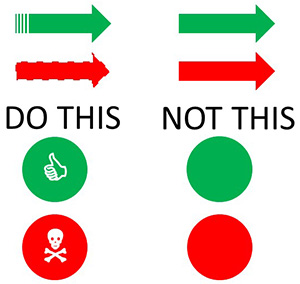
Figure 1: Different shapes and icons can provide additional visualcues besides color
3. Subtitling and captioning
Subtitles and captions are generally added withhard-of-hearing or deaf learners in mind. The truth is, though, that lots oflearners and gamers will use them, even if they do not have impaired hearing.For that reason, a best practice is to make captions and subtitles highlyconfigurable—allow players to choose size, color, font, and features like dropcaps and letterboxing (which can make subtitles easier to see for some people),and position. “Advanced” options include adding the speaker’s name or a symbolto indicate who is speaking, or varying the color or placement of the subtitleaccording to who is speaking. Note that these features should be individuallyconfigurable, since some players will find them distracting.
A key difference with captioning or subtitling games versusinstructional eLearning content is placement of the captions. On instructionalcontent, ordinary videos, and most simulations, the developer knows wherelearners are looking, making placement of captions relatively straightforward.But with games where players move a character at will, there is no way to knowwhere the character will be and what direction the player will be looking. Inaddition, many games use sounds as cues to the location of characters or itemsor even to indicate danger, potential bonuses, and more. Placing captions wherethe player will see them is a unique challenge of games and immersiveenvironments. Presenting an equivalent experience to players who cannot hearambient or locational sounds that provide crucial information is a secondchallenge.
Solutions suggested by Kari Hattner, a producer at Hangar 13Games and a conference presenter, include:
- Add visual cues, such as lighting or colorchanges, to location-specific sound cues. It’s even possible to use visual cuesfor footsteps.
- Place dialogue subtitles and caption informationin bubbles over characters’ heads so that a player will see who is speaking orwhere the sound originates.
- Represent all essential sounds with visual cues,including cues as to which direction a shot or thrown item is coming from, thesplash of something or someone falling into water, etc.
An additional consideration for players with impaired or nohearing in multiplayer games is communication between players. Enabling communicationvia text chat in addition to voice, and including visual ways to ping or signalother players, enhances inclusivity. These also aid players in groups wherethere are language barriers or when play is in a noisy environment.
4. Audio enhancement
An opposite challenge arises when considering players withlow or no vision. Audio enhancement of visual cues is one answer. Thisgenerally includes audio description of an environment as well as of charactersand objects, and might include voice-overs of instructions and menu items aswell, particularly on platforms that are not compatible with screen readers.Distinct sounds can be paired with locations, characters, objects, or events sothat blind players can track their location and know who and what is aroundthem.
Developers can offer additional orientation in the form of “pingable”maps or a spoken “GPS” that players can activate to figure out their location. Playersshould be able to configure all sounds separately, adjusting the volume ofdialogue separately from the volume of ambient sounds or turning on and offsound cues separately from audio description and dialogue.
Like captioning, audio enhancement improves the experienceof players outside the target group, aiding players who have low literacy orlanguage barriers in addition to those with visual impairments.
5. Timed events
In gaming, a “quick-time event” is an opportunity tomanipulate or control a character or item, often to gain a benefit or simply tostay “alive.” The opportunity is limited and usually requires a quick responsefrom the player, hence the name. These pose challenges to many players—particularlythose with limited mobility or vision and anyone with a slow reflex or reactiontime. Eliminating quick-time events completely is one option for inclusiveplay, but in some games, that would impair the experience of all players. Analternative is to make quick-time events configurable or optional. Some gamedevelopers limit access to scoring or leaderboards when some features, such asquick-time events, are adjusted or turned off.
Some players find any timed events, actions that requirefast or repeated button presses, or interactive elements that require draggingand dropping or other manipulation tasks, inaccessible, particularly if speedfactors into a player’s score. Again, building in configurable options—allowingplayers to have additional time or eliminating time constraints on theseelements, for example—enhances inclusivity. The amount of configurability toprovide depends on the target audience, the nature of the game, and the amountof development time and resources available.
Design with inclusivity in mind
The developers who attended #GAConf are highly motivated tocreate inclusive games that are accessible to a broad population of gamers—andeven they acknowledge that not every game can be made accessible to everygamer. Even so, attention to inclusivity early in the design process can leadto small changes that improve the experience of all players.
Joshua Straub, editor-in-chief of DAGERS,a game journalism site for disabled gamers, said, “Not every game can be or hasto be accessible to every single person,” but he encouraged developers to makesure that “when you choose to put a barrier in front of any player, you knowwhy you are doing it.”
Some features, such as mappable controls, high-contrastcolor schemes, and configurable audio and text options, make an enormousdifference for many players. “Accessibility equals flexibility, and flexibilitysells games,” Straub said. “Meeting the needs of people with disabilities alsomeets the preferences of other gamers.”
Designing with inclusivity in mind is essential; things that are simpleto build in, like alternative color schemes for low-vision or color-blindplayers, are complicated to retrofit. Developers who are looking for a place tostart can take a look at the Game Accessibility Guidelines or the Includificationguidelines published by the AbleGamersorganization. These guidelines group accessibility features into levels—basic,intermediate, and advanced or good, better, best—and explain who benefits fromeach adaptation.