





 New to virtualtraining? Not sure how to engage learners in a virtual classroom? Wonderingabout how that whole facilitator/producer partnership works? Looking for greattips on how to enliven your virtual training sessions, invigorate participants,and achieve better results?
If any of these questions hits home, take a look at VirtualTraining Tools and Templates: An Action Guide to Live Online Learning,Cindy Huggett’s new book, out June 27. Huggett is a seasoned veteran who’s beentraining people virtually since the dawn of virtual training—way back in theearly 2000s. She’s a coach and mentor, an accomplished author, and a frequentspeaker at eLearning Guild events. This book, her third, is ample evidence thatshe’s also willing to share her secrets.
The book is a nonjudgmental, in-depth guide to designing,producing, and preparing for virtual training. It is brimming with tools,templates, and tips: Questions to help instructional designers create bettersessions or producers to set up an almost fail-safe production suite. Ideas forways to engage learners as they enter the virtual space, during the class, atthe end of class, and even to get them to prepare to engage before thevirtual session. Tools and guidelines for evaluating whether your content iseffective, refining your teaching approach for the virtual space, or creatingdownloadable resources for learners to take with them.
Huggett manages to coach and guide without directing; shedoesn’t tell people what or how to present, but offers them a multitude ofchoices and help in implementing their virtual training, whatever the contentor platform.
What’s in the book?
Chapter 1 starts with preparing your company for virtualtraining. Huggett explains the difference between virtual training,where learners must engage and practice, and mere presentation ofinformation, which is what occurs in many virtual classroom sessions (Figure 1).
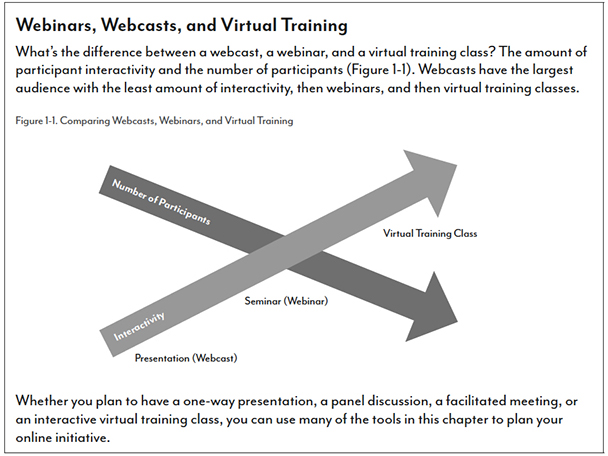
Figure 1: The book is full of usefultools, tips, and advice, including this guide to understanding types ofvirtual classes
Chapter 2 addresses the technology required to presentvirtual training and offers suggestions for working with IT departments andpartners. This is an area where many organizations make costly errors, such asnot accounting for the amount of bandwidth needed to run virtual sessions. Acknowledgingthat technology is always a moving target, Huggett touches on the many areas ofrelevance that virtual training professionals need to consider: Internetconnections, audio options, hardware and software, LMS integration, mobiledelivery of virtual sessions, and more, providing guidelines and questions toask rather than specific suggestions.
Chapters 3 and 4 focus on the content of the session:Huggett offers tips for converting face-to-face teaching to virtual, andemphasizes activities that keep learners focused. She offers ways to makewebcasts and other presentations more interactive as well.
Chapter 5 zooms in on the producer and facilitator roles andtheir relationship. Huggett strongly advises that facilitators—also referred toas instructors or presenters, the individual teaching the session—work withproducers. A producer can handle technical details, pull in polls and other sharedcontent, help divide learners into breakout rooms, and perform other helpfultasks so that the facilitator can focus on teaching
In chapter 6, Huggett turns to the participants, with adviceon preparing them to succeed in a virtual training environment. Thisoften-ignored element of the equation can make the difference between dull,soon-forgotten virtual training and success. Huggett includes ideas forteaching participants to use tools in the virtual platform.
Finally, chapter 7 offers templates for evaluation andsuggestions for post-training follow-up.
To help readers stay current in this fast-changing arena,Huggett provides links to additional resources, including an “action guide”page on her website where she’ll host comments, answer questions, and postupdated information.
The good…
It really is just “the good.” This book is a completestand-alone course on how to deliver virtual training. Huggett is as clear asshe is thorough, and she is generous with her tips and tools while encouragingreaders to seek many viewpoints. Sidebar boxes in each chapter provide examplesor share advice from other industry leaders, and Huggett emphasizescollaboration with colleagues and other stakeholders; this is not a book by orfor someone who thinks she has all the answers.
Sample meeting agendas, checklists, and lists of suggestedquestions cover every angle. For instance, “Questions to ask when creating anactivity” is a list of seven multipart questions that focus the reader on thegoal, what tools learners will use, what they will do, what they will see onscreenat each stage of the activity, what the producer’s and facilitator’s tasks are—andmore. There’s even a catch-all “what else is important to note” question.
The book is carefully platform-neutral. Huggett describesthe tools that are available in many virtual classroom platforms, such asbreakout rooms and status indicators, and explains how they might be useful. Sheprovides a list of questions to ask when trying out a platform or viewing ademo—but she never indicates which platforms support what or expresses apreference (though the screen shots are from Adobe Connect). Instead, Huggettprovides readers with the information and tools to determine which solutionbest meets their specific needs. Her emphasis on setting clear goals, planningand practicing, and preparation will serve readers well as they move throughthe steps of selecting a platform, honing virtual facilitation skills, adaptingcontent, and delivering training. Huggett even includes advice for avoidingculture-based misunderstandings, such as avoiding pop-culture references andchoosing character names that will be recognizable to a diverse audience.
Huggett’s target audience is “any training professional who is using (orwill be using) virtual—live online—training.” She hits the mark, keeping itrelevant for people all along the continuum of experience and who perform arange of roles in creating and disseminating virtual training. Whether you area virtual training facilitator or producer seeking to hone your skills, aninstructional designer seeking to move in-person training to a virtual space, amanager wondering how or whether to implement virtual training, or a newbielooking to learn what all this virtual training stuff is about, you will learna lot from Virtual Training Tools and Templates—and you’ll find manyuseful tools to ease your path to engaging virtual training.




