





Like manyinstructional designers and developers, I have a love/haterelationship with the rapid development tools I use. On the one hand,it’s comforting to know that I can fire up a rapid development toolto produce a piece of content that works as expected, complete withan interface learners can understand easily. When the developmenttool has built-in support for navigating the content, for508-compliance, or for user interactions, I’m free to concentratesolely on the content of my training. Cue the love.
On the other hand,rapid development tools also tend to generate much larger files thana developer would. Quick development time can come at the cost of aproject that downloads or runs more slowly than it should. Worse,some of these applications don’t provide users with an easy way toview or modify the code they generate. If things do go wrong, thisblack-box approach can make it incredibly frustrating totroubleshoot, for example, why the application’s implementation ofSCORM doesn’t work with the organization’s LMS. If I were able tomodify the code directly, I’d own the problem, but I’d also knowwhere to make the correction.
If I’m reallyhonest, though, my most substantial frustration with using rapiddevelopment tools is the rigidity that standardization imposes. Mycustomers generally prefer to have an interface that’s unique totheir project, rather than a color variation of a standard menu. Itend to wish for the ability to include elements that my tools don’treadily support. The standardization that makes these interfacesuseful and reliable can sometimes make them look a little, well,boring.
I will probablyalways use rapid development tools to help me create online learning.It just makes sense to take advantage of the things they do well,like creating screen captures or displaying a sequence of slides. Butthe tinkerer in me thinks that the best feature any of these toolsoffers is the ability to create output files in a variety of formats.
Most of my projectsthese days are a hybrid of content that I created with arapid-development tool, and some interface and interactive elementsthat I built using Flash. A project I’m currently developing loadsits menu from an .xml file and its content from a .swf file exportedfrom a rapid development tool (see Figure 1); it also provides PDF documents so thatthe learners can print job aids for future reference. This particularproject doesn’t play .mp3s, or .flvs, or use CSS to format thetext, but I could have easily included any or all of these options ifI needed them. I could even display an RSS feed in the sidebar, toprovide links to current articles or conversations taking place insocial media related to my topic. The RSS feed would keep my contentfresh without any additional intervention.
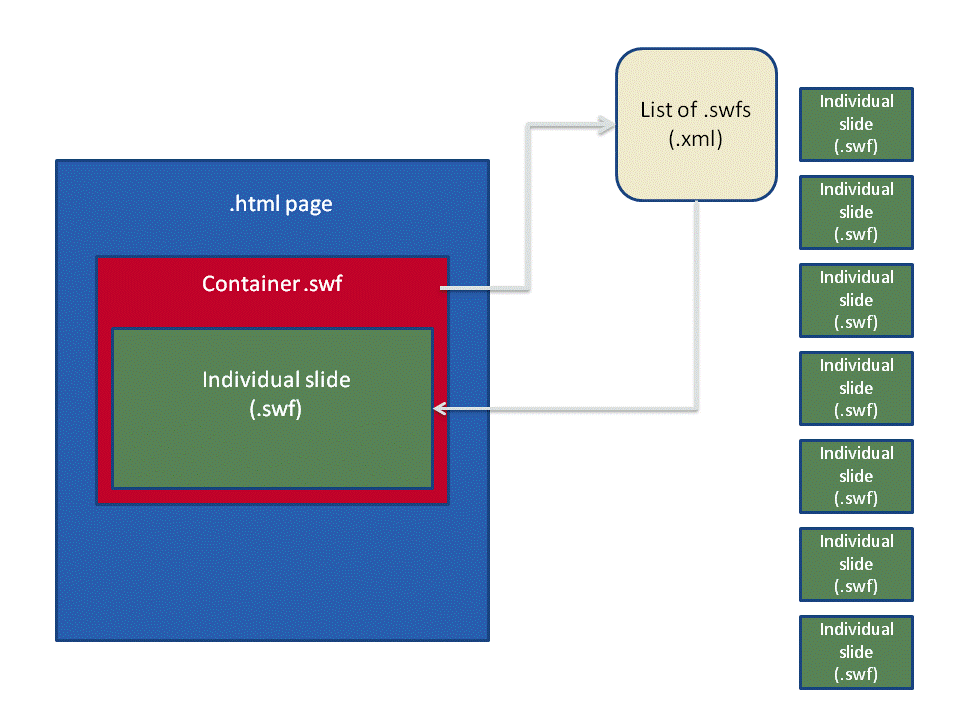
Figure 1: Content hybrids can make good use of XML to manage the mix of interface and content.
Mixing contentsources to create a custom interface can enhance a finished projectgreatly, but this practice is paradoxical: it is the best and theworst of both worlds. A custom interface comes with its own set ofpitfalls, the most obvious of which is the time it takes to programand debug. Each new element introduces the potential to interferewith other sections of code. When I was still a relativelyinexperienced developer, I used to think that my troubles were overafter the debugging was finished. It never occurred to me that Imight need to re-visit a project someday.
The best piece ofadvice I can offer to anyone thinking about mixing content sources isto keep detailed notes about the project. The locations of the sourcefiles, locations of edited or compiled files, the RGB or hex valuesof the color scheme, the dimensions of the graphics, and theprogram’s architecture are all easy to catalog while you’reworking on the project, and nearly impossible to remember six monthslater.
It’s also worthwriting developer’s notes when you come up with an unusual orclever solution to a coding problem. As tempting as it is to believethat the genius of a clever solution will make it memorable, clevercode is abstract code. The complexity of the coding problem is oftenthe reason you needed a clever solution in the first place.
So, keeping in mindthe output options rapid development tools offer, the occasionaloff-label hacks, and the tips and tricks we all pick up asdevelopers, I still fall mostly on the love side of the love/haterelationship. A little tinkering is good for the soul.





