





President Eisenhower is quoted as saying, “In preparing forbattle, I have always found that plans are useless but planning isindispensable.”

Figure 1: Eisenhower (center) and his generals: “Planning is indispensable”
The commander of the Allied forces at D-Day, and thearchitect of the strategy that broke the Nazi war machine, was no stranger toplanning. While designing a mobile eLearning experience may not be evenremotely as challenging as liberating France, planning ahead is still just ascrucial to success.
Mobile is fast overtaking traditional computing; more smartphones shipped in 2012 than PCs and that’s only likely to accelerate. Withincreasingly mobile and connected workforces, mLearning initiatives should beat the top of any CLO’s list for 2014.
In this article, I’ll present a step-by-step guide forcrafting an mLearning project-management plan, and explore how to addressunique mLearning design considerations throughout.
Using a projectplan template for mLearning
Project plans tend to follow the same rough template as the Project Management Institute’s PMBOK Guide. I’lluse a simplified version to outline your mLearning course development plan,which will cover:
- Purpose
- Scope
- Schedule
- Cost
- Quality
1. Purpose
The first step in planning for your mobile-learning projectis to figure out your goals. Determining your purpose actually consists of acouple different parts, and it’s more complex than simply writing, “Build anmLearning app,” and taking the rest of the day off. The parts you need to definein this stage of your project plan are:
- Targetlearners: Who at your organization (or outside) will actually use thematerial you develop? Ideally, you should create individual profiles for thedifferent learner “types” you have. Do your employees work remotely and require“point of need” training support, or does your workforce travel often and need accessto training materials from airplanes or other places with no internet access? Doall your learners use the same mobile devices, or is there a mix? Understandingyour target learners’ profiles will help you refine your goals.
- Assumptionsand constraints: What limits your mLearning initiative? Constraints can beorganization-based (for example, you don’t have the in-house skills to build amobile app) or technical-based (such as the small screen size of your targetedmobile platform). Many of these assumptions will play into the target learnerprofiles that you develop above (for example, if your workforce isn’ttech-savvy enough to operate a web-based app, that’s a constraint). You shouldalso lay out any assumptions about the actual impact the mLearning initiativewill have on your organization. Do you assume a certain dollar return? Orproductivity increase? Or accident decrease?
- Finally, theactual goals themselves: I recommend writing these out using the S.M.A.R.T. methodology. Regardless,make sure you at least answer these three questions:
- What are the project objectives?
- What are the expected outputs from the mLearningproject?
- What are the criteria for assessing projectsuccess?
The “purpose” step is, arguably, the most important one, asit sets the foundation for the entire rest of the project. If you skimp here,you could be setting yourself up for failure, even if you manage to build amobile learning tool.
2. Scope
The scope of your mLearning project plan should be composedof two parts: work breakdown and a deployment plan. Let’s look at both.
Work breakdown
First, you’ll want to detail the different tasks that youneed to work on in order to develop a successful mLearning product. It’shelpful to start by diagramming this breakdown, based on different stages inthe project. Figure 2 is an example using a native mLearning app:
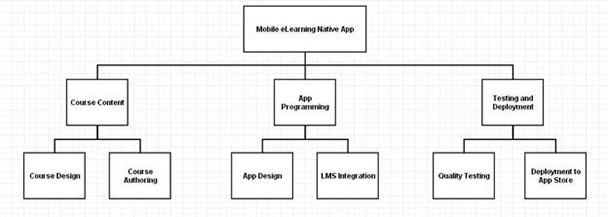
Figure 2: Mobile work breakdown map
The map above shows a pretty simplified version, and you maywant to include details like who’s leading each effort, and each effort’sestimated time and cost.
Deployment plan
How you decide to deploy your mobile learning experiencewill depend on several different inputs. That’s why the work you did in the “Purpose”step, above, is so important. Your answers to the three parts above (targetlearners, assumptions and constraints, and goals) may already have decided yourdeployment plan.
There are three main ways to deploy mobile learning:
- Native application: This is an “app” suchas the ones you would find in the Apple App Store. It resides on the mobiledevice itself and can take advantage of device-specific functionality like thecamera and GPS. It also doesn’t need to be connected to the internet for you toaccess it, so if your target learners work in places with spotty cell serviceor want to access learning materials on an airplane, a native app is the best wayto go. Downsides of native apps include potentially higher development costs(if you need to develop it for multiple mobile operating systems) or beinglimited to only one mobile platform, as they’re not cross-platform compatible. Assuch, native apps are not well-suited for BYOD organizations.
- Web-based application: This is,essentially, an HTML5 mobile-optimized website that operates very much like anapp. Because it uses a platform-neutral language, it’s accessible by anyone withinternet access, whether they’re using an iPhone or an Android. That said, it can’tuse some of the more unique functionality of a mobile device (like GPS), and youcan’t access it without internet or cell service. Additionally, most people automaticallythink of an “app” as a native app and will expect to access it through a buttonon their home screen, rather than on a webpage. As a result, a web-based app maynot be suitable for non-tech-savvy workforces.
- Hybrid application: As its namesuggests, this app mixes the above two models by storing some data locally onthe phone while also interfacing with the web for updates and specific material.The Wall Street Journal’s app is a great example of a hybrid; you download it asan app to your home screen, and you can access the most recent news even when you’renot connected to the internet. But when you connect to the internet, the appwill automatically update stories and download the new day’s paper.
There are a couple of other considerations when making thisdecision, such as cost, that we’ll get into below.
3. Schedule
Developing a detailed project schedule—with milestonesincluded—is key if you want to have your project done in a timely fashion. Theproject manager should check in every week to see whether the project is onpace with the original schedule and milestones.
You can incorporate the schedule into your Work Breakdown,and it should include milestones, activities, and deliverables. I alsorecommend including estimated costs and resource allocation to each.
Figure 3 is a simplified example schedule for a nativemLearning app:

Figure 3: Simplified mLearning app development schedule
4. Cost
Estimating how much the mLearning app will cost to developis a sticky proposition. There are a multitude of variables that go intofiguring the expense, including whether you’ll build it in-house, hire adeveloper, and what type of app (web-based, native, or hybrid) you plan ondeveloping. That said, there are some good rules of thumb to help guide you inmaking these estimates.
- Stick with estimating direct costs, like laborand material, not indirect or opportunity costs.
- Research from Propelics indicates that it takes one full time employee (FTE) oneweek to do all the work for one screen of a mobile enterprise app. That meansif you have one developer, a six-screen app will take you six weeks (includingdesigning, programming, and testing) to complete. Multiply that time out by thesalary of the FTE for a rough estimate of labor costs.
- If you plan on developing a native app formultiple mobile platforms, be warned: Deloitte says that could increase the cost by 60 percent for each additionalplatform.
- If you hire a programmer to build theapplication for you, it could range anywhere from $8,000 to $50,000.
- Small costs can add up, so be sure to includethings like the cost of converting existing content or images to a mobileformat or size.
5. Quality
In this part of the plan, you need to do two things:
- Define which quality standards you will use to measurethe project.
- Come up with a monitoring process to measurethese standards.
For an mLearning app, quality standards will vary based onyour goals. The Tennessee Board of Regents came up with a set of standards for educational mobile apps that includes:
- It is aligned with the curriculum
- It can be measured in terms of students’outcomes
- It allows the instructor to monitor and trackstudents’ progress
- It provides at least two learning modalitiesoptions (visual, audio, etc.)
- It can be used without the internet
While their list does not include technical issues like aminimum number of bugs or accessible user interface, these may be items youwant to add to your own QA list.
Monitor your finished mLearning product for quality both immediatelyafter you complete development and periodically after you’ve deployed the product.Quality assurance can come in the form of use tests, user surveys, and debugging.
Next steps?
Some final, additional things you may want to consider whenplanning for your mLearning project include using a mobile-friendly learning management system and getting a developer account for the mobile platform onwhich you plan to deploy (if a native app).
Did I miss anything big? Add it in the commentsbelow!





