





Rapid eLearning development (RED) programs such as AdobeCaptivate and Articulate Storyline continue to be popular tools in the trainingand eLearning industry due to the pressures of time, cost, and globalization.In 2014, 48 percent of companies reported that they use RED programs in theirworkplace (Training Industry Report, 2014).
There are several benefits of and challenges to using REDprograms (De Vries & Bersin, 2004; Hofmann & Miner, 2009; Pappas, 2014;Venkatesiah, 2015). Several benefits include:
- Easy contentcreation and updates. It is relatively easy to learn to use RED programs. WithRED programs, even novice eLearning developers can quickly create and update theireLearning content.
- Reduceddevelopment costs. When using RED programs to create eLearning content, costsmay be reduced by using fewer personnel such as subject matter experts (SMEs)and developers, compared to traditional eLearning development that requiresadditional expertise from graphic designers and programmers.
- Easy trackingand improved compatibility. It is easy to design content to track contentcompletion. eLearning standards such as SCORM allow developers to reducecompatibility issues between the content and the learning management systems (LMSs)that will host the content.
Part of the reason that RED programs help improve the contentdevelopment speed is their integrated templates and characters, which serve as agreat help to novice eLearning developers. However, with the templates, novice eLearningdevelopers often start their first eLearning projects using a linearsequence—one slide follows another—with some interactive exercises to checkcomprehension and provide feedback. This linear content design can be effectivefor delivering “knowing-what” types of learning objectives to beginner-levellearners.
However, frequent use of this template-based formulaic eLearningcan become standard, manicured, and boring to learners, reducing effectiveness.Learners do not always prefer perfect depictions; they look for authentic,relevant, and relatable content (Clothier & Taran, 2008). Thus, despite thebenefits of using RED programs, eLearning developers should also avoid thechallenges associated with using RED programs, such as:
- Limitedpractice activity types. When relying on the templates provided by REDprograms, most practice activities are suitable only for reinforcingcomprehension-level knowledge.
- Limitedopportunities for types of assessment. Assessments may be limited tomultiple-choice, matching, and sorting questions that are provided by REDprograms’ templates.
- Dependenton learner investment. As in most eLearning situations, learners must beself-directed and self-motivated to focus and complete the content. eLearningproducts quickly developed with RED programs do not necessarily make learning outcomeseasier or faster.
Scenario-basedeLearning
In lieu of designing page-turner type learning sequences,another content design technique that novice eLearning content developers can implementwhile using RED programs is scenario-based learning with simple branchingstructures. Integration of branching strategies may increase the attentivenessof the learner and improve the transfer of higher cognitive learning outcomesassociated with problem solving, decision-making skills, or work-based practice(Andrew, 2013; Keramida, 2015). Scenario-based learning provides opportunitiesfor learners to go through progressively more complex experiences as they makedecisions, receive feedback, and experience the consequences of their decisions(Clark, 2013).
A simple branching structure design may start by presentinga scenario, story, or problem to the learner and then a question follows with answeroptions for a learner to choose. Each answer to the question leads the learnerto a different outcome. Another scenario with a question and answer options mayfollow after the learners’ decision and can be dependent upon the learner’schoice (see Figures 1 and 2). In the next section, we present a sample of scenario-basedeLearning content that novice eLearning developers created with a RED program. Atthat time, the developers had zero to six months of experience in using the REDprogram.
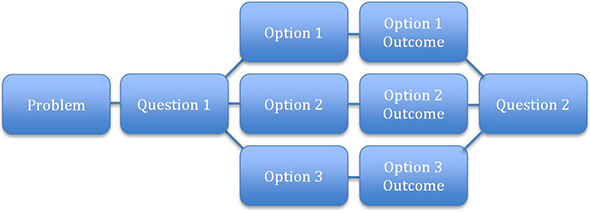
Figure 1: Single branching scenario

Figure 2: Continuing branching scenario
Stopthe Beeping
Performance need and eLearning solution
While inspired by an actual performance gap, Stop theBeeping, a scenario-based eLearning module, is designed to help improvetechnical support provided by the computer lab staff at Brownstone University(pseudonym).
Uninterruptible power supply systems, or UPS systems, areamong the most used resources in college and university computer labs. Thesedevices offer temporary, emergency power to protect computers from systemfailures and data loss when power fails. Unfortunately, power outages may alsouncover issues with UPS systems themselves, which also need to be addressed.Troubleshooting and resolving UPS issues involves a basic set of procedures forcomputer lab staff. Brownstone hasidentified a gap between the desired performance expectation and the actualperformance of its computer lab staff, and developed an eLearning module totrain and reinforce appropriate troubleshooting steps.
This eLearning module assists computer lab technicians with:1) identifying Option 8 calls (priority/emergency calls) based upon servicelevel expectations, 2) distinguishing UPS problems based on tones and displaysettings, 3) troubleshooting and resolving UPS issues, and 4) accuratelyupdating and closing service requests in the customer support application.Additionally, computer lab monitors learn how to handle the lab and addressstudent concerns when UPS systems fail. The eLearning module also includes anassessment to measure whether the computer lab staff successfully acquired newknowledge and can successfully apply this new knowledge to workplace tasks.
Selection decision: which RED program?
The developer of this eLearning module, a novice eLearningdeveloper, considered a number of RED programs, and narrowed the selection tothree: Adobe Captivate, Articulate Storyline, and TechSmith Camtasia. Thedeveloper evaluated these programs based on several factors, including: 1) easeof use, 2) ability to seamlessly integrate photos, illustrations, sound, andanimation, 3) ability to engage learners and allow them to interact during thelearning experience, 4) ability to assess learners and integrate the moduleinto a LMS, and 5) ability to provide closed captions. Although each of the REDprograms has unique features for designing content, the developer choseArticulate Storyline as it best matched the developer’s needs. ArticulateStoryline’s user interface (UI) is very similar to Microsoft’s PowerPoint UI,making it very easy to navigate and learn (Figure 3).
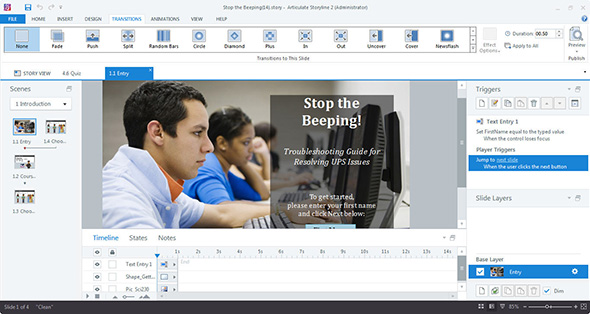
Figure 3: Articulate Storyline 2 user interface
As you will see in thediscussion that follows, however, Adobe Captivate offers closed captioning, afeature not included in Storyline, that would have been useful for thisscenario. This is a typical trade-off that in certain cases would have favoredCaptivate.
Scenario-based design for engaging and interactive learning
The developer chose to design the content with ascenario-based branching structure that allows learners to make choices andview the consequences of the choices. This scenario-based branching method alsoassists with transferring the new knowledge to workplace tasks. The developerdesigned the scenario-based branching structure, using multiple scenes (Figure4).
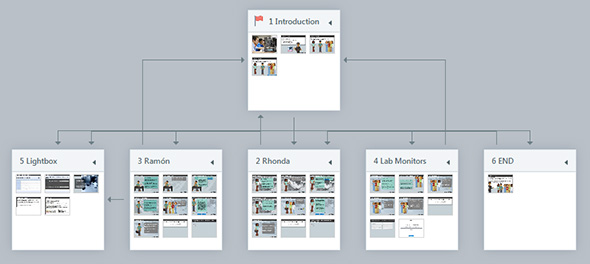
Figure 4: The overall scenario-based branching structure of Stop the Beeping
The eLearning module opens with an introductory scene that capturesthe learner’s name. During the module, a learning agent (portrayed with acharacter) refers to the learner by name to provide a personalized learningexperience (Clark, 2013). The introductory scene is followed by three unorderedscenes—three different scenarios from which to choose. Scenario 1 is about Rhonda’s case, Scenario 2 is about Ramón’s case, and Scenario 3 is aboutthe Lab Monitors’ case.
During each scenario, the learner is acquainted with a tech-supportsituation by watching and listening to the characters’ conversations and isasked to help the characters make the most appropriate tech-support decision(Figure 5).
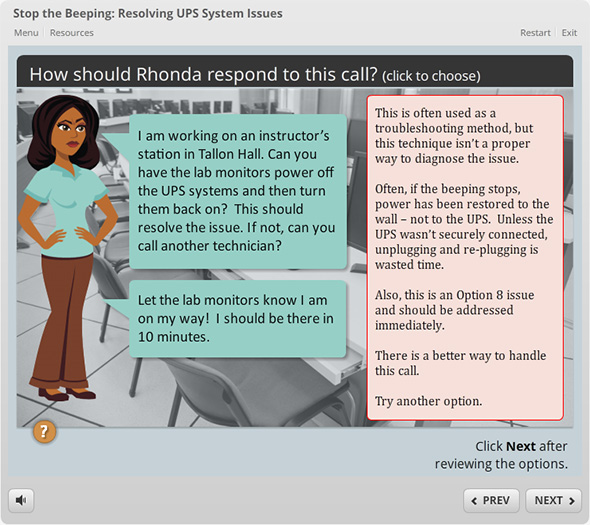
Figure 5: Example of scenario-based decision and feedback
While making the decision, the learner can activate layersof reference-type content to support their understanding. Upon the learner’sdecision, immediate and constructive feedback is provided. Each scenario endswith a knowledge quiz where the learner is tested and provided with immediateand meaningful feedback on his or her answers. After completing his or herfirst chosen scenario, the learner can either choose another scenario or endthe module. The eLearning module is uploaded and accessed within Moodle, thecollege’s LMS. Storyline is SCORM-conformant and allowed the designer to exportthe module in a format that could be used by Moodle or other SCORM-conformantLMS applications.
Effective design with meaningful multimedia components
Following Mayer and Moreno’s (2002, 2003) cognitive theoryof multimedia learning, the developer created eLearning content with meaningfulgraphics, audio, and animation. To her, it was important to use a RED programwhich allowed her to: present words and corresponding pictures in closeproximity; add auditory narration to explain or enhance onscreen text; anddesign the content in ways that minimized the chances of overloading a learner’scognitive abilities (p. 108).
Storyline allowed the developer to incorporate all of thesefeatures, including user-activated audio and effects (Figure 6).
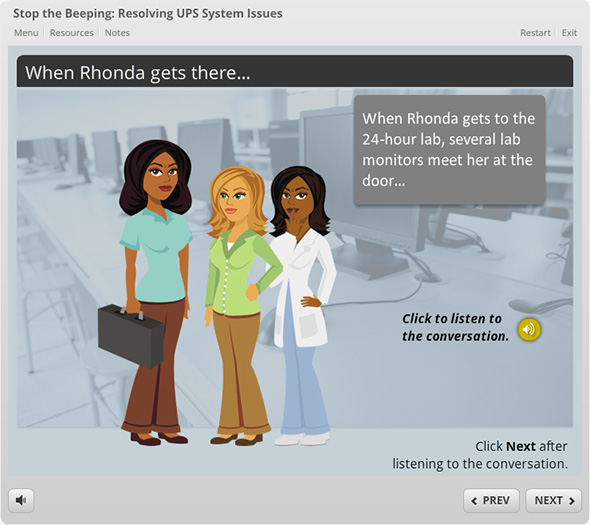
Figure 6: Example of onscreen text and audio narration options
When adding audio narration, the developer also wanted themodule to provide closed captions. Storyline 2 does not have a built-in closed-captionfeature similar to Adobe Captivate, but a developer may accomplish this in acouple of ways, including: 1) adding a notes option for slides that includeaudio, or 2) creating a text box in a layer that could be activated when thelearner clicks an onscreen icon.
The developer chose the first option (Figure 7), but alsobelieves that this is an area in which Storyline 2 can improve. In fact, thedeveloper preferred the closed-captioning feature in Adobe Captivate.
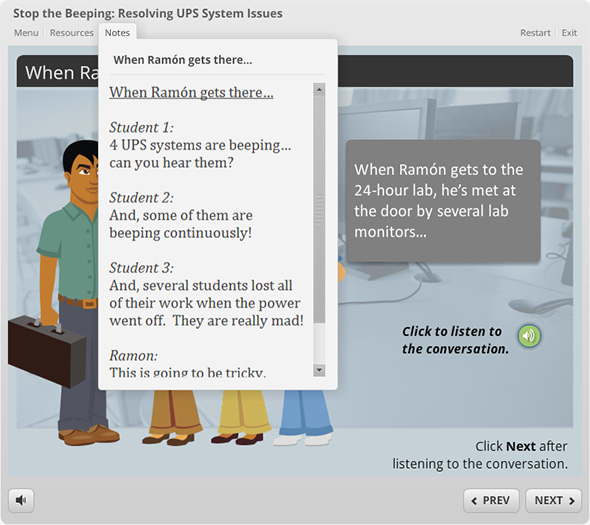
Figure 7: Notes showing closed captions
This eLearning module is available at
https://opwl.boisestate.edu/ychyung/learningsolutionsmag/sample1/story.html.
Final comments
We presented a sample of a scenario-basedeLearning product that novice eLearning developers created with a RED program, ArticulateStoryline. Novice eLearning developers tend to find Articulate Storyline moreuser-friendly than other RED programs (Chyung, Conley, Gibson, and McWatters,2015). Although the eLearning sample here was created with Articulate Storyline,it is not our intention to assert Storyline as a preferred choice for all noviceeLearning developers or for all types of scenario-based eLearning development.
Nonetheless, we had afirst-hand experience that by using a RED program, novice eLearning developers wereable to think outside the “page-turner” box and successfully create their firstscenario-based eLearning product with a simple branching design.
As in any other instructionaldesign project, the overall success of rapid eLearning development lies heavilyon preparing a solid storyboard before jumping onto development. Clearly layout the sequence of conversation and feedback with a branching structure whenincorporating scenario-based learning in eLearning design.
References
Andrew, B. 8 Effective Scenario Ideas for Instruction Designers. eLearning Brothers.2013.
Chyung, S. Y., Quincy Conley, Erin Gibson, and GrayleyMcWatters. What Do Novice eLearning Developers Think About Rapid eLearning Development Programs? Learning Solutions Magazine. 12 October 2015.
Clark, R. C. Scenario-based eLearning: Evidence-based Guidelinesfor Online Workforce Learning. San Francisco: John Wiley & Sons, 2013.
Clothier, P., andCarmen Taran. Edge and Emotion: What eLearning Programs Are Missing. Learning Solutions Magazine. 27 October 2008.
De Vries, J., andJ. Bersin. Rapid eLearning: What Works. Bersin & Associates, 2004.
Hofmann, J., and NanetteMiner. Tailored Learning: Designing the BlendThat Fits. East Peoria, IL: American Society of Training and Development, 2009.
Keramida, M. “How to Design Effective Non-Linear eLearning Design Misconceptions.” eLearningIndustry. 1 April 2015.
Mayer, R. E., and Roxana Moreno.Aids to computer-based multimedia learning. Learningand Instruction, 12(1). 2002.
Mayer, R. E.,and Roxana Moreno. Nine Ways To Reduce Cognitive Load in Multimedia Learning. Educational Psychologist, 38(1). 2003.
Pappas, C. The Major Rapid eLearning Advantages and Disadvantages. eLearning Industry. 7 September2014.
Trainingmag.com. 2014 Training Industry Report. 2014.
Venkatesiah,K. Top 5 Benefits Of Using eLearning Tools For Staff Training. eLearning Industry.14 January 2015.




