Since Social Media forTrainers was published, we’ve seen skyrocketing popular use of tools andever-more organizational acceptance of them. The advent of users generating andsharing images has exploded, spurred on by easy-use tools like Instagram andPinterest and Google Hangouts and Vine and Periscope and Meerkat. My last columnthat dealt explicitly with this was “Social Media for Learning” back in 2011, so if the topic is new to you I encourageyou to check that out first. Let’s take a look now at a few newer ways youmight extend your own practice through the use of social tools.
Extending
Social tools offer excellent means of staying connected withlearners and getting into the spaces before, between, and after formalinstruction or other events, or as a way for L&D to provide supportthroughout a worker’s life with the organization. Tools make it easier tobroadcast.
One of the easiest wins for instructors and facilitators isthe course alumni group. People meet and bond in class and want to stay intouch. A post-course community encourages reflection, can give a goodpost-training nudge, and offers a space for graduates to share experiences andget additional support and encouragement as they work to implement their newlearning. Mike Rohde, for example, offers classroom workshops based on hispopular Sketchnote Handbook. Uponcompletion, he invites attendees to join a closed Facebook group where they canengage with others with similar interests, some of whom they met in their ownworkshop. They can show their development, ask questions, and get additionalsupport from Mike if need be. Figure 1 shows past attendee Chip Kavenaugh’sbefore-and-after sketchnotes of a recent trip. He’s also experimenting withadding some color: See the note from SketchnoteHandbook author and instructor Mike Rohde. Reflect, apply, revisit.
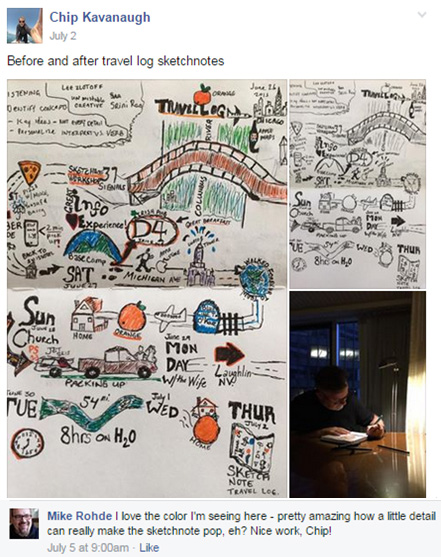
Figure 1: Sketchnote Workshop alumnus Chip Kavanaugh shows notesfrom his travels (used withpermission)
Backchanneling: Including others
I was lucky enough to attend the pilot of Mike’s workshop. Asour day started I tweeted some photos but quickly saw it would make more senseto set up a Pinterest board. That would allow me to create a narrative of theday rather than blast out a lot of disconnected tweets, and make easier goingfor those interested in following along.People not attending the workshop could join in and comment or askquestions (Figure 2). Going public with my learning that day also proved usefulfor marketing the event: one person following me that day contacted Mike aboutbringing the workshop to her organization.
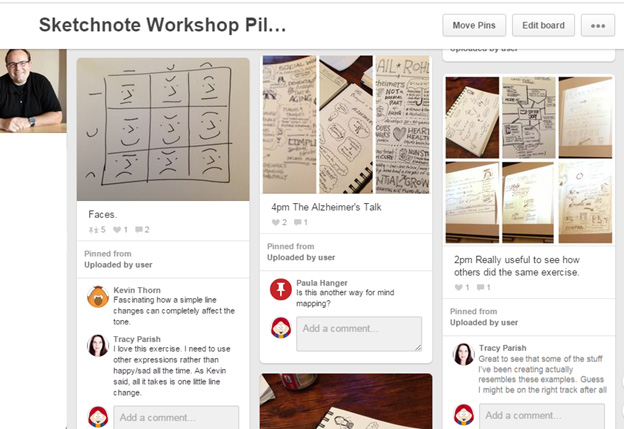
Figure 2: Pinterest board offered real-time overview of my day in aworkshop (image used withpermission)
See https://www.pinterest.com/janebozarth/sketchnote-workshop-pilot-w-mike-rohde/to see the complete board I created that day.
The use of the backchannel—a secondary network conversationthat takes place concurrently with a conference, course, or other event—helpsto include others who for whatever reason can’t attend and gives a space forattendees to share comments with one another (without disrupting the event),share their own relevant resources, or pose questions they might not want toask aloud. It also, as with the example in Figure 2, provides a recap of theevent for review later.
Branding and performance support
New photo-based tools make building a virtual tour or a visuallyinteresting useful narrative easy to do. Figure 3 shows the solution the weekbefore we were expecting the arrival of a number of new staff. The building israther labyrinthine so to minimize confusion and put the newcomers at ease Icreated this Pinterest board called “Your First Day.” It took maybe 10 minutesstart to finish, including taking the photos with my phone. Side note: this isthe most popular single item I have ever created using a social tool. Schoolshave created similar boards and sent links to substitute teachers before theyreport for their first assignment. It has been adapted by several hospitals andto help patients and visitors.
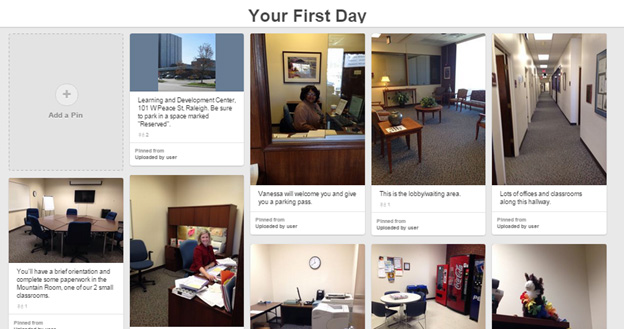
Figure 3: “Your First Day”—Pinterest board for onboarding
“Learn-along”
It’s hard nowadays to find someone who will say they’venever learned anything from YouTube. Now there are a number of channels foreasy live or recorded video broadcasting. Will Constantine offers real-timeIndian cooking classes via streaming video through Periscope, a tool recentlyacquired by Twitter. And it’s not just broadcast-only. Periscope is a two-waylive stream, so viewers can chat with Will while he cooks: they send text chat,he can answer by video in real time. Will posts information about upcoming lessonsvia Twitter, Instagram, and Facebook (Figure 4).
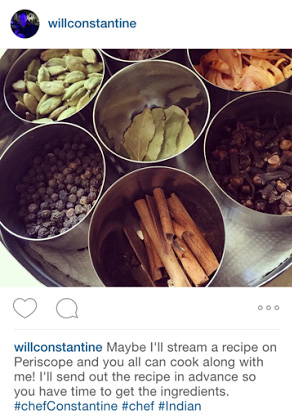
Figure 4: Will Constantine offers real-time video cooking lessonsvia Periscope (used with permission)
In this example we have an “instructor” offeringinstruction, but the idea could extend to anyone with expertise offering a bitof real-time help. Or flip it around: think of the service technicianbroadcasting live video back to headquarters for real-time coaching whileenacting a repair.
So?
L&D is great at creating and delivering content. Butemerging and evolving tools give us the opportunity to engage with our learnersin new ways, to help move us toward making workplace learning more a process andless an event. Consider where you have needs to extend the reach of a course, orstay in touch with alumni or people in particular work areas or job categories.Look for staff whose schedules, locations, and job titles keep them from liveexperiences, and see if you can identify ways to include them. Chances arethere are easy ways of solving a problem, enriching conversations, and makingL&D’s work more visible and valuable.
Stay tuned for Part 2
Next month’s column offers “Social Media for Learning, Part2”: we’ll look at choosing tools and consider the value of making conversationsas public as possible.
Speaking of social tools: The DevLearn bloggers
Blogging is a powerful, if underutilized, tool for learning.It encourages attention and reflection, and is another excellent backchannelavenue for including those who can’t attend an event. At DevLearnthis month I’ll be participating in “The DevLearn Bloggers” program thatprovides different examples of how you can use blogs to enhance learning. Ihope you’ll follow along.
Meet Jane at DevLearn 2015!
If you’re a fan of Jane (and who isn’t?), she will bepresenting two sessions at DevLearn 2015 in Las Vegas:
- Session 114: Designing for Performance: Nine Critical Elements (10:45 AM, September 30)
- Session 614: Reignited! Meme-ing the Innovative World of Learning (3:00 PM, October 1)