




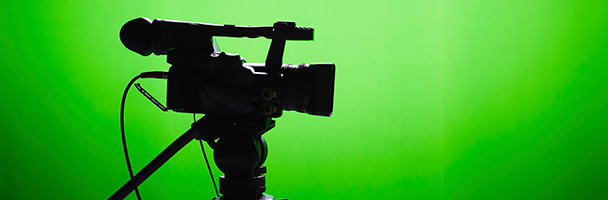
What do you do when you have to shoot on location and youractor can’t be there? What if the “location” where the action will happen onlyexists in your mind? How can you superimpose an actor onto a still photo or avideo as a background?
The classic answer to these questions is “chromakey,”otherwise known as “green screen” (or “blue screen”—different name and colorbut the same principles are involved). This is how your television weatherman appearsin front of a big weather map or radar display. Sounds simple, doesn’t it? Putyour actor in front of a green background (the “green screen”), then just use videotechnology to capture an image of your actor (without any of the greenbackground). After that, use video technology to put that actor’s image on topof the background you want.
But it isn’t that simple. Green screen is a technique thatrequires careful planning and setup, careful lighting, a certain amount of theright equipment, and a lot of know-how and tweaking. Don’t believe me? Google “green screen techniques for video and photography.”
There is a simpler way. You don’t need all that equipment,and software can take care of almost all the rest. In this article, I willoffer you a working review of Adobe Presenter Video Express, the latestsoftware solution for the kinds of problems I mentioned in the first paragraph.
Adobe Presenter Video Express
Here’s the opening screen for Adobe Presenter Video Express(Figure 1).

Figure 1: Presenter Video Express opening screen
Now, that’s pretty basic. A little box inside a big box and one biggreen button at the bottom center of the screen.
You might imagine that this is a simple piece of software; however,this isn’t the whole story. In this case the power is under the hood, so tospeak. From this screen you can either continue working on a past project (thesmaller box in the upper left of the bigger box) or you can start a new projectby using the big green button.
I’ve looked at a lot of “new” video- and audio-related software. They’remostly a rehash of what I’ve seen or used. Most offer little in the way of newfeatures.
Features
But I cannot ignore Adobe Presenter Video Express. This is oneprogram I’ve seen in the last several months that totally exceeded my expectations,and continues to do so. It’s a standalone version of the video part of AdobePresenter that allows you to capture directly into PowerPoint from your laptopvideo camera. But that was about all it did when it was part of Adobe Presenter.There was no way to change what was behind your head. Presenter Video Expressis an amazing new program on several levels, both in concept and in execution.
The first (and most important) thing Presenter Video Express (PVX)does is to eliminate the need for green screen production.You can do the same things with PVX that you can do with a regular green screensetup, but without all the fussiness.
In eLearning, we never seem to have enough time or budget for videoproduction. As I mentioned earlier, green screen, even in a studio, is not theeasiest thing to use. You need some expertise to use it, mostly in lighting,but it also requires good post-production skills. Not so with PVX. All you needis a blank wall and a webcam. That’s it. You can make “green screen” videoanywhere.
Adobe’s engineers wrote a brilliant algorithm that will make yourwork look like network TV. It doesn’t matter whether you are in front of ablank wall or plain fabric, or even a mostly blank office wall, no matter thecolor of the wall or fabric, PVX can extract you. All you have to do is clickon the bottom of the screen where it says “Make my background awesome” and ittakes a snapshot. Then use your mouse to draw a line from the top of your headto the bottom of the screen and a second line across your shoulders. PVXcaptures you and leaves the rest. After that, you can put whatever you want inthe background, including a still image, a video, or a motion graphic. Theprocess is just that simple, and it’s very fast.
In Figure 2, I’ve already drawn a vertical line with my mouse fromthe top of my head to the bottom of the screen. The dashed line (marquee ormouse tracks) appeared around my head, partially selecting my face and neck assoon as I let go of the mouse. At this point, I used the mouse to draw thehorizontal line across my shoulders that you see in Figure 2. In Figure 3, PVXimmediately completed capturing everything from my shoulders to the top of myhead. (Note: I had to capture the screen while my hand was still on the mouseholding down the left hand button. Not an easy task … think mouse on floor andfoot holding down button! But it does explain my expression!)
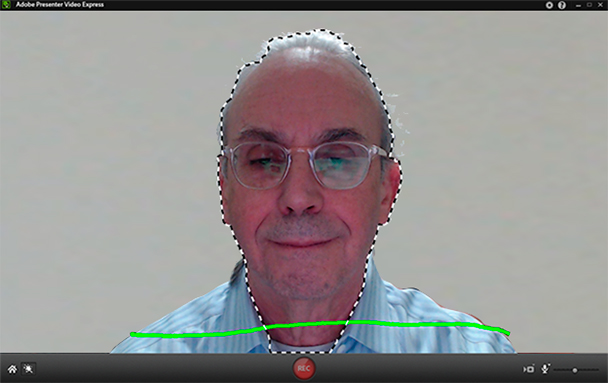
Figure 2: Presenter Video Express (PVX) with my head selected and thehorizontal line visible. This line captured my shoulders. I drew the line and letgo of the mouse to capture my whole torso.
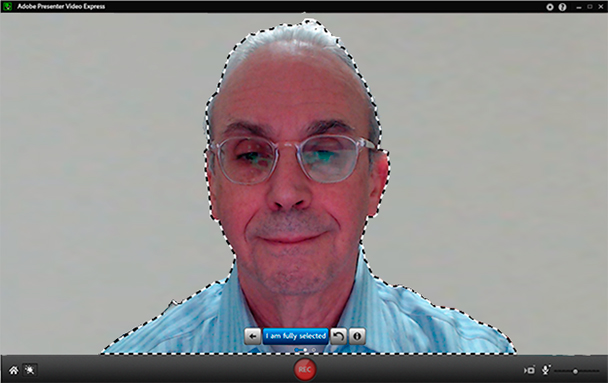
Figure 3: Two lines, and selection is complete!
In Figure 4, I’ve dropped a still photo behind the image ofmyself. Because the light on my face in the extracted image pretty closelymatches the direction and color of the light in the still photo, the result looks alot like I was there.
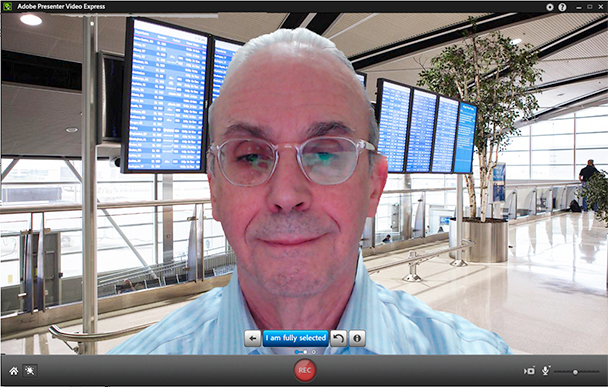
Figure 4:This is the final result after dropping a still photo in behindthe extracted image.
This selection is a bit of prestidigitation that uses a verycomplex new algorithm. The program first takes a still image from my camera.Then it uses that image to “extract” me from the background. Then iteffectively allows me to record my video (in this case it would be a talkinghead, but it doesn’t have to be) while I’m doing standard human movements andmotions. And it keeps me separated from the background the entire time I’mrecording.
One of the things I’ve learned to do with PVX while I’m doing theinitial recording is to drop in an image from the Adobe library included withthe software. Or better yet, I’ve discovered if I put in a black image I made inPhotoshop (saved as a JPG or PNG) and use that as a temporary background, then,at my leisure, I can drop in the file I want to use, which is usually a video.The program doesn’t care if you put a video, a motion graphic (which is video!),or a still image behind the presenter’s image.
Let me explain that a different way. I find stills a bit tooboring. We need motion in our images to keep our eyes active, so I’m moreinclined to drop video in behind the presenter. But if the video isn’t shotyet, I drop in that black still image as a backdrop for now and change it tovideo later. After you’ve recorded your video with the black background, youcan go right ahead and use the video in Premiere Pro (or other video editingprogram) or in After Effects and use the black background as an alpha channel,effectively creating your green screen without ever seeing a big green screenbehind the image.
I’m still figuring out all the different ways I can use PresenterVideo Express to create unusual effects that really grab the eyes of ourlearning audience.
Making your background is just the beginning of what PVX can do asa stand-alone program. Do you want to add some interactive questions duringyour video? Easily done! How about publishing the project from PVX as a canvasdocument (see sidebar) or import it into Captivate or Presenter inside PowerPoint?You can do that too! It’s a versatile program for eLearning and I believe it’sgoing to become an actively used program in video production everywhere. Thebest part is you can learn how to use it in 15 to 20 minutes. Really.
What is Canvas? I’ve mentioned it in this article and it deserves a little explanation. Canvas is an HTML tag. Think of tags as “commands” to tell the browser how to display things. In this case the canvas tag was added to HTML5, which is just a new standard in HTML, not a different program. Canvas allows you to do all sorts of things on a web page without a plugin like Flash was. There are several advantages to this, and some disadvantages. The main disadvantage is you can’t just drop the media onto a page for your training or site. There are several parts to a canvas: the media file itself, a JavaScript file that tells the browser all about the media file you want to show on the page, and a CSS file that tells the browser how to display what you’ve also explained in the JavaScript file. If we all had to code these things ourselves, we’d be spending lots more time coding than creating content. The new programs create all three files for your web site. |
Making better productions
So why all the excitement on my part? I’ve been doing green (andblue) screen productions for a lot of years. The green screen background has tobe very carefully lit, and the actors on camera have to have lighting thatmatches the scene behind them. Example: if you’re using a sunset for abackground and you have actors in front of a green screen, light them stronglyfrom the left (on a map, left is west).
How well does Presenter Video Express work? Fantastically, as longas you can sit in front of a plain wall. The wall can be almost any color. Thebetter the lighting, the better the result. But the lighting doesn’t have to befussy. That said, I once extracted my image at a conference in a hotel withmiserable sodium discharge lamps overhead and a mottled wall behind me andalmost NO separation between me and the wall. PVX gave me pretty goodbackground extraction. Not perfect, but amazingly good, given thecircumstances. The green screen alternative is more difficult and requires moreequipment.
You can make improvements in your setup. For example, you can usea better camera instead of the one in your laptop (for now, that camera wouldhave to be connected to the computer through USB) or set up the camera so thatyou can include your whole body (or your actor’s whole body). Adobe includes somestill backgrounds you can use, but why? Use what you need, either still ormoving. For example, use a video background for cases where you couldn’t do alive shoot. Use anything else you can imagine, including an After Effectscomposition or a Premiere Pro project.
PVX is so easy to use, it almost defies imagination. I’m prettygood with the Adobe video products, but I get paid by the hour and the more Ican deliver to my clients in as short a time as possible, the more they like meand the more likely they are to hire me for another project. It’s all abouttime and value. At the end of the day, what matters is the value we can deliver(even in internal organizations) and not how glitzy the product is. If you canmake it look wonderful, even better!
Adobe offers a fully functional 30-day trial (you can even savethe files). Even if you’re an accomplished videographer, producer, director,editor, or whatever in the video sphere, PVX has value.




