





In the last few years, I’ve written close to 80 articles forthis magazine, and in that time I’ve reviewed just about as many tools. I’veoften said that tool vendors must balance power and ease of use, and that mosttend to favor making their tool easy by omitting some more powerful features.No tool is both the most powerful and the easiest to use.
Xyleme is a company that provides a tool and a service thatreally attempts to give you both, in ways that many of you may like right awaybut that others may find require a period of adjustment.
First, let’s start with some basic facts.
- 1. Xyleme is not actually just an authoring tool.It is a content management solution designed to support learning. Yes, you cancreate web-based lessons with it, but using the same content, you can formatand publish for a variety of other types of files (see Figure 1).
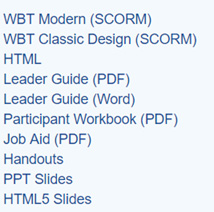
Figure1: Several output options from the same content
- 2. The main focus of Xyleme is enterprises andcontent publishers. The company works with organizations, configuring theproduct to meet the needs of each client organization. This means that youdon’t buy a license to Xyleme to just play around with it. You normally requirea business strategy to ensure that the Xyleme installation serves a validbusiness purpose.
- 3. Like most newer tools, the Xyleme platformresides in the cloud, so you can access it anywhere you have an Internet connection.There is no need to install anything on your hard drive. It uses secure Amazonweb servers to ensure that your content is safe.
So just how does Xyleme try tobreak the mold of typical authoring tools, learning management systems (LMSs),and learning content management systems (LCMSs)?
TheXyleme platform is where you do it all
- Develop and author
- Publish
- Deliver
- Analyze
Developing and authoring
You access the Xyleme site toauthor your content. You can edit your documents in an online editor or in adesktop editor (see Figure 2).

Figure 2: Home page of online editor
Editing your content is a little different from using astandard authoring tool. By adopting a WYSIWYG (“what you see is what you get”)approach, other tools tend to force you into one output form, primarily aweb-based course. If that’s all you need, and many times it is, then manyauthoring tools provide this option. I’ve been asked by several clients overthe years, though, if it wouldn’t be possible to take the content I had createdin an authoring tool and use it to also publish a handout or create PowerPointslides to use in live training sessions. The answer is that it’s not easy to dowithout manually copying content out of the authoring tool and pasting it intoWord or PowerPoint.
Xyleme doesn’t give you a true WYSIWYG approach, though youcertainly can see your content laid out. In this manner, you can format thecontent into various publish options, like those in Figure 1. Xyleme providesHTML5, Word, and PowerPoint templates for you to use, and you can edit thosetemplates and the styles therein to customize the look of the documents Xyleme publishes.
Working in the editor, you’ll see lots of options forinserting various media and interactions. Of course, you can insert images,video, audio, and more (Figure 3).
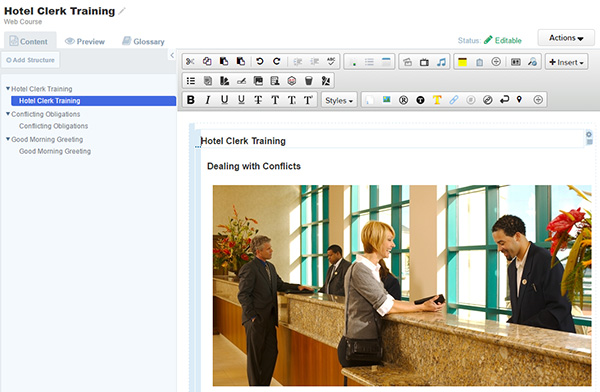
Figure 3: Content editing
You can also insert several interaction types. Theseinclude:
- Multiple choice
- Essay
- Matching
- Fill in the blank
- Drag and drop
- Matrix
- Hot text
- Bin drop
- Image map
Xyleme also fully supports procedural-based content(step 1, 2, etc.) (Figure 4).

Figure 4: Procedural content options
You can save and share authoring templates, so teams canstandardize interactive learning and testing approaches. Xyleme providestemplates for building tabs, animated timelines, slide shows, flash cards, andmore.
Like many modern tools, much ofthe content you create is stored in an XML file, which is what allows Xyleme tokeep the content separate so you can tag it and reuse it in a variety of ways.You never need to edit the XML files because you work directly in the editor tomake changes. However, when publishing to the web, you will get a combinationof files, just as you do when using any other tool. This includes the HTML filethat launches the content. You can edit the HTML file if you wish, but younormally won’t feel the need to edit it directly.
When you’re bringing in newcontent, such as media files, you can attach word tags to them. In fact, youcan attach tags to many elements. This allows you to find specific content bysearching for the words you used to tag content—not just in the current filebut across all of your files.
Publishing
Regarding web delivery: Withthe slow death of the Flash file format on the web, Xyleme is part of a newcrop of tools that do not publish to Flash. Rather, it publishes to HTML5. It’sonly a matter of a little more time before older browsers, which don’t supportHTML5, will no longer be used in organizations that have been slow to upgradetheir systems. At that point, expect that no tools will publish to Flash anylonger.
I want to emphasize once againthat using the same content you’ve created doesn’t just mean publishing to aninteractive web lesson. You can also publish to all of the other formats inFigure 1. However, note that interactive lessons will be responsive, meaningthey will look correct both on desktop and on mobile devices without additionalformatting on your part.
You can deliver microlearningand performance support, too, which is an added bonus that many coursedevelopers might consider an afterthought.
This kind of versatility iswhat separates Xyleme from authoring tools. This means you create content onceand then you can use the same content to publish a fully interactive webcourse, plus printed guides that can be digital or paper-based. That’s prettysweet.
Delivering
Xyleme features a contentrepository. You can distribute content authored in Xyleme, and in other tools,and invite learners, collaborators, and reviewers to access it. All of yourlearning systems, like your LMSs, websites, and apps, play the content from therepository so that you have one source for your content, and that means youhave only one source to maintain. You can search the repository for fullcourses or individual nuggets of content. This is where the power comes in.
Analyzing
Onceyou’ve delivered content on the web, you can then keep tabs on a number offactors regarding those who have accessed that content and how they did. Thisis a very rich environment, visually easy and pleasing to the eye (Figure 5).
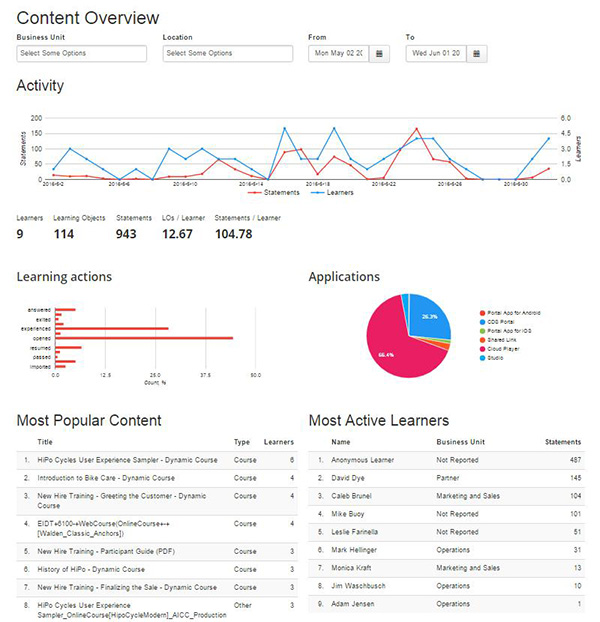
Figure 5: An analysis report
Settinguser permissions
You can provide varying levels of permissions to users sothat you can assign different abilities to each:
- Collaborators:Yes, you can have several authors collaborating on a lesson from anywherein the world. This lets you split up the work on a project so that each authorhas a specific assignment.
- Reviewers:You can also have reviewers write comments on your course and track thosecomments to act on them.
- Learnersand other users: Of course, the main goal is to get the content in front oflearners, readers of the documents you create, and others.
Xylemeuses a SCORM Thin Package to talk to an LMS
You can preview and play SCORM courses right in Xyleme, butmost developers don’t. A more typical scenario is to integrate with your LMS.Like the SCORM cloud’s dispatch capability, you can point any standardSCORM-compliant LMS to a course that resides on the Xyleme servers. This isgenerally called a SCORM Thin Package,and I’m starting to see more services offering this option. To be honest, I’dlike to see the industry drop the older SCORM protocols altogether and movetotally to the xAPI or better. Unlike what I have seen traditional LCMSs andmost LMSs offer, Xyleme provides xAPI compatibility and has some very coolanalysis techniques, as you saw in Figure 5.
Xyleme supports all the standard tracking protocols: SCORM1.2, 2004, AICC, and the xAPI.
Xylemelets you output to just about anything you want
Second, like many tools, ituses XML (Extensible Markup Language) to store all the content you create. However,unlike most of those other tools, it also lets you publish in almost any formyou wish.
It doesn’t provide a fullWYSIWYG approach, like that seen in PowerPoint and in most authoring tools,because you don’t get just one output. While you get a sense of the layout, youactually have to preview content in its output format to see what it will looklike. This is one of those things that might take some getting used to.
Overall, Xyleme has madeauthoring structured content in an LCMS tool easier and distributing contentmuch more effective. It is a different paradigm, and I suggest that, if youwork in teams and if you need to repurpose the same content in various ways,you take a look at Xyleme.





