





This month’s review covers a tool called Elucidat, which touts itselfwith the tag line “Let’s make amazing eLearning together”—with the promise thatit will be easy to do. As one who has long pronounced that there is no freelunch and that there is no easy-to-use eLearning tool that doesn’t have youhitting walls, I wanted to put Elucidat through the wringer to see just what itcould do and what it would find too hard to handle.
Elucidat certainly proves itself to be easy and a bit fun. Take a lookat the first menu in Figure 1.
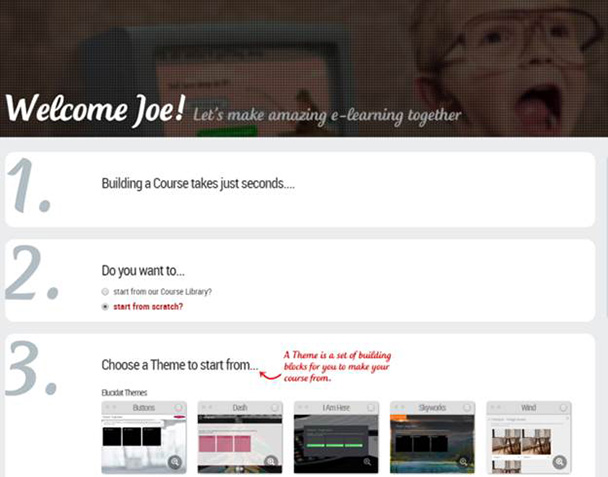
Figure 1: Creating a course
As you can see, you can choose from a course library or you can startfrom scratch. If you choose the latter, you will be prompted to choose from aseries of themes. New themes are added from time to time. The Wind theme, forinstance, was added shortly before I wrote this review.
Choosing a theme starts the process of creating your course, whichprompts you next to name it and begin the process of building pages. You createa page based on several page types. See Figure 2.

Figure 2: Creating pages
You can add as many pages as you like at the start, each with its ownpage type, and then go and build the course from the pages you’ve chosen. SeeFigure 3.
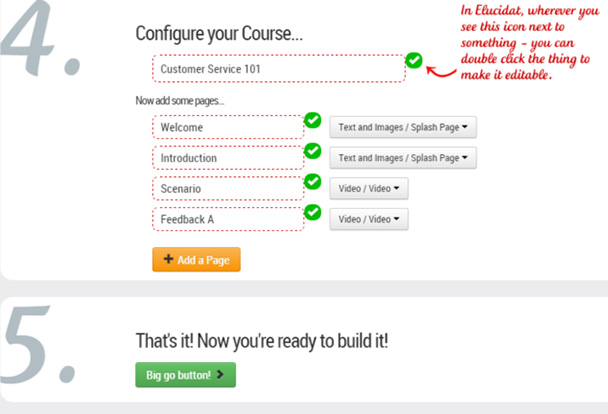
Figure 3: Configuring your course
The first time you use Elucidat, helpful videos pop up to guide you inthe process of creating your course. If you ever get stuck you can choose aHelp Me button to speak to Elucidat’s support department, though it’s notlikely you’ll need to as options are pretty clear.
Customize the color scheme by choosing from some preselected themes orby creating your own, as seen in Figure 4.
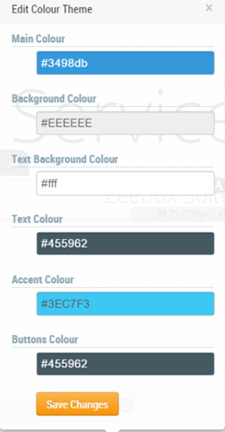
Figure 4: Change your colors
Add audio, images, and text to any page. You can customize every elementfurther. For instance, on my initial course splash screen, there is a Startbutton. I can change its destination from the default Next page and also changeits color or how it animates. InElucidat what an author sees is pretty close to what the learner sees (whichI’ll abbreviate to WYSIPCTWTLS, ha ha), making it intuitive to use.
As an author, you can manipulate anything with a gray Edit button. SeeFigure 5.
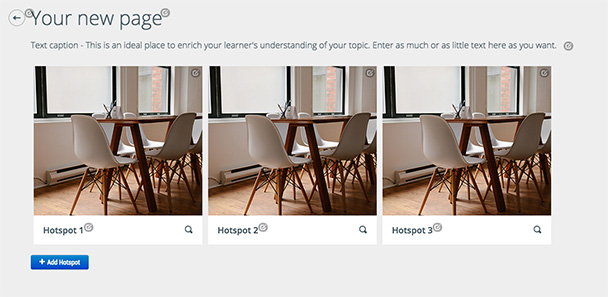
Figure 5: Note the gray dots that tell you what you can edit
You can duplicate, delete, and add and move pages so you can alwayschange your mind about the page flow if inspiration hits you.
Elucidat allows you to build simultaneously for all devices within thesame course, and you can immediately preview exactly how the course will lookon a variety of devices. A wide variety of choices are afforded you. You cansee a partial list in Figure 6.
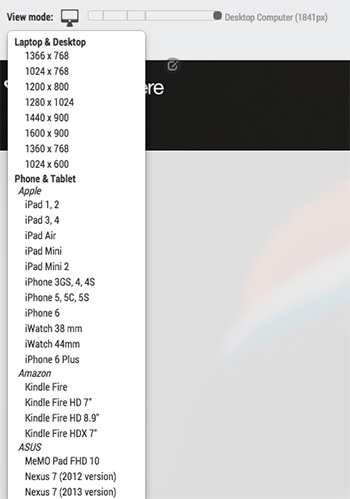
Figure 6: Device choices
Publishing is fast. The published file can work with SCORM, theExperience API (xAPI), or simply be made available online if you’re not worriedabout progress tracking. Elucidat has a unique feature called Rapid Releasethat allows you to update the content of a course in an LMS directly fromElucidat so that there’s no need to upload files more than once (note that Ihaven’t tried this feature).
Elucidat allows you to work simultaneously with colleagues and clients,so that several authors can work on a project at one time. It accomplishes thisby assigning author roles to different developers. There is also a role forreviewers who can comment on the course directly. The commenting feature allowsusers to right click on any element of the screen and leave a comment (Figure7). Here’s an example of how to use the function: https://youtu.be/1lXRP4GlRPU?t=24s.
You can view all comments that have been left in a project in the Reviewsection, which saves a lot of time as you don’t have to copy and pastecomments.

Figure 7: Commenting in Elucidat
User roles allow you to control who is able to view and edit courseswithin your account. There are several different user roles such as Editor, who has complete access to allyour projects, through to LimitedReviewer, who is able to view and add comments in projects to which theyhave been given access. This mode is very valuable if you are rapid prototypingand it means you can send content in Elucidat to stakeholders without the riskof losing work.
Reviewers pay nothing,so you can invite as many as you like. You only pay for Authors (users that are able to change content).
Anyone who knows me knows how much I dislike linear learning and howmuch I value user-centered navigation. That’s not difficult in Elucidat becauseyou can set links and menus easily enough. You can control the path a learnertakes. You can use any element with a link button, as seen in Figure 8, to jumpfrom any page to any other page.
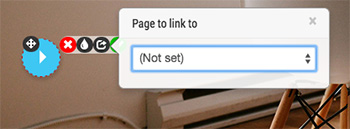
Figure 8: Setting up links
If you find gamification elements useful, Elucidat allows you to create gamified experiences with features suchas custom badges, timers, rules, and advanced branching, as Figure 9 shows.
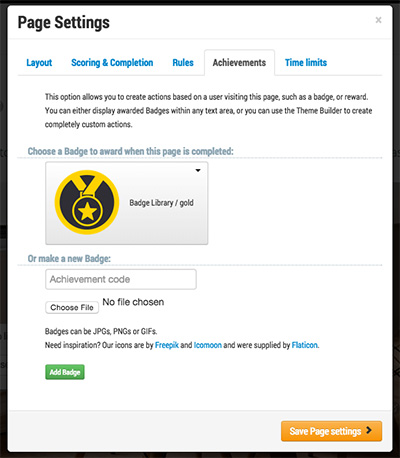
Figure 9: Gamification options
Elucidat comes with an online HTML editor called the Theme Builder whichallows you to customize any element of a page. This means while Elucidat has asimple authoring interface, you can further extend any part, includinginteractions that you create in Elucidat. See Figure 10.
Figure 10: Elucidat’s Theme Builder
Finally, I should note that Elucidat allows for API integration whichmeans it can integrate with other systems. This opens a variety ofpossibilities such as creating a single sign-on between systems and embeddingElucidat content into mobile apps.
So what do I like?
- It’s a pretty easy interface.
- There’s more under the hood than first appears.
- You can create courses for multiple devices.
- They’ve included analytics that can help identify weakspots in your learning.
- They’ve included different roles that allow reviewersand other developers to work together.
So what don’t I like?
- The price is a bit steep when compared to other tools:$2,475 for a single author per year. This does get you every upgrade, includesemail and chat support, and eLearningArt’s image library. If you want to getpricing for teams, you can contact them at https://www.elucidat.com/pricing#.
- The 14-day free trial they offer is only about halfthe trial time of most other authoring tools.
- There is no timeline so you must use animations totime elements, similar to what you do in PowerPoint.





