





As a learning professional who strictly develops courses foradults, I often overlook how simple it is to apply everyday instructionaldesign practices to projects for young learners. But when my seven-year-old son,Donovan, took the initiative to create his own math logic puzzle in PowerPoint,I jumped at the chance to use a real-life scenario to show him what I do for aliving, build something fun and engaging for young learners, and, ultimately,help him package his creativity into something accessible to the masses.
Although this impromptu project was meant to be an intimatelearning experience for him, one thing I was surprised to learn was that nomatter the age or the expertise of your subject matter experts (SMEs), theprocess for developing high-quality learning products that meet theirrequirements is the same, including the compromises we sometimes have to makewhen working with people unfamiliar with what we do and how we do it. Here, I sharethat experience and the lessons learned along the way.
The self-proclaimed math whiz
Before I point out the similarities between working withsomeone so young and working with adult SMEs, let me take a moment to describemy son to you. In some ways, Donovan is a typical seven-year-old boy: He’sobsessed with all things video games, thinks superheroes are the coolest, andonly eats chicken nuggets. In other ways, he is unique. For example, he enjoyslearning. But let me put some context around what that actually means. When Ipicked him up on the last day of school before winter break, I asked him if hehad fun with all the parties and candy and games and such. I was caught offguard by his response: “No. I wish we had math.”
Math is by far his favorite subject. Donovan—aself-proclaimed math whiz—loves to solve problems in his head, and the morechallenging, the better. This has led to an interest in solving logic problems.So, when he came home one Friday with a logic puzzle from school, heimmediately went to work on it even though it was not an assignment and doingso reduced his video game playing time.
I didn’t realize until the next day that his interest wouldcreate the perfect opportunity for me to share with him my love ofinstructional design and the process for making eLearning courses.
Storyboarding in PowerPoint
We just bought our first home (snaps to us!), and as a meansto occupy my time and assuage my perfectionist tendencies, I created scaledfloorplans in PowerPoint to have a little fun playing with layout and colorcombos. When I showed him what I was working on, Donovan was less interested inwhat I created and more interested in howI created it: asking questions about the basic components I used to make thesectional, detailing the steps he would use to recreate the objects, wonderingwhat program I used and whether Dad had it on his computer. PowerPoint is not atypical program young persons gravitate toward, but Donovan was immediatelydrawn to it.
With a few pointers on inserting shapes, text boxes, andresizing objects, he was on a mission to create his own logic puzzle. Fromscratch. In a program he’s never used before. (Figure 1)
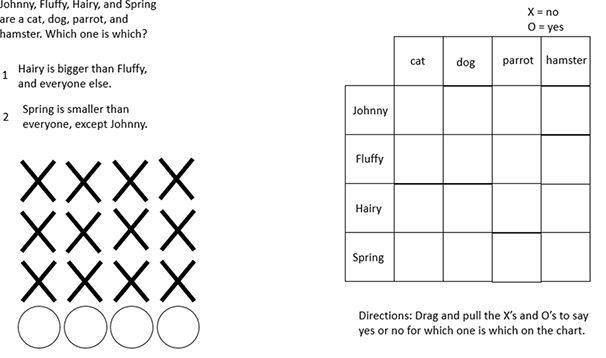
Figure1: The PowerPoint wireframe for the logic puzzle
Leaving the file in edit mode, I dragged and dropped the Xsand Os to various spots in the chart while I determined which name belonged towhich animal. Then it hit me: This was the perfect storyboard! He evencompleted his puzzle with a feedback slide that provided the correct answers.
After solving the puzzle, I pointed to key elements that functionsimilarly in the program I used for work—Articulate Storyline 2. And when herealized I could turn his puzzle into something that many people could accessand solve, he was hooked.
The project: Donovan’s Logic Puzzle
I am an avid ADDIE follower, but I have few occasions whereI can progress through a project and adhere to the five phases in their purestforms, mainly because most clients have their preferred method of development.Since my son drafted the storyboard, this project skipped the analysis phaseand jumped straight to the design phase.Going back to analyze the source material and get a sense of the fulldesign requirements as they pertained to Storyline 2 was met with someresistance—something I’m accustomed to receiving from adult SMEs.
I found myself having a similar conversation with Donovan,explaining the importance of taking the time up front to truly understand hisvision to make sure I can replicate it in my program. Donovan, like mostclients, didn’t fully grasp the intricacies behind changing states on objects,applying triggers, adding slide layers, creating variables, and the like. Hesimply wanted me to look at his storyboard and make it work.
He also didn’t see a need to change the aesthetic of thelogic puzzle from the typical paper-and-pencil format of black and white.Because he was able to produce it so easily in PowerPoint, it wasn’t necessaryin his mind to add color, interest, or anything visually engaging to hold thelearner’s attention. Knowing how important this step is to the overall userexperience, I offered several options for compromise: colored background withwhite lines and text, icons for the animals, white background with coloredlines and text, etc. Despite my many attempts, we left the issue open until hecould look at my proof of concept before making his final judgement.
The requirements
After our session, we agreed that the following list roundedout his essential requirements to make his logic puzzle, with a few key itemsof my own added in:
- Arrange all slide elements in the same locationas in the storyboard
- Drag and drop Xs and Os just like in thePowerPoint edit mode
- Add an instructions slide
- No player controls
- Customized feedback slides
- Indicate correct and incorrect answers
- Can’t move on until correctly solving the puzzle
The process
The instructions slide seemed to be the best starting pointbecause it incorporated several of the items from the requirements list. Sincethis puzzle is targeted to a younger audience, for the proof of concept Ithought it would be more appealing to tie in a classroom feel. The slidebackground looks like the average blackboard, making it easier for white textand brighter colors to pop. Furthermore, I decided to beef up the instructionsby not only telling learners what to do, but also requiring them to try forthemselves before moving on. (Figure 2)
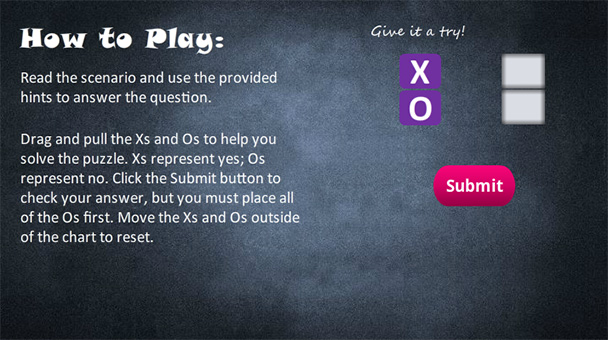
Figure 2: The proposal for the instructions slide
States and triggers
Constant feedback is a must, and this logic puzzle utilizesmultiple states to cue learners when their interactions are complete. Thenormal state on the Xs and Os is purple; however, when either one is dropped ona drop target in the chart, it changes states to “placed,” which is orange.When an O is dropped on one of the correct answer drop targets, it changes to a“correct” status but maintains the orange color so the learner won’t know whetheror not the answer is correct until the submit button is clicked. (Figure 3)

Figure 3: Image states
The state of the Os triggers either the “Incorrect” feedbackslide layer or the “Correct” feedback slide layer when the submit button isclicked. If incorrect, the color of the Os changes to red and a retry buttonpops up, which closes the layer and allows the learner to try again. (Figure 4)To reset the colors of the Xs and Os, learners simply drag each one outside ofthe chart on any side. This drags them over transparent rectangles, changingtheir states back to normal. If correct, the Os change to green and anotherbutton pops up, allowing them to move on. (Figure 5)
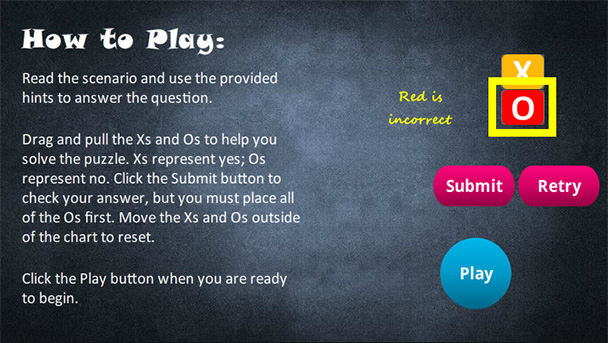
Figure 4: The “Incorrect” feedback slide
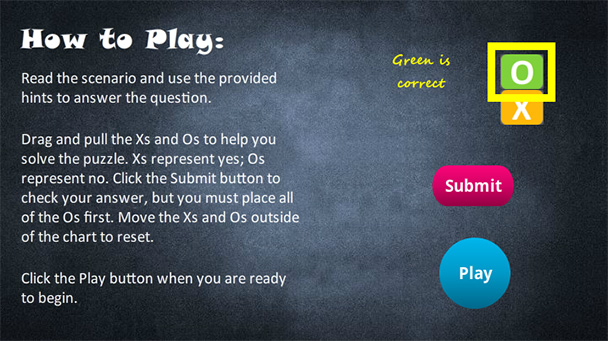
Figure 5: The “Correct” feedback slide
Proof of concept review
When I was confident all potential kinks had been workedout, I presented to Donovan the proof of concept build of the instructionspage. Now that he could see how impactful the colors were and the benefit ofcreating a theme within the project, he fully supported my decisions on thelook and feel for his puzzle. He even loved the idea of having learnersexperience what happens before they are required to solve the puzzle.
Then he asked me what I find many adult SMEs ask at thispoint in the process: “Where is the rest?” Although many clients nod inunderstanding when explaining the design phase and the idea of building a smallsample of the desired outcome to get approval before spending hours developingthe entire course, they tend to expect a fully fleshed out and functioningproduct complete with sound, voice-over, and the like. I reminded him, as I’vedone in other settings, that his input was necessary prior to creating the restof the puzzle to make sure what was done on a small scale met his expectations.With his approval, I could move forward and complete development.
He understood, and I got busy with the meat of the puzzle.
Development and redesign
Two things occurred to me while creating this puzzle: First,we needed to rethink the size of the animals, and second, this short projectwill have more triggers in it than most of the courses I produce.
Regarding the size of the animals in the puzzle, some catsare bigger than some dogs. Also, parrots are larger than cats when consideringtheir wingspan. So, if we wanted to have an absolute correct answer for eachoption, we needed to select animals in our puzzle that absolutely followed aparticular size order. Therefore, we changed the size order to elephant, horse,dog, and hamster. And for added difficulty, Donovan wanted to mix up the sizeorder in the chart.
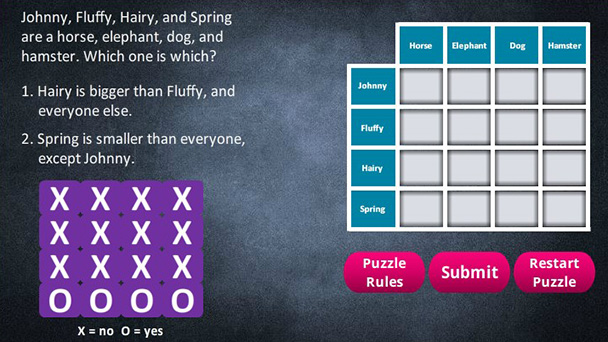
Figure 6: The revised puzzle chart
Applying the triggers from the instructions slide to theactual puzzle itself resulted in over 50 triggers on that slide alone. Toreiterate the earlier point of why a proof of concept was necessary, I showedDonovan the trigger panel and explained a few of the commands. He understoodright away that working through all of those triggers just to make a changewould be incredibly difficult and time consuming.
While he was there, he tested the puzzle and gave me twothumbs up for the functionality and the design, even though he thought havingbackground music was a little much. All that was left was an intro slide and anexit slide. Using his likeness from a previous project, I had the perfectcharacter to introduce his puzzle. (Figure 7)
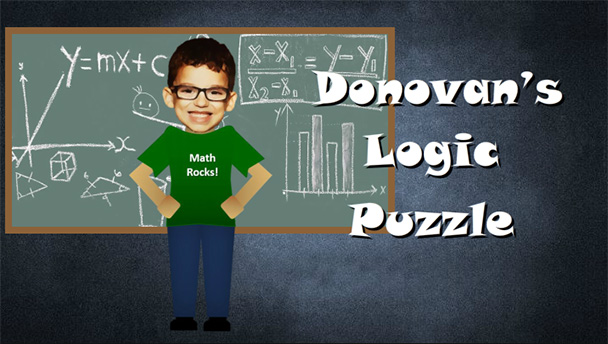
Figure 7: The introductory slide
The result
Maybe I had the wrong expectations when starting thisprocess. I thought Donovan would follow along and be more of a spectatorinstead of an opinionated participant. Looking back, however, it makes perfectsense why he would react similarly to any adult SME I’ve worked with: He wastreated as the knowledge expert, and I made sure my interactions respected hispoint of view even when we didn’t see eye-to-eye. I can’t tell you when I last completeda math logic puzzle, so I was completely reliant on his experience, much likeany other adult SME who has expertise in a field I have limited knowledge of.It was a special moment where I got to share something I love with someone Ilove, and I couldn’t be happier with the result.
Now that you know the story behind Donovan’sLogic Puzzle, go ahead and give it a try! Click this link to launch the puzzle,and leave a comment to let us know what you think: https://bit.ly/2oeEyst.




