






As the eLearning industry matures, more and more developerswant to make significant learning experiences that go beyond the abilities oftraditional eLearning software. Complex simulations, tactile experiences, and“rehearsal” style trainings are often much beyond the ability of traditionalauthoring tools. While much improved, these tools are still based on a “sliden’ tell’ paradigm that PowerPoint forced 20 years ago.
Airline and military pilots have trained in simulators likethat shown in Figure 1 for years. This simulator trains new and current Airbus380 pilots. This is computer based learning too!

Figure 1: Airline and military pilots have trained in simulatorslike this one for years
While this short tutorial isn’t going to help you code anadvanced flight simulator, it is going to help you write your first lines ofcode in about 10 minutes. So fire up your laptop, make sure you’re connected tothe Internet, and let’s code.
Step 1: Set up your development environment
I’m going to simplify this initial task. Normally setting up adevelopment environment would require several downloads and possibleconfiguration. However we’re going to use a cool site called JSFiddle. JSFiddleallows us to write and test lightweight code in the browser.
Visit www.JSFiddle.net and you should see a screen similarFigure 2. Welcome to your sandbox!

Figure 2: JSFiddle.net is your sandbox for this tutorial
Step 2: Write some code
In the upper left hand blank box, write the following code:
Hello World
Click the button towards the top of the interface that says“Run.” You’ll notice the result appears in the Result box (Figure 3).

Figure 3: Hello World
Congratulations! You’ve written your first bit of code. Inthis case it’s in the HTML language.
The “Hello World” program is traditionally the first thinganyone writes when they learn a new language. You’re among the coders now!
The code we wrote specified to output the words “Hello World”in a paragraph form (known in HTML as paragraph tags).
Step 3: Write some new code.
Delete the code in the HTML box (upper left) and replace itwith this:
We’ve created a “logical division” that will hold our output. Thereis no output yet so if you click the run button, nothing will happen! Essentiallywe’re just reserving some space in the browser that we’re identifying as outputthat will hold our output. Next we’ll output something there.
Step 4: Add some JavaScript code for interaction
Interactive code is written in JavaScript. JavaScript,increasingly, is becoming the most important language to know. We’re going to useJavaScript to ask the user two questions and then output a result.
Key in the following in the JavaScript quadrant (bottom leftin Figure 2):
first = prompt("What is your first name?");last = prompt("What is your last name?");fullName = first + " " + last;document.getElementById('output').innerHTML = "Greetings, " + fullName;Be very careful toenter the code exactly as listed. Even a single incorrect character can breakyour code. (Yes, this is something that frustrates even experienced coders).
Step 5: Testing
Click the run button again. You should be greeted with aprompt like the one in Figure 4.
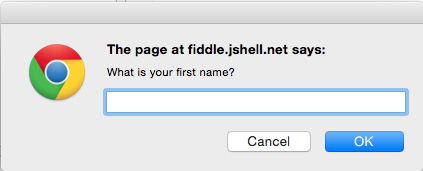
Figure 4: The first line of code you entered in Step 4 producesthis prompt when run
Respond to this prompt and the subsequent one and view theresult in the result panel of the JSFiddle interface (Figure 5).

Figure 5: The code in Step 4 leads to the personal greeting whenyou run it and respond to the prompts
We’re using variables here to create the eventual output“Greetings, Mark Lassoff.” You, of course, remember variables introduced as ‘x’in 8th grade Algebra? In this code “first,” “last,” and “fullName”are variables.
The variables are assigned values based on the result of theright side of the “=” sign—which in programming parlance is the assignmentoperator.
Study the code carefully and—even if you don’t understand eachline explicitly—you should be able to determine how it formulates the finalresult in the result quadrant.
Step Six: Let’s try one more
Let’s change the code in your JavaScript quadrant once more. Carefullykey in the following code:
age = prompt("Enter Your Age");if (age >= 65){ document.getElementById('output').innerHTML += "You can retire.<br/>";} if (age > 20){ document.getElementById('output').innerHTML += "You can legally consume alcohol.<br/>";} if (age > 17){ document.getElementById('output').innerHTML += "You can vote.";}Here we’re introduced to how decisions are made in code. Runthe program and experiment with entering different ages and examine the result(Figure 6).
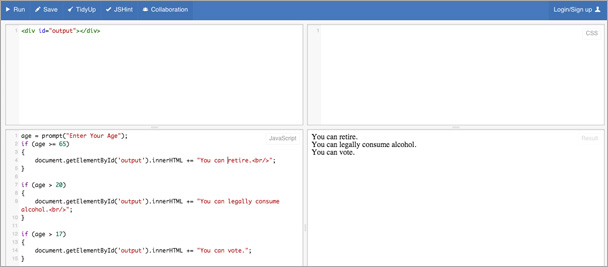
Figure 6: Step 6 provides you with some good news (if you are oldenough)
This result was generated by entering the age 70 at theprompt. Life gets better as you get older…
Step 7: Examine the code.
First we prompt the user for their age. Whatever the userenters is stored in the variable age.
age = prompt("Enter Your Age");Developers often joke that programming would be fun if it weren’t for the users… What they mean by this is that users will find the most unique ways to break software. Try clicking ‘run’ again and instead of entering age as an integer, enter text with letters. See what happens…
We then compare the age value to the values 65, 20, and 17. Wetest age to see if it’s greater than these values. If it is we put text in the“output” division. You’ll note that the <br/> symbol simply means linebreak.
if (age >= 65){ document.getElementById('output').innerHTML += "You can retire.<br/>";} if (age > 20){ document.getElementById('output').innerHTML += "You can legally consume alcohol.<br/>";} if (age > 17){ document.getElementById('output').innerHTML += "You can vote.";}Challenge
Using the format above add the following results:
If the users age is greater than 90, output “You can saywhatever you want, without consequence.” If the user’s age is greater than 100,output “Willard Scott would be proud!”
Want to see if you got it right? View my JSFiddle at https://jsfiddle.net/c51jbqrd/.
Conclusion
Now you’ve written two programs. Not exactly Flappy Birds—butit’s a start, in just about 10 minutes. Okay, maybe 20.
The challenge here isto move further. Nothing will future-proof your career more than learning tocode.





