





A few years back, Ifound myself hitting the limits of my rapid eLearning software’s“interactivity” toolbox. I’m not a programmer, and have had to self-learn mostof the eLearning tools I’ve used over the years. It was at that point that Idiscovered Raptivity.
Raptivity was abeautiful discovery for me since I found it to be really intuitive, and it gaveme the opportunity to rapidly create “variations on a theme”—the themes being abroad collection of interactivities including games, reveals, questions and answers,branching scenarios, and quizzes.
The one challenge thatI constantly faced with Raptivity was the inability to chain interactivitiestogether; they could either be deployed alone, or could be dropped as finishedobjects into another authoring tool through Flash movie addition. I’m delightedto say that I’ve now found the solution for my challenge: Raptivity Linker.
What is Raptivity Linker?
Raptivity Linker isdesktop software that enables the stitching together of a series of Raptivityinteractivities and parts. It is intended to resolve the problem ofinteractivities that stand alone.
Raptivity Linker‘s firstfull version out of beta testing has just been publicly released. The team hasobviously learned from its beta release and made some wonderful adjustments.This new tool creates “experiences”—or a collection of parts from Raptivity interactions—andit is a snap to rapidly chain together parts to make a whole eLearning lesson,module, or course.
User experience ofRaptivity Linker
The software presentsan easily understood user interface. To explain the paradigm concisely, Linkercreates a navigable wrapper that sits around the interactivities. The visualoutput of the navigable interface (the “Linker”) is similar to what can becreated with tools like Articulate Presenter and iSpring Presenter.
Importantly, I found thatconfiguration of the color and background of the “Linker” interface has beengreatly simplified compared to the editing process associated with other rapid eLearningtools. With just two mouse clicks, I could change colors and even apply abackground image for slides in the Linker. Intuitive placement of logos andinsertion of Raptivity interactivities through double-clicks on the obviouspart of the Linker interface made for easy and rapid builds of experiences.Changing a screen’s name happened right where you would expect it—in the tableof contents list, with in-spot editing.
Raptivity Linker hasprovided the ability for the eLearning designer to create text and image-basedslides right in the interface. Standard templates are available for textslides, image + text slides, and video + text slides. Video incorporationincludes the ability to link to YouTube and Vimeo using their embed codes.
Creating my first LinkerExperience
I was able, in 10minutes, to pull together a short experience about my business using just thebuilt-in slide types—admittedly, that’s the boring part (see Figure 1).

Figure 1: RaptivityLinker environment for the build of a quick corporate presentation includingboth image+text slides and video+text slides (i.e., pulling a corporatepromotional video from YouTube)
A Preview option, withselectors for the entire experience rather than from a point in the experience,allows you to rapidly see and adjust your work.
The published outputis rapidly built, and faithfully reflects the design positioning of thecustomized Linker wrapper when viewed in a browser (Figure 2).
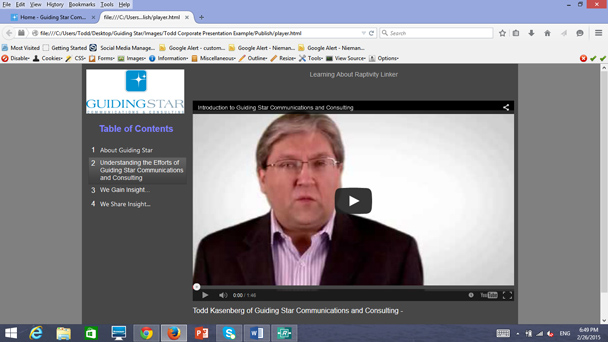
Figure 2: TheRaptivity Linker build of my rapidly developed corporate presentation, showingthe pull of my corporate video from YouTube
Output from RaptivityLinker is in HTML5 format, which means that those engaging with the experiencewill not have to rely on their browser having the Adobe Flash plugin installed.Output will play on tablets. And Raptivity Linker allows eLearning developersto set up tracking through SCORM, so that published experiences willeffectively communicate with the LMS and LRS.
What can be done better?
Of course there isroom for improvement. I can immediately see an opportunity in the next release toinclude audio in the Linker-generated presentation-type slides, and the abilityto play with colors in the background of the title bar and the buttons. I missthe ability to add a glossary along the top bar, to bundle some files with theinterface for learner access and download, and a dedicated area for a presenterbiography.




