




It seems that we’ve reached atipping point in the field of eLearning development tools. All of the newlyintroduced tools lately are cloud-based, and they address mobile learning head-on.In addition, many also respond to the market’s demand for easier authoring ofmicrolearning and gamification.
mLevel is one of the companiesthat has brought to market a viable option that addresses these needs and thensome. For instance, it does a very good job of addressing analytics, which is afocus area near and dear to me.
The approach that mLevel takesis interesting and different and may very well be an excellent solution to aproblem that many developers experience: needing to store content in a way thatmakes it easy to repurpose. The formatting of the content is separate from thecontent itself, allowing you to serve up the same content in different formats.
Objectives > missions
Just as is true in any learningendeavor, you always start with a learning strategy that will then lead to aset of measurable objectives. In mLevel, these form the basis for what arecalled missions (Figure 1). A mission is, in essence, a topic that addresses anobjective. You may have several missions, of course, for the learning strategyand for any objective.

Figure 1: Setting up a mission
At this point, an instructionaldesigner will normally begin to create questions and content. Instead, here itwould be wise to stop and think. You’re not creating questions for yourself;you’re creating them for learners. In fact, in mLevel you don’t have to worryabout creating all the questions yourself. The cool thing about mLevel is thatif you provide the content, it will generate the questions for the learner inan unbiased way. Hard to believe? Keep reading.
Creating the content grid
How do you provide the content?Again, start with the objectives and begin to build a grid of the knowledgethat would allow learners, once they gain that knowledge, to meet thoseobjectives.
In mLevel this is called the content grid, and it looks somethinglike the one in Figure 2. You can construct the content grid on the platform,or you can build it in Excel.

Figure 2: A typical content grid
The top left cell is the actualtopic name, Cities Overview. Theleft-hand column is where you place the items related to that topic, such as Boston and Sydney. Across the top, you indicate the attributes for each ofthose topic items—the qualities of each item that you want users to learn, suchas on which continent and in which country the city is found. The intersectionof an item and an attribute is a value.In fact, in the intersection, you may include multiple values, all of whichwould be considered correct. An example might be at the intersection of “Seville”and “Popular Attractions” where you would include all possible attractions. SeeFigure 3.
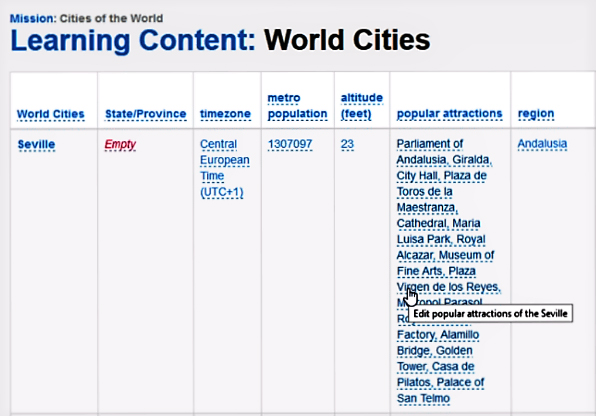
Figure 3: Multiple correct answers
Creating the question templates
Once you’re done (and you canalways edit the content grid later), it’s time to create the question templatesfor the information in the content grid.
Question templates cancomprise:
- Single-answer multiple choice
- Multiple-answer multiple choice
- True or false
At this point, don’t think thatyou must build everything and generate questions only from the content grid.Other types of questions, such as image hot-spot and image-based questions, areavailable through other platform activities. More on that in a bit.
In Figure 4, you see a typicalquestion template design screen, this one as part of a learning game. Bybuilding the content grid and a question templatelike this, you will avoid spending many hours creating questions from scratch. mLevelwill generate dozens of questions in two seconds (literally).
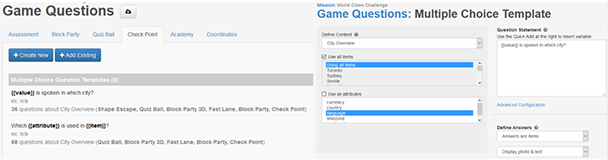
Figure 4: Setting up a question template
As you can see in both Figures2 and 3, the intersection of an item and an attribute is where you put thecorrect answers. So then how does mLevel choose the wrong-answer distractorswhen generating a multiple-choice question? It does this by choosing answersfrom the attributes of other items in the grid. For example, in Figure 5, whenmLevel creates a question regarding the language spoken in Prague, it mightlist as answers:
- German
- Italian
- Czech
- Russian

Figure 5: Choosing wrong distractors
By the way, I find that theengine that generates the questions is pretty smart. It won’t choose two identicaldistractors from the attributes of different items, ensuring that you won’t endup with a confusing question. So when creating this question, mLevel won’t listEnglish twice (nor German, Italian, or French), despite the fact that it appearsmore than once in the list in Figure 5, because the program recognizes that theanswers are the same.
The mLevel company tells methat many instructional designers have said generating questions this way helpsthem avoid introducing bias into the questions. Of course, you can further editthe questions.
Easy SME reviews
Next,you can generate a Microsoft Word document containing all of the possible questionsthat mLevel can generate for your learning activities, such as the one seen inFigure 6. Send the document to your subject matter experts, and they can thenreview all the questions easily, mark them up for you if need be, and allow youto further enhance the effectiveness of the questions.
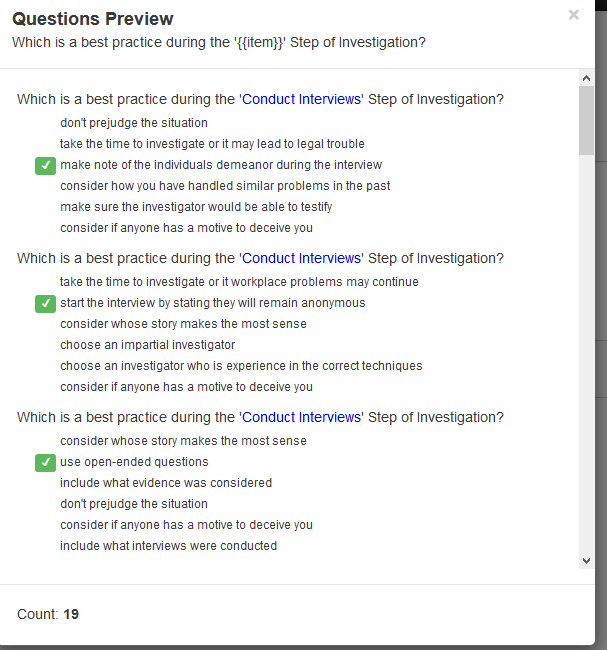
Figure 6: Questions preview in Word
Make it your own
The platform lets you brand theactivities so that they reflect your organization. That includes imagery andcolor palettes. You can customize the look of the activities to make it matchany other lessons or style guides you have. See Figure 7.

Figure 7: Branding the activities
Select the activities you’re goingto use
Aside fromthe content grid, mLevel offers 16 activities, which pertain to each of thedifferent levels of Bloom’s Taxonomy. The program makes it possible fordesigners to mix and match activities to fit their various learning objectives.For example, mLevel’s game-based activities (such as Block Party and Quiz Ball)help users remember the information before they can continue to a more advancedactivity (such as Pathfinder) to apply that information in a scenario-basedtraining activity. It’s easy to add these activities to missions by selectingthem from a list and then assigning questions to those activities. Most of theactivities are game-based, and the company used Bloom’s Taxonomy of LearningObjectives to ensure you could use them effectively. Figure 8 shows how theFast Lane activity looks.
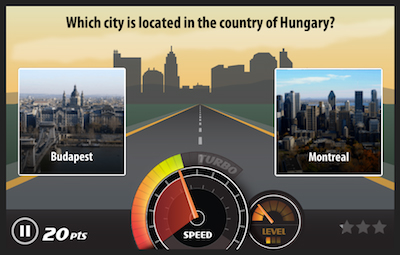
Figure 8: The Fast Lane activity
Theactivities include those in Figure 9, where you can also see information abouteach one.
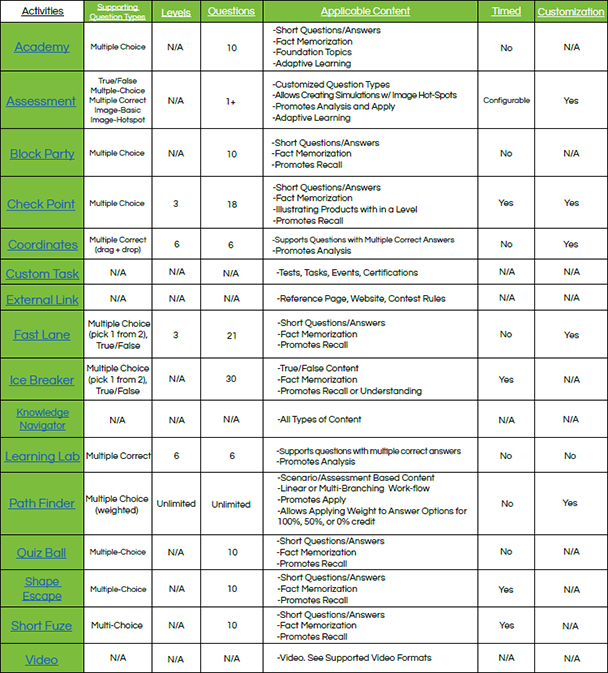
Figure 9: All mLevel activities
Each mLevel activityasks a different number of questions based on a game’s needs. As you can see inFigure 9, certain activities are relatively short and ask six to eightquestions, while others are longer and ask 20 to 30 questions. There is nolimit to the number of questions you can assign to each activity. You should,however, assign at least 50 percent more questions than you plan to generatefor a test so as to ensure that learners don’t see the same questions everytime they play.
Audio and video
Audio does not seemto be used much in mLevel activities, though video is used quite a bit. That’snot to say that audio isn’t supported—just that I haven’t seen much use of it.The focus seems to be on using videos. In fact, to find which audio files aresupported, you have to look on a page called Supported Video Formats.
There’s no waycurrently to upload a number of media files and have them reside on the mLevelservers in a resource library. Each time you want to introduce a video, forinstance, you need to upload it from your computer or link to it online. Thisis not a show-stopper, but it would be nice to organize my media files inadvance of using them. I’ve suggested that for a future version.
Analytics!
mLevel also uses thecontent grid to provide analytics on the back end. It does this by taggingquestions to remember the knowledge intersections used to generate the correctanswers, such as the fact that Chile is in South America and that Santiago isits capital. A pretty cool interactive color wheel shows you the tag’sdistribution. See Figure 10.
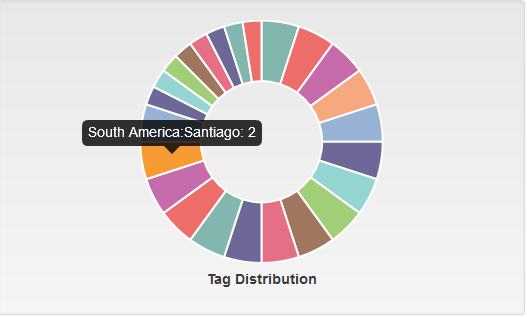
Figure 10: The tag distribution color wheel
The platform thenprovides five different types of analytics dashboards.
- Completion:Certifies which users have taken the mission and which of them have completedit. See Figure 11.

Figure 11: Completion analytics
- Engagement:Measures how many users have taken a certain mission, when they took it, andthe average number of times each user took the mission. See Figure 12.
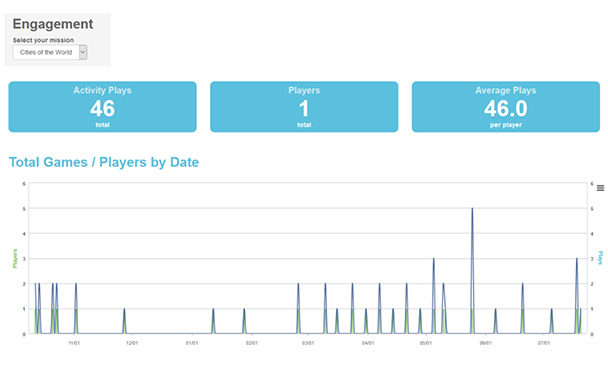
Figure12: Engagementanalytics
- Knowledge:Identifies the questions users are struggling with, along with the ones thatthey understand, by measuring the percent of questions they get right aboutthose specific topics.
- Performance:Measures how users are answering certain questions. This dashboard can befiltered to see which questions users get wrong the most often, allowing you todetermine whether those questions are worded properly or whether there is anactual knowledge gap. See Figure 13.

Figure 13: Performance analytics
- Leaderboard:Shows the same leaderboard that users see in the platform, so administratorscan see who is scoring the highest in game-based activities. See Figure 14.
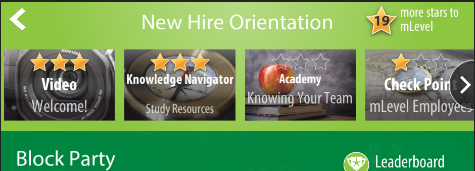
Figure 14: Leaderboard
You can also export thesereports as Excel spreadsheets, allowing you to combine data from multiplemissions or break it down even further to identify knowledge gaps.
Publish for desktop and mobile
Once you publish yourmLevel activities, learners will be able to access them equally well on mobile anddesktop. I’ve taken a look at the demos on the mLevel app, which is free todownload on your mobile device, and they look very good. See Figure 15, where Iscreen-captured six examples from my phone.
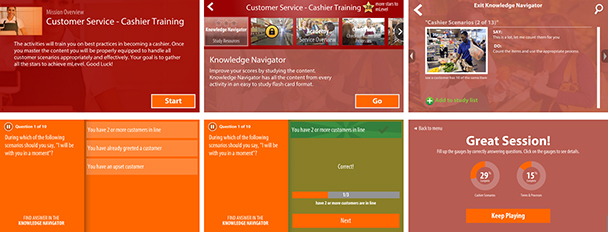
Figure 15: Mobile screen examples
Limitations of mLevel
- mLevel is currently not compliant withSection 508 of the Rehabilitation Act. However, I’m told that this capabilityis imminent. You may have to test mLevel thoroughly for accessibilitycompliance when working on US government contracts or on projects for companiesthat adhere to Section 508.
- mLevel started as an eLearning or mLearningtool geared heavily toward gamification. There’s nothing wrong with that, butin my view, games should not be the primary focus of learning. Most of themLevel activities seem focused on games. I hope to see more activities addedthat are not based on games.
- You cannot download or upload missions.However, you can embed mLevelactivities in any tool that allows for an embedded web window, or you canlaunch a separate web window for those authoring tools that allow you to do so.Most authoring tools today allow for embedding web windows and launching.
- mLevel is not SCORM-compliant. However, you can link to an mLevelactivity from an LMS, and you can also transfer data via the xAPI to a learningrecord store.
Pricing
You pay for mLevellicenses according to the number of active users you have per month and otherfactors. There are some initial fees, after which you’ll pay $20 per month ifyou have only one user, down to $2 a month per user when you have 20,000learners or more, which is obviously cost-effective for organizations largeenough to have that many learners. There are discounts when paying in advance.It’s best to contact mLevel to see what your costs would be.




