





As many of you know, I’m a huge advocate of making eLearning challenging and engaging. I canhear you now, “Yeah, Joe, but who isn’t?” Well, we may all want to create greatlearning but the truth is that most learning is linear, passive, and boring. Forthe last several of the 32 years that I’ve been creating eLearning, my maincareer mission has been to show and teach how to design and develop eLearningthat is scenario-based, that makes the learner think, that allows experts notto waste their time slogging through a lot of material they already know, but thatalso allows novices to get plenty of extra help. There are more elements, ofcourse (media, social learning, and others) that help a lot, but we start withscenarios and build upon them.
Scenario-based learning, simply put, allows the learner tomake mistakes and learn from those mistakes, not typically with immediatefeedback (though that may be preferable sometimes), but with delayed feedback. Whatif the learner makes a mistake in performing the series of steps in a surgicalprocedure. In real life, that may not be evident until several minutes, hours,or even days later. Scenario-based learning gives us the ability to havepotential surgeons and everyone else learn from their mistakes in a safeenvironment, one in which real patients don’t actually die as a result (andthat’s a good thing).
In the past, whenever I’ve created such a lesson, I’ve usedflowcharting applications to lay out the scenes and their branches, which madeit much easier to then develop the slides or pages and the navigation betweenthem in Adobe Captivate, Articulate Storyline, or Trivantis Lectora. See Figure1 for a complete scenario I built for first-responder flood training and Figure2 for a close-up of a section of it. Notice how after I created the flowchart Iassigned numbers to each scene, which translated into slides in Captivate andStoryline and into pages in Lectora.
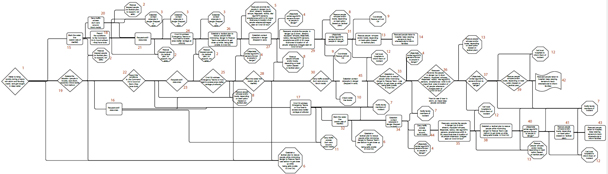
Figure 1: The complete flowchart for first-responderflood training

Figure 2: A section of the flowchart
Enter BranchTrack
While this approach has certainly worked for me in the past,I’m very happy to have found BranchTrack,a cloud-based tool that makes not just the flowcharting easy but actuallyoutputs a full-fledged simulation for you. You can even take the result andinsert it into a slide of your favorite authoring tool. In other words, it’sbuilt to play well with other tools.
BranchTrack is simple. Start by setting up your first scene.See Figure 3.

Figure 3: Editing a scene
Add a built-in character or an image of your own to displayas part of the scene. Set the character’s emotion as well. Finally, you can adda background image too, again from built-in background images or one that youupload (Figure 4).

Figure 4: Adding characters and backgrounds
Once you’re set up your responses, you can link them toother scenes, by clicking and dragging the link symbols you see in Figure 4 toany other existing scene or to a blank part of the canvas to create a newscene. As you being to work, you’ll see your scenes and links forming, as Figure5 shows.
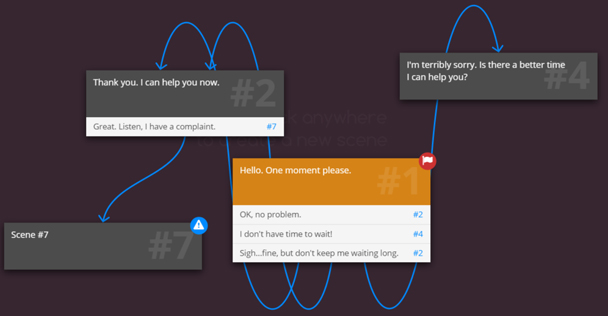
Figure 5: The start of a scenario with scenes andlinks
Notice that Scene #7 has a symbol. Roll over it and it willprompt you as to what’s missing. See Figure 6.

Figure 6: Helpful prompts
Back in Figure 3, note the  symbol. This lets you enter the Full Screeneditor, where you can add the score for the scene, change the text color, setor change links, and more. See Figure 7. Notice the Feedback option. It can bea bit confusing at first glance because it is not shown as a result of thelearner choosing one of the options in the current scene. In fact, it is shownprior to the learner making a choice. It actually serves as feedback to thechoice the learner made in the last scene, which then linked to the currentscene. In other words, I normally wouldn’t have feedback on Scene 1 but may forsubsequent scenes.
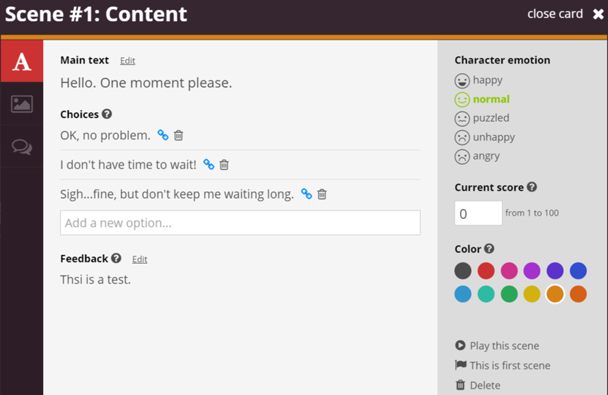
Figure 7: The full-screen editor
In the editor (full screen or regular), you’ll also see the  symbol. This lets you add comments to thecurrent scene for yourself or for other developers who may be working in thelesson. More importantly, the comments can be set by reviewers. A convenientoption in BranchTrack is the Review & Comment window, which lets you inviteany number of reviewers you wish and will show you their comments. See Figure 8,which shows a symbol for Scene 1, indicating there is a discussion for thatscene. Figure 9 shows the comment, along with additional options.

Figure 8: The Review & Comment section

Figure 9: Comments for a scene
You can add audio voiceover to any scene and to itsindividual responses (video options are coming later this year). One reallynice feature is the ability to automatically generate a script in BranchTrack,with relevant information, including what to name each file. By following thefilename suggestions in the script, all of the audio files can be brought intothe BranchTrack scenes in one fell swoop. See Figure 10.
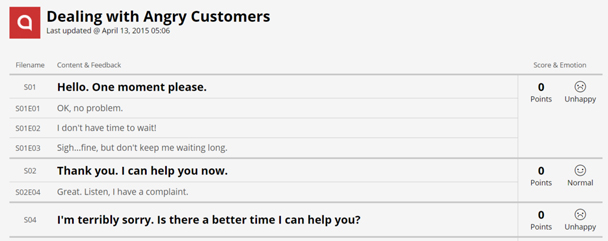
Figure 10: A generated script
Remember how I wrote above that you can set the emotion in ascene. This can be displayed to the learner if you wish, using an emotion meter, as seen in Figure 11.This may help learners gauge how well or how poorly they are doing.

Figure 11: An Emotion Meter
There are several other options in BranchTrack worthmentioning:
- There is a whole section to Brand your simulation so that it can match the rest of yourlearning.
- If you use Captivate, Lectora, or Storyline,BranchTrack will communicate with your lesson via JavaScript, if you wish, sothat it can pass the score for a scenario back to your authoring tool.Furthermore, in Captivate version 8, you can set up a listener function whichwill be triggered every time the learner does something in BranchTrack. You canthen use that to decide what to do next in Captivate. That’s prettypowerful!
- Some nice touches are found here and there inBranchTrack. For instance, when I switch out a character for a different one,the speech bubble I had on the first character will automatically move so thatit’s positioned correctly for the new character.
- You can zoom in and out of the editor veryeasily, a must for this kind of environment.
When you are ready to Deliveryour project, you have several options. See Figure 12.
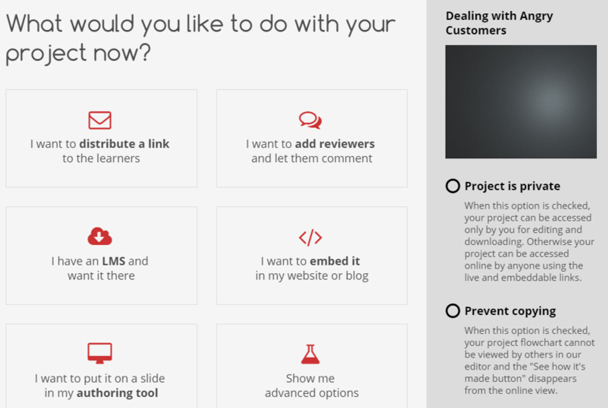
Figure 12: Delivery options
Note that BranchTrack works within your environment,delivering to HTML5. The HTML5 output is built for responsive design, meaningit will automatically adjust itself to different resolutions on mobile devicesand desktops, not just by shrinking the image but by arranging it in the bestway possible. If your learners are using older browsers like Internet Explorer 8,a tiny bit of Flash is included to enable media playback.
What else I’d like to see
Some more elements will be coming later. I’ve indicated thatvideo will be coming this year. In addition:
- Scoring is currently limited to numbers between1 and 100. I’d like to see the ability to have a negative score applied, or araw score of any value.
- Scoring is also set up so that the last scorealways counts. This is logical in most instances but in some cases I’d like tohave more flexibility there.
- There is no way at the moment to set upconditional actions, so that for instance I can determine whether a learner hasalready seen Scene 25 and if so, go to a different scene.
- I’m told that Analytics will be coming at alater time and I urge the company to implement that sooner than later. Whendelivering simulations, it’s important to have a robust analytics engine thatcan give us information regarding learner choices with as much detail aspossible.
What do I think?
I really do like this product. It’s simple and not overlycomplicated, but packs some nice features under the hood. For more powerfulsimulations, ones that use a lot of conditional options and variables,BranchTrack probably won’t be enough, but for most of the simulations that Ibuild, it is a quick and nice product to use. Yes, it’s important that they addvideo and analytics and that scoring is made more flexible. As I use it moreand more, I may find other limitations I’d like to see overcome, but I’mfinding this tool is helping me create my scenarios more quickly than I couldbefore and the fact that it communicates with the authoring tools I normallyuse makes it easy to incorporate the scenarios I deliver from BranchTrack. Ithink it was very smart for the company to have built in that functionality tolet it play well with other tools. I wish more tool vendors would follow thatroute!





