




Articulate has been hard at work, not only creating anupdate to Storyline as expected but changing the whole way that it offers itsproducts. Articulate 360 is not just an update: It includes all of the productsthat Articulate offers—updated versions of those it has offered in the past,along with new ones—all under one banner. Figure 1 shows the nine differentproducts included, four of which you download and install, four of which areweb-based, and one of which is an iPad app.
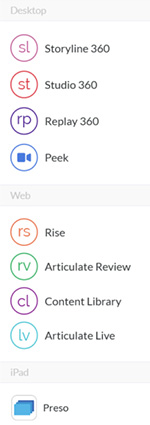
Figure 1: All of the Articulate 360products
There is too much to cover in Articulate 360 to fit into onereview. This month I’ll focus on Storyline 360 and Articulate Review. Nextmonth I’ll cover the changes to the other tools, as well as the new tools thatare now included in Articulate 360.
Storyline 360
Storyline was introduced in May 2012 and quickly started togain steam in the marketplace. Version 2 was released in September 2014.
Storyline 360 toolbars
Using Storyline 360 now, you have several more features atyour disposal, though the interface and the toolbars have largely remained thesame. The biggest differences are:
- There is no longer a New Slide option, nor aRecord Screen option, on the Insert toolbar. Rather, they are now on a newtoolbar called Slides (Figure 2), which gives you faster access to insert thetype of slide you wish. It also now includes access to Storyline’s new ContentLibrary (described below).

Figure 2: The new Slides toolbar
- You can see the new Insert toolbar in Figure 3.Note that the Screenshot choice is still available but has been moved under thePicture option.

Figure 3: The updated Insert toolbar
New Dial interaction
Notice there is a new interactive object called Dial, asseen in Figure 4. You can convert objects and images into a custom dial orchoose from two basic pre-built dials, each of which is very customizable. Seethe options in Figure 5. Both the Dial and Slider interactive objects give youa great deal of power: They let you build interactions for learners that letthem experiment with changing values to see what the results would be. Forinstance, you can have learners turn dials to adjust number variables andchange the state of panels, characters, or any other type of object, and thenchoose what they believe is the best combination of factors, at which point youcan provide feedback on the choices made. Dials are really helpful for buildingcourses in manufacturing environments where you’re trying to recreateindustrial machine interfaces. For example, you can imagine a dial thatlearners adjust to the correct setting to perform a particular operation.
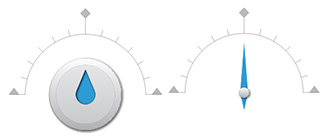
Figure 4: The two Dial options

Figure 5: The Dial Format options
Responsive design
Whatever you create in Storyline now, you automatically getresponsive options. Always resident at the right on the toolbar are previewoptions for desktop, tablet portrait and landscape, and phone portrait andlandscape (Figure 6). You can choose individually to limit the phone and tabletviews to just portrait or just landscape.

Figure 6: Responsive Design Previewoptions
My experiments, albeit limited, with the responsive designviews have proven to me that Articulate has done a great job optimizing eachview to ensure good results. Note that you don’t have the ability to exclude oradd objects in different views. Whatever you have on the screen will be thesame in all views. Like the Flash version, it will resize the slide for eachview without changing the aspect ratio. The advantage is that you don’t have totweak the different views, but the disadvantage is that you can’t tweak the different views. Ifound in testing this, for instance, that a Dial I placed on the stage was toosmall to adequately use on my phone, so I had to make it bigger, but thisdoesn’t affect only the phone view: The Dial is bigger in all views. Having thepower to customize each view is a matter of some debate in the eLearningindustry. Articulate has opted to keep it simple by not allowing changes in theviews, which in most cases will serve your needs well, but it may mean makingsome small design compromises at times.
Content Library characters
Storyline 360 has upped its selection of characters inthe new Content Library (Figure 7), now allowing you to filter the charactersyou see by style, gender, clothing, and age group. Content Library isintegrated directly with Storyline 360 to support a fast workflow. And the new,realistically illustrated “Modern” characters include built-in emotional statesfor easy trigger creation. Articulate has publicly noted that it willcontinuously add characters to Content Library.
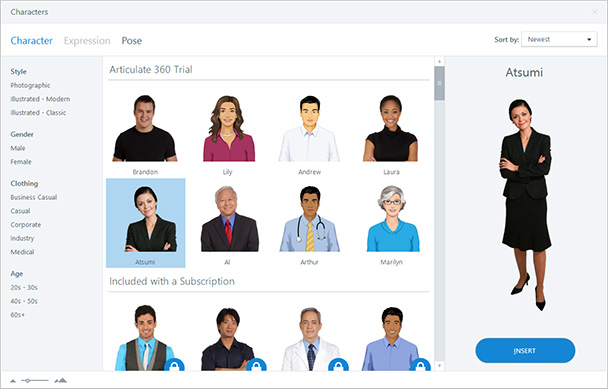
Figure 7: New Content Library characters
Content Library templates
Similarly, Storyline 360 now also includes many newtemplates (Figure 8), which you can filter by type and light or dark theme. Allthe interactions included are pre-wired and ready to go, and all their elementsare tied in to font and color themes, so you customize them to your style andbrand. Templates come in both 4:3 and 16:9 aspect ratios, and Storyline 360will serve up the closest version to your project canvas.
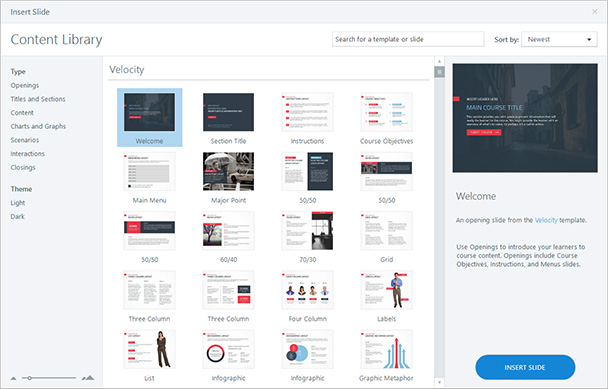
Figure 8: New Content Library templates
New motion path options
A really nice addition to the motion paths is that you cannow indicate that objects should change their orientation as they move alongthe path so as to appear fluid (Figure 9). For instance, if you have a car movearound a circle, rather than have it always appear in the same position as itmoves around, it will turn. See the example I posted here. Youcan also now rename motion paths.

Figure 9: The new Orient Shape toPath option
New trigger actions
You can now activate triggers on four new conditions:
- When objects intersect
- When objects no longer intersect
- When objects appear on the timeline
- When objects disappear from the timeline
You can use these new triggers to add gaming elements, butalso to apply other types of learning needs.
New publishing options
Earlier versions of Storyline allowed for publishing toHTML5, but always included the Flash version when doing so. Articulate hascompletely overhauled the Storyline 360 rendering engine using the latesttechnologies, leading to faster playback, particularly on mobile devices. Nowit offers several options (Figure 10), the default being HTML5 with Flashfallback. The four options now include:
- HTML5 only
- HTML5/Flash, which will use HTML5 when possiblebut Flash when not
- Flash/HTML5, which will default to Flash whenavailable, else HTML5
- Flash only
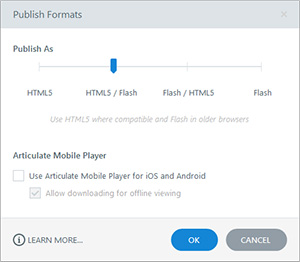
Figure 10: New publishing options
I think it’s great that Storyline now offers these fouroptions, because it adds flexibility and efficiency to publishing. As before,you can also check the option to have the learners use the Articulate MobilePlayer. When checked, learners who don’t have the Mobile Player will beprompted to download it free of charge.
You can now also publish individual scenes or slides, addingmore flexibility.
Integration with Articulate Review
Storyline 360 integrates with a new web app included withArticulate 360 called Articulate Review. It lets you gather consolidatedfeedback from stakeholders and subject matter experts on your course. In theStoryline 360 publishing options, when you choose Articulate 360, Storylinewill publish your course online and allow you to immediately see it there.There, you can password-protect your course if you wish, and then share the URL(and the password, if needed). Your reviewers don’t need an Articulate 360account to provide feedback. When they make comments, Articulate Reviewcaptures a screenshot of what they were looking at, reducing misunderstandings(Figure 11).

Figure 11: Articulate Review
Other options
There are a handful of other additions and updates that areworth mentioning:
- HTML gesture support
- Buttons can now have square corners
- Audio can be optimized for broadcast
- Picture placeholder enhancements
- Result slides have new design elements
- Right-to-left language support has been added
Pricing
Articulate 360 products are offered under a subscriptionmodel. When you purchase a subscription to Articulate 360, you get all theproducts listed in Figure 1 at the beginning of this review.
You can buy an individual license for $999 a year, though ifyou are an existing Storyline or Studio customer, that rate is discounted to$599 for the first year. Education pricing is $499 a year, $299 for the firstyear for existing Storyline and Studio customers.
You can purchase a team license for $1,299 per year per seat,discounted to $799 per seat for the first year for existing customers. Teamlicenses offer several more benefits for the added cost. Education team pricingis $649 a year, $399 for the first year for existing customers. See how thecustomer discount works here,and see a comparison of what’s offered under both plans here.
I should note that perpetual versions of Storyline(Storyline 2) and Studio (Studio ’13) are still available for sale, but they don’tinclude the latest Articulate 360 updates.
My thoughts
This month at DevLearn, some people told me they werevery excited about the new and updated features in Storyline 360. Others toldme they expected more in this release. My take is: This update is well worthusing for its additional triggeractions, motion path improvements,and the dial option; I just love theextra power these give me. Of course, the responsivedesign features are fantastic for their simplicity, even if they lack theextra power to customize the different views. Add to that the Content Library, the integration with Articulate Review for easy projectreviews, the added flexibility when publishing,and the other updates I’ve discussed above, and I have no hesitation inrecommending that Storyline users update now.
What of the pricing changes? If you are already usingmore than one of the products that are included in Articulate 360, you will endup saving money in the long run, even if it means that you will be paying anannual fee to continue using the products. If you are using only one of the tools,it may still be worth updating, as you now will have several other products atyour disposal that you may very well find useful in meeting your instructionaldesign needs.




