




This month I decided to take a look at two tools that havebeen on my list to review for the last few months: eXe, the eLearning XHTMLEditor, and nimbleAuthor from elearning247.
eXe—eLearning XHTML Editor
eXe is an open source authoring tool that piggybacks on theFirefox browser. It’s free to download and use and, as open source, you caneven download the source code if you’re a programmer who wishes to update andcustomize the source code. There are versions available for Windows, Macintosh,and Linux. The idea behind it is simple: create eLearning without needing toknow XHTML. In truth, the tool feels clunky, buggy, and not ready for primetime. In trying this in the latest version of Firefox, I received severalillegal-operation errors with the direction to restart Firefox each time. Ifyou try to close eXe by clicking the X in the title bar (Figure 1), you aretold not to do that, but to use File > Quit, which is a bit odd.

Figure 1: Don’t try to close eXe by clicking the X in the titlebar. Use File>Quit instead
If you can get around the bugs, you may find this free tooluseful, especially if you work in academia, as it is clearly geared towardteachers (Figure 2).

Figure 2: eXe
You use a tree diagram to build your course and can splityour content up into topics, which you can split into sections, which you canthen split into units (Figure 3). You don’t need to use all the levels and youcan name them anything you wish.

Figure 3: Building a course using eXe involves a tree diagram
You can place content at any level, and the content is anyof a list called iDevices (Figure 4). Many of the iDevices use the same editor,which allows you to mix linked images and videos, math equations, and text tocreate a user experience. These building blocks include a nice varied mix andonce you’ve included an iDevice, it’s easy to move or copy it to any other partof your course.

Figure 4: Content building blocks in eXe are called iDevices
When ready, you can then export your course to SCORM 1.2 orany number of other options, and put it on your own server or in your LMS(Figure 5).

Figure 5: eXe provides several export options for your course
I think eXe has a lot going for it, especially as it’s free,but it won’t replace a more robust eLearning development tool in its currentstate. If you’re looking for a free tool that may require you to learn to workaround some idiosyncrasies, take a look at eXe. Learn more at https://exelearning.org/.
nimbleAuthor
nimbleAuthor is part of the nimbleLMS family, so it’s partof a complete environment in the cloud and, in case you forget that, thebackground for the website is a sky full of clouds. It feels slick and veryfriendly. You can even try an interactive demo of how to author in the toolwithout signing up so that you can get a feel for nimbleAuthor. That shows alot of confidence on the part of eLearning247, the parent company. My reviewcovers only nimbleAuthor, and not the LMS functionality to which you can tie it.You can publish to SCORM 1.2 and host the lessons in your own LMS as well.
Being cloud-based, nimbleAuthor shares some advantages withother tools in the cloud. For example, it will automatically keep a history ofthe last six versions of your course, though you should of course remember tosave your changes. It is also likely to be updated more often than an installedtool.
Like eXe and several other authoring tools, you build yourcourse in layers. A course contains lessons, which contain topics, whichcontain pages, though you can name each level what you wish. Each page can usea layout template or can be free-form. Templates (Figure 6) includepresentation, exercises, and interactions:
- Empty page
- Text with image on right
- Text with image on left
- Text with image above
- Video and text
- Multiple choice exercise
- Multiple choice exercise with image
- Drag and drop exercise
- Satellite interaction
- Reveal interaction
- Tab reveal interaction
- Text matching exercise
- Reflective text interaction

Figure 6: nimbleAuthor’s templates
Figure 7 shows a menu of options available whenever you’reediting.
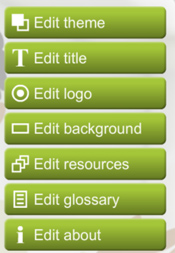
Figure 7: nimbleAuthor’s editing options
Editing a theme means changing the colors on the screen,nothing more. You can change the theme color separately for assessmentquestions. There are 24 colors presented, but you can also paste in a hex codefrom Photoshop or other image editor.
You can change the title text and the images for the logoand background to whatever you wish. You can also provide a list of resourcesin the form of titles and hyperlinks, set up a glossary with terms anddefinitions (text only) or create an About screen too (text only with links) ifyou wish.
Assessments allow you to choose randomly from pools ofquestions that you set up. As noted above, there are four types of questionsyou can create:
- Multiple-choice exercise
- Multiple-choice exercise with image
- Drag-and-drop exercise
- Text-matching exercise
TheText-matching exercise lets learners type an answer to a question and then letsyou decide if they’re right depending on whether the answer is exact, close,matches any word, or matches all words. The drag-and-drop is limited to textitems only and you can have up to eight draggable text items and five targetareas.
Onany page, you can add title and body text, warning text, quote text, images,rollover popup text, and comments (only you can see the comments) (Figure 8). Drageach to where you want it on the page and then edit it as you like. You can addas many of these elements as you like. You may also add one audio file and canprovide a transcript as well. It appears, however, that you can only add videoto the page types that support it, which currently appear to be only the Videowith Text and the Empty Page layouts.

Figure8: To add text of various kinds, drag the appropriate icon into position,drop it, and edit
At one point, while editing a drag-and-drop exercise, I gotan error that the Shockwave Flash plug-in had stopped responding and I had toreload. Luckily, I didn’t lose all my work.
nimbleAuthor is free to try for two weeks, after which itcosts £850.00 annually (in British pounds, about US $1,300).
Learn more at https://elearning247.com/nimble/.
Conclusion
Two tools, very different from each other.
You download and install eXe on your computer. It looks a bit sparse though it has somenifty features. It does not appear very stable, however, so I don’t recommendit in its current form in spite of the fact that it’s free. Learn to get aroundthe bugs and you’ve got a free tool to use.
nimbleAuthor staysin the cloud. It looks fun and elegant to use. It uses page layouts in mostcases, which makes it easier to use but also limits its function set. While youcan start with a blank page and in most cases create what you like, you willfind limits to what you can do in many cases. Of course, nimbleAuthor is notfree.
You may find your experiences differ from minein the use of either of these tools. Please feel free to share your ownexperiences below.




