




I’ve long been an advocate of the idea of continuous learning.After all, just because you have taken a two-week piano class or taken aneLearning course on water skiing does not make you an expert in either. Theysimply form the foundation for further learning. They become the impetus tolaunch you into a continuous learning mode. At least, they should. Often aftertaking a class or perusing an eLearning course, without practice the foundationerodes away quickly. Practice can come in many forms, but most of the time wehave been left to our own devices to find our own ways to practice. Figure 1illustrates the problem.
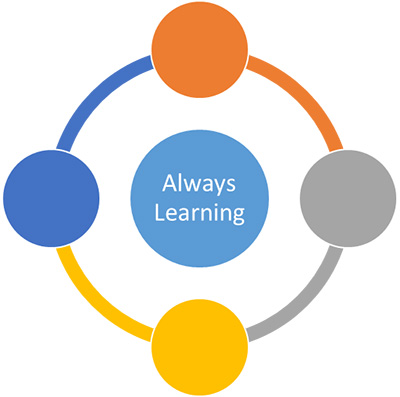
Figure 1: “Never stop learning” is a good slogan, but we are leftto our own devices to figure out how
Most eLearning development tools try to squeeze in manyfeatures so that you have a lot of flexibility to create almost any kind oflearning approach. The flexibility they offer, as should be clear from my manytool reviews, varies greatly.
Expanding the definition of an eLearning development tool
However, there has been a trend in the last few years of newtools that instead focus on one particular means of learning or practice. In sodoing, they are very strong in their focus areas but not in general-purposecreation of eLearning. I see these as the difference between a person who is ageneralist and one who is a specialist. A generalist is very valuable day to day,but a specialist is sometimes the best bet to solve a problem. In some cases,these specialist tools can be used on their own. In most, they serve as anexcellent means of supplementing an eLearning or classroom course to helpguarantee that learners will have the means to build rapidly upon what they’velearned.
As an example, you might create an eLearning lesson on goodmanagement skills that covers all the topics that one must know to become agood manager. It contains various lessons, all of which I hope are interactiveand engaging, to help the would-be manager learn how to communicate well withteam members. It uses case-based scenarios, which of course are set up inadvance and which posit a challenge that the learner must solve by choosingfrom various options. This is good foundational learning that tries to simulatereal-life managerial challenges and how to solve them.
So what happens when the learners finish the course? Nowthey are better prepared to understand the whys and wherefores of goodmanagement skills, and they’ve practiced communicating with team members usingsome excellent canned scenarios of common problems. But … before we unleash thenewly anointed managers on unsuspecting teams, is this enough?
Wouldn’t it be better if they got a chance to practice withsomeone who has an excellent reputation as a manager and who has been managingpeople for a while? Proactive managerial candidates may seek out Susan or Peterto ask their advice, but most won’t. They’ll make many mistakes on their way togarnering a similar excellent reputation, or they’ll fail entirely and findthemselves demoted or fired.
Therefore, after learners have finished an eLearning course,it would be nice if we could ensure that the learners meet with Peter or Susan.They’re busy people, but perhaps we could get them to help—not in a livemeeting but in an asynchronous manner, such as email or Twitter.
Let’s rehearse

Better yet, why not look at using Rehearsal.com?This online tool lets learners focus on practice, practice, practice. Its mainfocus is to help people practice their communication skills, which are skillsthat just about anyone in the workplace needs to improve, and not just managerialcandidates. We can all attest to how often we encounter bad customer servicewhen talking to vendors, store employees, tech support personnel, and others.Why aren’t they hearing us? Why aren’t they able to understand us? We ourselvescan certainly sometimes be guilty of communicating poorly with others, if forno other reason than we’re tired or feeling overwhelmed.
The site sets up and provides a dialogue with a real person.You may use it without having learners take a more traditional foundationaleLearning course, but in my view it is best used to help learners practiceafter they’ve learned the fundamentals. To really help someone to developcommunication skills, you need a real human being, an instructor, who canevaluate a learner’s attempt to communicate. Some things are still best done byhumans, such as evaluating nuance, facial expressions, etc.
Here’s how Rehearsal works.
1. Learners, expert mentors, and the administratoraccess Rehearsal. It’s a nice, clean interface that I found easy to navigate(Figure 2).
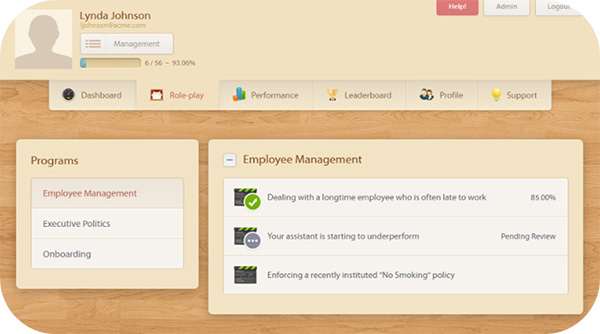
Figure 2: The Rehearsal.com user interface

Figure 3: Learners respond to video or text scenarios, which can besynchronized with a PowerPoint presentation
Confidencelevel: 8/10
Tone/demeanor:9/10
Abilityto get to the heart of the problem: 8/10

Figure 4: Mentors may choose to provide a video response as well astext
Using the live human mentor can lead to continuous learning,in which challenges and practice occur on a continuous basis both for new hiresand for veteran workers needing to learn new techniques.
Analyze this … and that
If you know me even a little, you know that I’m a bigbeliever in analytics, making sure that you know if the learning is working ornot. I’m pleased that in Rehearsal you can, at any point, analyze how your teamis doing and filter by student, group, or scenario (Figure 5).

Figure 5: Rehearsal provides analytics
Follow the leader
What I really like about this tool is that the learner maybe in Kansas while the mentor may be in Tasmania. The coaching is not done inreal time, which would require that both be online at the same time, but insteadin back-and-forth practice sessions. The process can be made formal or close toad hoc. It can last a short time or continue for months.
Mentors and instructors can take the best videos provided bylearners and place them on a leaderboard, where other team members can watchthem to see the best responses to a scenario. They can also use the library ofresponse videos as a way of learning from their peers while preparing their ownresponses (Figure 6).
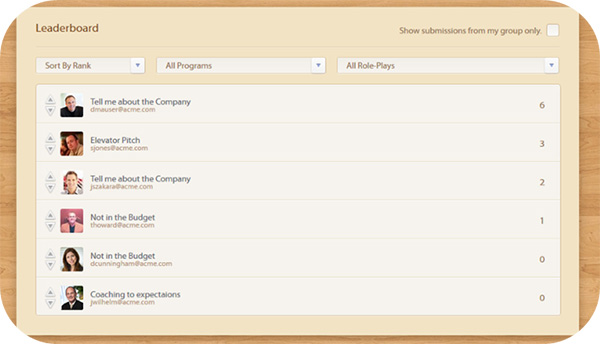
Figure 6: Rehearsal provides a leaderboard so that team members canwatch the best responses to a scenario
More good features
- In Rehearsal, you can include PowerPoints thatcontain the scenarios.
- Rehearsal works on any computer or smart mobiledevice.
- You can integrate Rehearsal with most learningmanagement systems so it can supplement all of the other learning availablethere.
- There is a user management area where you canestablish roles for each user in a hierarchy so that each user will be able toprovide different learning paths and perform different functions.
But remember …
- Rehearsal doesn’t let you create traditionaleLearning as you can with Adobe Captivate, Trivantis Lectora, ArticulateStoryline, or any of the other dozens of authoring tools, so don’t expect it tolet you create screen recordings or have pools of questions for quizzing.
- You can’t have live role-play with Rehearsal. Itis all about back-and-forth asynchronous exchanges, so it doesn’t replace webinartools, Skype, or Google+.
- It’s best to have a fast Internet connectionbecause, after all, we’re dealing with videos. Rehearsal does let you recordyour videos offline and upload them when ready, so you do have the ability tofinesse your videos.





