





Last month I offered a look at uses for some new social tools, with exampleslike a virtual workplace tour via Pinterest and live cooking lessons via Periscope.Here’s the promised follow-up on choosing tools, finding their best uses, andperhaps rethinking what you share, with whom, and when.
What to use when?
One of the questions I hear most is: “Which tool should Iuse?” And I know people hate it but the answer truly is, “It all depends.” Sketchnote Handbook author Mike Rohdedeals in a lot of photos, which he posts—in bulk, if he needs to—to Flickr. Followers can likeand comment on these. I use Pinterest as a living, updateable handout for manyof my courses, so I typically work with one item at a time to mix photos andsometimes videos with links to articles or other resources. For example, seethis board supporting my Tips for the Positive Deviant webinar and conference sessions.
Both Flickr and Pinterest will allow for collaborative orgroup sharing, a feature I sometimes use. Those who prefer mobile work andtools might go with Instagram. And if you just want a place for some photos,Facebook and Twitter both work fine. (Little known feature: Twitter accounts willdisplay uploaded images and videos under a single “media” link, like this one showing the weekly #lrnchat Twitter account’s “Why I #lrnchat”endorsements.) I love Facebook; others love LinkedIn. Some hate Facebook orLinkedIn.
So in choosing tools … it all depends. The best advice Ihave: get clear on your goals. Broadcast, conversation, or collaboration? Photosonly? Photos and links? Moving camera or talking head webcam? And just spendsome time playing with available products, which launch and change all thetime. The first time I saw Pinterest, back then full of photos of shoes andwedding dresses, I didn’t see much to get excited about. Then I realized thatat its root Pinterest is really a bookmarking tool—and now it has largelyreplaced my old less visually interesting go-to for that, Diigo.
There’s an old grad-school adage: “The best dissertation isa done dissertation.” I’ll borrow from it and say: “The best tools are the onesyou’ll use, that meet your particular goals and needs—and the ones youraudience likes.”
What can you do that’s new?
I think what matters more, upon seeing a new tool, islooking at the problem it can solve and what it will allow us to do that’s new. Many will remember the hype aboutSecond Life, a product ahead of its time that held great promise for creating avirtual world we could all inhabit. And what did some trainers do with it? Theycreated virtual classrooms with virtual lecterns and virtual projectionscreens. Just using tools—which will often come with at least some learningcurve for everyone involved—to replicate existing practice doesn’t seem like avery good use of time or energy. Honestly, do we really need ONE MORE way todisplay slides online? If a tool solves a problem? Great. If it’s better thansomething we already have? Fabulous.
Live out loud
In helping others use social media for learning, nothingfrustrates me more than some organizations’ insistence on making everything “private.”Financials? Of course. Research data? Certainly. Concerns about a client?Absolutely. But take a look at Figure 1, which shows the Facebook conversationthat followed when I tried to Periscope my view from a plane but the Wi-Fisignal was too weak to stream video. Kate asked about using Periscope, andsince I knew of Will’s work with online cooking classes I tagged him into theconversation. He had advice useful to her as she prepared for an upcomingevent. Later someone else said, “What’s Periscope?”
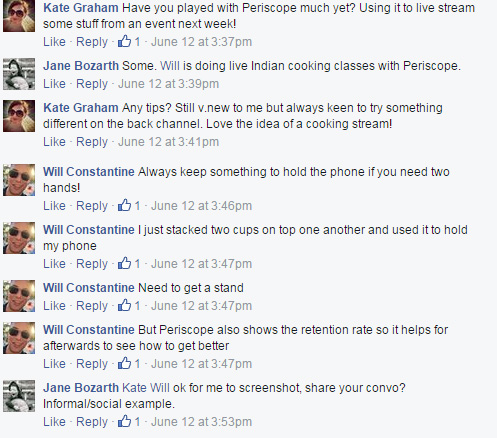
Figure 1: Spur-of-the-moment tips from experienced user to novice (used with permission)
This is how peoplelearn. From each other. Informally. Serendipitously. All the time. How many times have you worked tofigure a problem out, or finish a project, only to find someone in anotherbuilding, division, or company had already done the same thing? Or struggled toteach yourself something to find out too late that someone nearby has a degreein that? Making your work morevisible is how people find out what you know and what you’re good at. It helpsyou connect the dots between people and across silos and even disciplines. Itcan also help with marketing your L&D department: As noted in Part 1 of this piece, someone contacted Mike Rohde about bringing hisworkshop to another event because they happened to see the Pinterest board Icreated that day.




