





From the Editor: “ExploringTech” is a new column in Learning Solutions Magazine. Brian Dusablon will discuss ways that he has found to help eLearningprofessionals and teams be more productive, and to solve the many administrativechallenges that surround development of eLearning.
Scheduling meetings has been a problem for decades. Forlearning professionals, meetings are a critical part of the design anddevelopment process. We must meet with subject matter experts, stakeholders,graphic designers, teammates, reviewers, and many others. As a geek, I amfrustrated by technology’s inability to solve this problem.
In recent years, however, I have discovered a few tools Iuse regularly that save me time and reduce the volume of emails I send andreceive related to meetings. Unfortunately, I have not founda one-size-fits-all scheduling tool, so you may need to build more than oneof these into your workflow. I hope these help you save some time and sanity!
Calendly
Probably my favorite time-saving discovery in recent memoryis Calendly. Calendly is a scheduling toolthat syncs with your calendar(s) and provides an easy interface for others toschedule meetings. With Calendly, you configure different types of meetings,set scheduling rules, and customize notifications, meeting details, and requestforms. The simple interface for administrators and for clients or colleaguesmakes it easy to use (Figure 1).
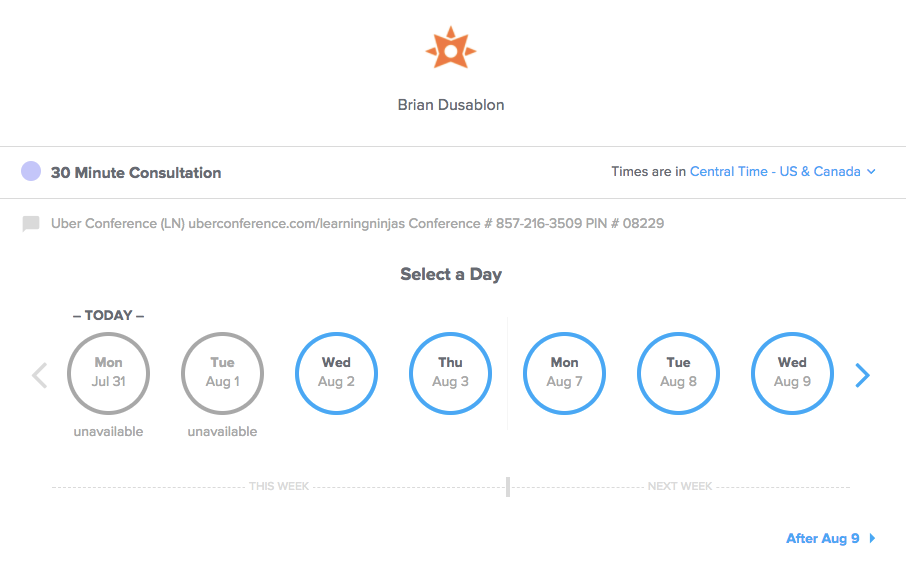
Figure 1: Calendly’s simple interface
When someone emails or texts me requesting a meeting, Isimply respond with my Calendly link and ask them to select an available time slot. Once they complete thecustomizable form and select the time that works for them, Calendly handles therest by:
- Sending an email confirming the request to youand the meeting requester
- Sending a meeting invitation for the right timein the appropriate time zone (automatic time zone detection!) with all themeeting details you have preset
- Adding the meeting to your Calendly dashboard
My favorite features of Calendly are the auto-buffer andmeeting limit. It will never schedule events that overlap or are too closetogether, nor will it allow too many meetings to be scheduled per day (Figure2).
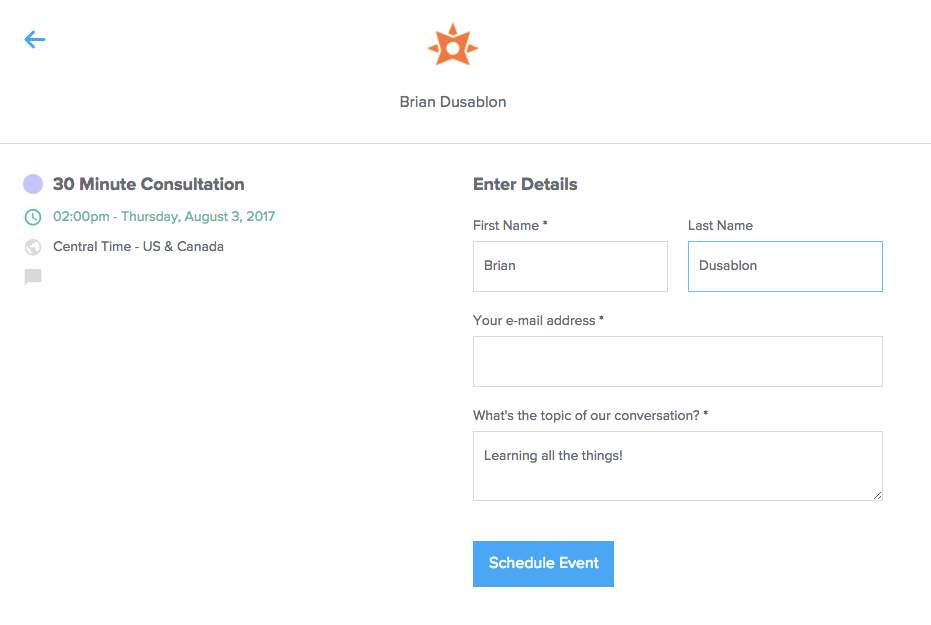
Figure 2: Scheduling a meeting in Calendly
Canceling or rescheduling is also automated, with one-clickaccess to cancel the meeting or find a new time. You can start using Calendlyfor free for one meeting type (with Calendly branding). To turn off brandingand add multiple meeting types, it’s $96 per year, which I will happily continueto pay.
Currently, Calendly works with Google, Outlook, Office 365, andiCloud. The mobile interface is excellent for administrators and invitees.
The lone drawback I have found with Calendly is that it isonly good for scheduling one-on-one meetings or open sessions (such as a groupwebinar that multiple people can sign up for). If you have multiple people youare trying to coordinate a meeting time with, it is best to use one of theother tools I have outlined below. If you manage a team, there is a teamedition that adds additional functionality for clients to book times withspecific team members or open meetings that any team member can fill.
Doodle
Doodle has been around fora while. Its most recent overhaul of the user interface was much needed,cementing it as my favorite group-coordination tool for scheduling meetings.Essentially, you are sending out a poll to potential attendees. Once everyonehas responded, Doodle automatically selects a time that everyone agreed to orallows you to select from the times everyone is available (Figure 3).

Figure 3: Doodle polls meeting attendees to find the best availabletime to meet
It’s simple. It’s free. It works. A mobile app is availablefor Android and iOS for administrating and sending invites. The mobileinterface for respondents is simple and easy. Set up a “MeetMe” page if youwant a Calendly-like page where users can select a time to meet with you (here’s mine). If you want to upgrade, you canremove ads and add some custom branding for $39 per year. You can also upgradeto a Teams account for a custom domain and the ability to manage users.
Doodle works with Google Calendar, Outlook, Office 365, andiCal.
Vyte
I first heard about Vyte in 2015. This app has seen a few updates and has an iPhone app for schedulers.It is similar to Doodle in that it allows you to select a set of times thatwork for you and then invite multiple people to respond as available orunavailable. Vyte will then select the best time and send out a meeting inviteto all the attendees and to the scheduler.
The drawback for many will be that Vyte requires a Googleaccount. Vyte currently has a signup form if you want be notified when it addsmore calendar sync options.
Outlook and FindTime
In 2015, Microsoft introduced FindTime, a free extension forOutlook on OS X and Windows. FindTime provides a button in the Microsoft Ribboninterface to select multiple open time slots in your calendar and send themdirectly to invitees in an email as a visual calendar they can voteon. Invitees vote and FindTime sends a meeting invitation to allparticipants. Invitees do not need to be using Outlook to respond to yourmeeting polls, but organizers do need to be using Office 365.
The free Outlook mobile app,upgraded in 2016, includes a similar scheduling feature called “SendAvailability” that does not require organizers to have an Office 365 account.In the mobile app, you select times that work for you and Outlook generates anemail with simple links for invitees to select.
Other tools
- x.ai: An AI-enabled“personal assistant” that schedules meetings for you
- Timebridge:Inbound and outbound meeting scheduling for Outlook and Google Calendar




