





Picture this scenario: You, the instructional designer, aretalking to a client about a new eLearning project. She describes an activity.You start to write down what she’s saying, but you stop yourself. Instead, yousketch out a series of screens. You sketch the same content as it would appearon a desktop screen (horizontal) and on a tablet or smartphone held vertically.She quickly realizes that she needs less text and a different graphic.
Guild Master Nick Floro is a passionate advocate of thismethod of scoping out a project. It’s called “wireframing,” and (he claims) itworks even if you have zero artistic talent. “Wireframing is a great way to prepare the stakeholder andyour team for what needs to be created. It allows you to test a concept andanalyze what is possible,” Floro said.
Awireframe focuses on how space is allocated to different types of content:text, images, menus, buttons. It illustrates intended functionality and behaviors.A series of wireframe sketches can show the navigation and relationshipsbetween pages or how a single page will look on different devices—a laptop, atablet, and a smartphone, for example.
In an earlier interview, Floro described the process likethis: “If you write down those notes in bullets, it looks good, andyou’re repeating it back to them [the client]. But if you sketch the idea, andthey’re saying that they want a picture, but they don’t have an idea what the [quiz]question is. It might be two words or three paragraphs. Because you don’t havethe data when you start to sketch, you show them: You have some squiggly linesrepresenting a short question and some squiggly lines representing a longquestion. They are able to visualize what will happen if I deliver this to aphone vs. a tablet vs. a computer. How much real estate do we have
towork with?”
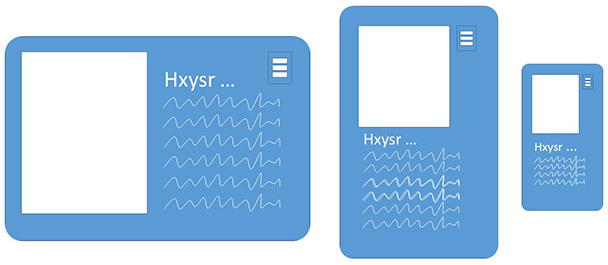
Figure 1: Wireframes show how space is allotted
In a nutshell, wireframing is sketching, rather than usingwords, to outline a project, imagine its screens and layouts, and see theeLearning begin to take shape. Especially now, when most eLearning has to workon multiple devices, it is essential to visualize the same content ondifferent-sized screens and to imagine the horizontal as well as verticallayouts. A wireframe is easier to adapt and change than a prototype, so it’s alow-risk place to start conceptualizing an eLearning project. It’s easy toreview the design with a client—and to tweak, update, or toss and start over—beforetoo much time, effort, or budget is burned on development.
A caveat: Wireframes are relatively simple. Some clientswill not fully understand the concept or functionality they illustrate. Evenso, wireframes are an excellent first step in the design and developmentprocess.
You can sketch the wireframe by hand, use a template (onethat shows the different screen sizes and orientations, for example), or use atool. “There are somany tools today to get started, from PowerPoint or Keynote to Marvel App to InVision to Proto.io to Adobe Experience Design,” Floro said.
From the wireframe or sketch, the next step is a prototype—aworking model of the bare-bones product. (See “MVP Is the Key to Agile Project Management” for more on prototyping.) Florosays that sketching aids in communication—all the parties can tell if they areimagining the product the same way. He even created an online resource to help IDsget started.
“Look at using it [wireframing] to start to gather audience feedback andinput, where you can walk them through the concept and then ask them whatworks, what doesn’t, what would be helpful,” Floro said. “Use that to quicklyiterate and build the next version. Once everyone is on the same page,move into building a working prototype, gather feedback, iterate—and then moveinto development.”




