





If you tell me you’ve heard of Mohive, I wouldn’t besurprised, nor would I be surprised if you told me you’ve never heard ofMohive. As a product, Mohive has been available for over 10 years, but it hasn’tbeen widely known. Like most good products, Mohive has been steadily building aclient base, and now many more have become aware of it. I’m here to let youknow why and when you should consider Mohive as an eLearning creation platformand tool. It is both a mature product and one that continues to grow and adaptto ever-changing needs. It is also international in nature, allowing formultiple languages to be used and chosen in several places.
Consider the workflow
First, I very much like that Mohive is not simply focused onthe eLearning development stage: It shows a four-stage workflow when you firstopen it, calling them the four steps to eLearning (Figure 1).

Figure 1: Mohive’s workflow stages
- Planningis the stage wherein you establish the objectivesfor your module, create and maintain to-doitems, and set up and maintain planning reviewcycles, assigning new and established users as reviewers. As a result of thereview cycles that will occur throughout the project, you can return here andimprove on the objectives when necessary. When you invite new reviewers, youcan tell Mohive to send them an invitation to join Mohive using AmericanEnglish, UK English, German, Spanish, French, Dutch, Norwegian, Portuguese,Japanese, Swedish, or Flemish! However, when it comes time to send them theinvitation to review the module, the default text it offers is in English,though you can edit it as much as you want.
- Authoringis the main area, in which you create and upload the content you wish thelearner to experience, including exercises.
- Quality assurancelets you set up and manage review cycles and keep every stakeholder aware ofthe current state of the module.
- Publishingnot only creates a version you can upload to your learning management system(LMS), but also allows for translations using standard XLIFF files. This, too,has a well-defined workflow, which you can see here.
Planning
When you create a module, you define a few factors at the beginning(Figure 2). Mohive can automatically create the thumbnail you see from thefirst slide in your module, or you can upload your own image to show to learners.You can also access a library of free images, currently numbering about 2,000.
You can choose from eight standard themes or dozens ofcustom themes. You can always change a theme later, and you can create your ownusing the Theme Wizard.
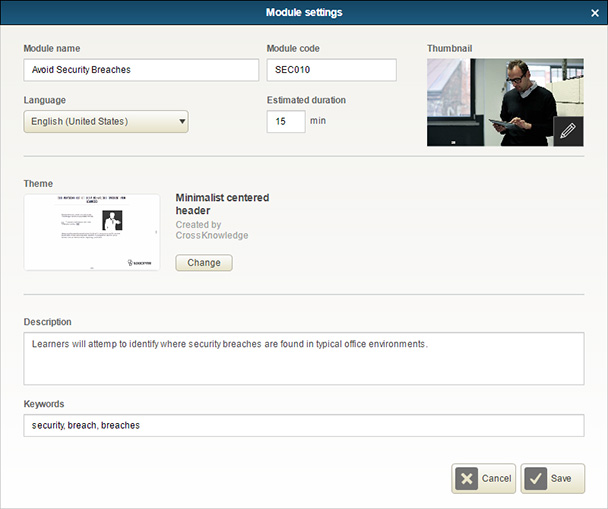
Figure 2: Setting up a module
Authoring
You can divide your module into chapters, sequences, andexercises and create the contents ineach. Chapters are set up like a book, in that you can have an introduction, as many chapters as you wish, and a conclusion. You can set up a series ofexercises using one of 33 templates (Figure 3).
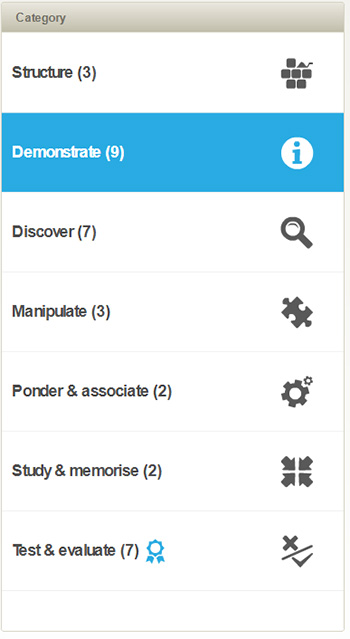
Figure 3: Template categories
The templates cover a wide range of needs. Each templateoffers one or more layouts.
- Structureis for creating:
- Module titles
- Chapter titles
- Module endings
- Demonstratelets you create:
- Infoslides (with multiple layouts)
- Presenter,in which you can synchronize sound or a video with text and images
- Bulletpoints
- Video
- Discussion,wherein you create a sequence of screens where two or more people are having adialogue
- HTML/Flashanimation
- Web contentthat lets you show live content from other websites (Figure 4)
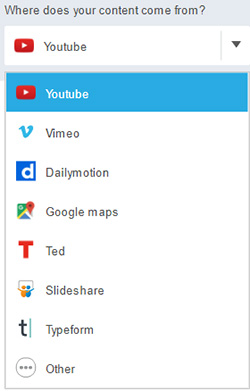
Figure 4: Website content insertion
- Conceptlist, using small or large images
- Sequencer,which lets you group several Info templates
- Discovergives you:
- Clickableimages (click to show full-screen feedbacks)
- Clickablezones
- Aboutimages, which show images and text (without a need to click)
- What if…?,offering multiple alternatives with associated feedbacks
- About aprocess
- Aboutmatrix
- Manipulateoffers:
- Processpuzzle (reassemble steps into the right order)
- Combinephrases (assemble sentences that are divide in two)
- Matrixpuzzle (complete the text matrix)
- Ponder& associate lets you:
- Match toimages (associate text and images)
- Matrix totexts (sort words or sentences into categories)
- Study& memorize allows:
- Fill inthe blanks
- Check list
- Test& evaluate are more traditional quiz questions:
- MCQ(three different layouts for multiple-choice questions)
- ClassicMCQ
- Fill inthe blanks
- Assessmentresult
- Evaluatemedia
- Match toimages
- Match totexts
Every one of the above templates offers a wizard and optionsthat are pretty easy to use.
Quality assurance
During this very important stage, you can:
- Create andmanage proof sheets
- Set themodule’s status (to Planning, Development, In Review, or Ready forpublishing)
- Create andmanage to-do items (as in Planning)
- Printcontact sheets, voice scripts, and video scripts
- Create andmanage review cycles (as in Planning)
Publishing
There are a few options for publishing:
- Create andcopy an internal link for stakeholders
- CreateXLIFF files, the standard used by translation agencies, to allow them totranslate all the text in your module to one of 132 different languages, fromAfrikaans to Zulu
- Create aSCORM zip package to upload to your LMS (note that xAPI options are not yetavailable)
Uploading media
Whenever you want to upload media, you can choose the type fromthe list in Figure 5.
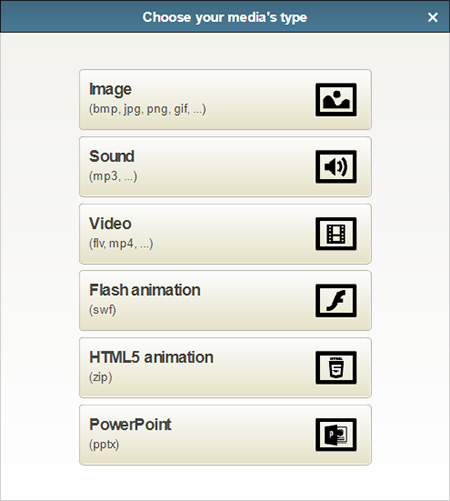
Figure 5: Types of media you canupload
Whenever you upload an image, you have the option to haveMohive re-encode the image for optimal streaming and add screen reader text foraccessibility needs (Figure 6). This happens automatically with video (just asit does when you upload to YouTube).
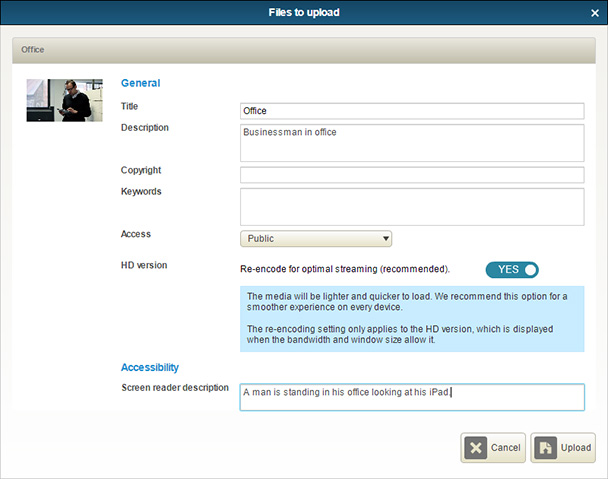
Figure 6: Uploading images
More about Mohive
Mohive is web-based (just as is true of almost all newplatforms). The approach in Mohive is straightforward and intuitive. As with anytool like this, you may find yourself wanting to have a little more freedom aboutwhere items are placed on the screen. On the other hand, this does mean you canusually work faster and with fewer errors.
The resulting published file is all HTML5 (unless youinclude Flash animations) and is also responsive. You have options for lockingdown quizzes or chapters until prerequisites are met. A recent added feature isuser self-registration, which allows you to send an invitation to any number ofpeople and have them choose their own username and password.
For pricing and more information, visit the CrossKnowledge Mohive website and click the orange box that says, “Getin touch with our experts.”


