





The rise of high-qualityvideo in eLearning projects over the last few years has been phenomenal. Videoin eLearning is now nearly as common as images and text. Most eLearning coursesI see start with a video introduction, perhaps from the CEO or head of HR,presumably to add a human dimension that will lessen the loneliness of the long-distancelearner.
There are other usesof video that are now common in eLearning:
- Softwaredemonstrations and simulations
- Examplescenarios and conversations
- Staffinterviews and stories
- Animatedexplainer concepts
But are these reallythe best options for video? We’d say no!
Modern video techniquesoffer so much more
Just as there is a shifttoward using Hollywood-style production techniques in mainstream TV, so it istime that we “Hollywoodized” eLearning—but at a fraction of the budget. Videoediting and production tools are now relatively cheap, so there is really noexcuse for not doing much more with video. A video that’s been brilliantlyscripted or that captures a real-life story will engage your learners, but thereare also a few learner-engagement tricks that you can easily adopt.
We recently completeda project for a global investments organization. The brief? To bring new lifeand energy to personal development planning (PDP).
Our first “aha” momentarrived when we put ourselves in the shoes of a critical, even cynical,learner. “Personal development planning—what’s the point of that?” Which gaverise to the thought: What if there wereno personal development? This brought to mind the character George Baileyas played by Jimmy Stewart in that Christmas classic, It’s a Wonderful Life. Facing financial ruin, George Bailey wishes tonever have been born—and is temporarily granted his wish. Accompanied by hisguardian angel, he sees how much worse off the world—and those he loves—wouldbe without him.
We quickly drafted aninitial script (Figure 1) to see if the client liked the idea as much as we did.We weren’t disappointed. The client suggested adding a devil to the script, andso our thinking moved toward using an angel-and-devil-on-the-shoulder approachto highlight learning gaps and challenge misunderstandings.
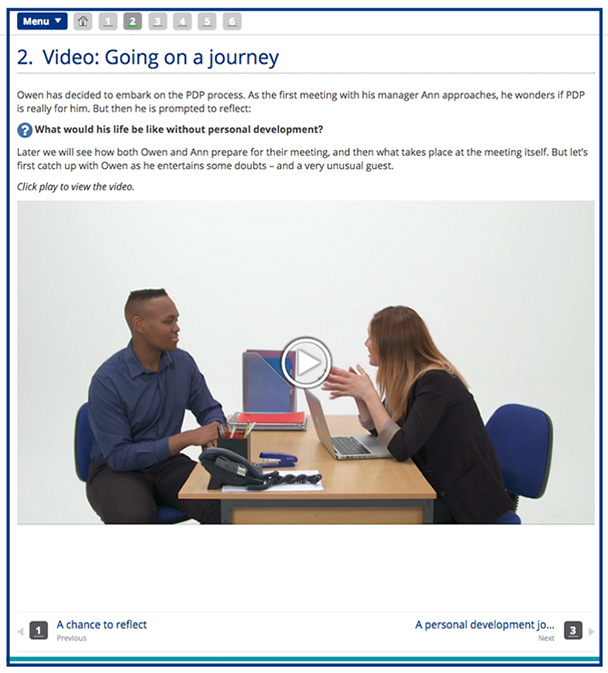
Figure 1: Thisis the original script as proposed to the client. We used video clips withinthis document.
At the heart of ourcourse lies the story of Owen, a rather jaded employee who discovers that he ismuch better at some things than he originally thought—insights the angel usesto encourage him to develop his career. As Owen’s confidence grows, the devil’sdiscouragement falls on deaf ears.
The video containsvisual and auditory effects, along with exercises and interactions, so it goesbeyond the typical sort of video you see in most eLearning courses. While it istrue that many eLearning programs use video and sometimes original drama, theseare presented in much the same way as text is—which is to say, rather flatly.
So what did we do?
We took a “Hollywoodproduction” approach to this project. We devised a treatment plan, produced ascript, cast the actors, defined the special effects, and wove the story ofOwen and his career development options around the core learning concepts. Wealso devised interactive elements to accompany some of the video clips. As Owencompletes his PDP journey, we ask learners to complete certain PDP tasks alongwith him.
From a conceptualpoint of view, the video of Owen carries the narrative of the course and drivesmost of the learning (Figure 2). We devised the video script first, thenfigured out where everything else might fit. This type of approach—narrative-basedlearning—is useful in supporting culture change. You can use narrative tochallenge the status quo and show how doing things differently can reallybenefit an organization, and you can do it with humor (carefully—our audiencewas international, and so we had to rescript the devil’s invitation to theangel to join him for a beer, “A swift one down at the Horns and Halo?”).
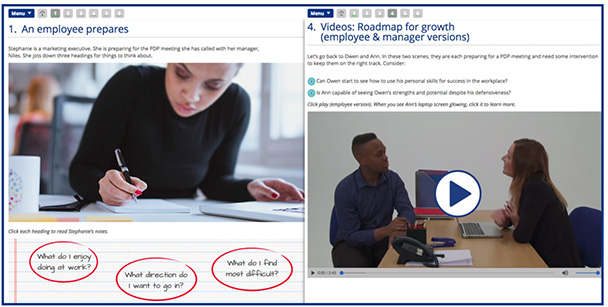
Figure 2: Thecore eLearning content prepares the learner for video examples, using the Owencharacter
The eLearning developmentprocess for interactive video
This was the processwe followed:
- Planning andwriting the script
- Integratingspecial effects and interactive elements
- Castingand selecting the actors
- Dressingthe set and background
- Completingthe post-production work
Script planning and writing
The trick to usinghumor in any form of training is to not alienate your target audience. It canbe very easy to patronize learners or oversimplify an organization’schallenges. In this project, we focused on “known contradictions”—for example:
- Everyonefinds PDP boring, but knows that “the company” or HR loves it
- Peopleconsider PDP as a tick-box exercise, and so don’t put in the effort needed toget results
If you are at theplanning stage for your script, this is a good area to focus on with the client:
- What doeseveryone “know” about the process, but still find frustrating?
- Where arethe contradictions?
Using special effects (SFX)
The script needs toinclude the actor’s words, the flow of the story, some direction for filming,and details of any special effects (SFX). The use of SFX in eLearning video isstill relatively rare, so in this project we pushed the boundaries a bit to getit to work.
We used SFX as audiomarkers to bring the angel and devil characters in and out of scenes (Figure 3).This gave the video a visual and auditory consistency, helping the flow. Using SFXalso adds another ingredient for storytelling—allowing you to use flashbacks,for instance.
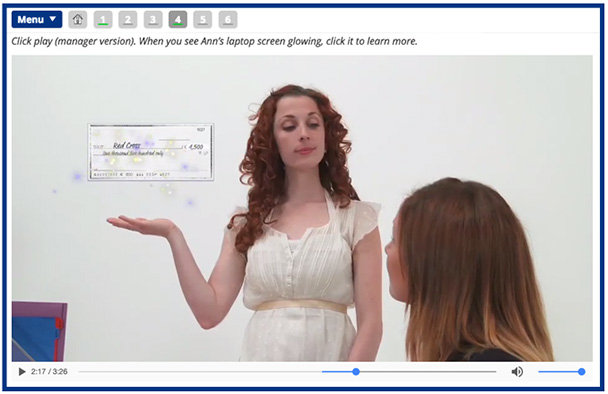
Figure 3:Special effects from our “angel”
Casting the actors
Just as with anycharacters you use for examples or scenarios, you need to make your charactersas diverse as your target audience. Diversity considerations include gender,race, age, socioeconomic status, and job role.
Props and clothing arealso vital for actors. Do you need business attire, or will a casual look do?If you are using computer equipment, be sure to hide logos—unless you are beingpaid for product placement! Also, use the type of furniture and equipment thatyour target audience would see in their offices.
Dressing the set and yourbackground
In this project, theactors’ words and the SFX were the most important aspects for the learner tofocus on. As there was quite a lot going on in the foreground—actor, angel,devil, and interactive elements on screen—we kept the backdrop a solid white.The last thing you want is your learners’ attention straying to insignificantelements.
Completing thepost-production work
With somepost-production magic added, we had a video narrative that “looked the part”—contemporaryand engaging (Figure 4). This was a perfect fit for the client’s corporateidentity. We also added the interactive elements—activities for the learner topractice completing various elements of the PDP. These activities popped upwithin the video, keeping the learner within the story and focused on thecultural change that was being promoted.

Figure 4: Weadded interactive elements and contemporary styling in post-production
If you’re interestedin learning more about this project, you can check it out here. We’d behappy to talk you through a full demo and answer any questions.
(Editor’s note: Readers may also want toreview the articles Stephen Haskin has written for Learning Solutions Magazine on the details of video production andpost-production. See a list of his articles here.)




