




The shift to blended and online training has become afixture in most organizations and the next generation of “death by PowerPoint”has emerged … “death by voiceover PowerPoint.” This type of training is oftenseen in the form of animated PowerPoint slides with limited opportunities forinteraction.
As a tried and true classroom facilitator, I would cringe atthe voiceover PowerPoints that would come my way and long for the days offacilitator-led interaction. I would ask myself if this was truly learning orjust a means to crunch the budget and check the box that training wasdelivered. If it’s the latter, why even expend resources at all?
Providing an engaging and fun experience for online learnersdoes not need to break the budget, and will provide a greater return oninvestment in the long run through transformative learning. Online learningproves cost effective, reaching broad and geographically dispersed audiences;however, it should not only transform your budget and reach, it shouldtransform behavior and performance. The next generation of learners will expecta highly visual, multimedia, and interactive experience. The good news is thatthere are ways to spice up your training, engage your learners, and win overstakeholders.
Apply tiered learning
Apply a tiered approach tolearning that includes:
- High-level audio-visual information
- Detailed text-based information
- Opportunities for interaction and skillapplication
Tier 1 provides a visual way forlearners to understand some high-level basics about what the chapter or topicis all about (Figure 1). Tier 2 provides the meat—the details, strategies,tips, etc. Tier 3 includes interaction and skill application. Any point in thelearning experience in which the learner can touch the content provides anopportunity to keep them engaged, increase retention, and meet learningoutcomes.
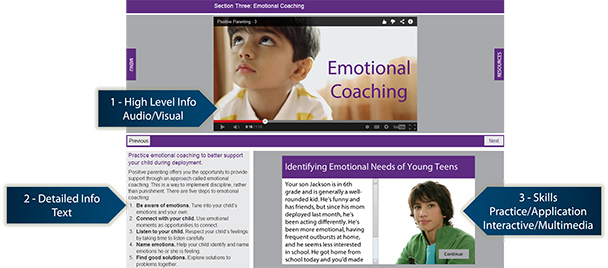
Figure 1: The tiered approachto learning breaks content out conceptually
Tiered learning breaks out thecontent conceptually, not only from an adult learning perspective, but alsofrom the technical perspective. Look at the content itself, and the tools usedto create that content, as a puzzle. Each tier can be seen as a learning chunk—orreusable object—where the content and user experience trumps all.
The tendency in the learningfield is to make the content fit one single authoring tool or LMS. Reverseengineer instead, and choose a variety of tools that will work for the contentand user experience you want. I am not here to advocate for any specific tool,but you can use a combination of off-the-shelf tools and coding to createanimations, text, and interactivities and then piece them together as part of alarger puzzle—or framework.
This works almost like websitedevelopment. I’ve never been a fan of the “square peg? round hole” approach that tries to force content into asingle tool—the foremost culprit of voiceover PowerPoint.
Use responsive design
Responsive online learning on mobile and tablet devices willprovide increased access and use by a broader population. Younger learners havegrown up with mobile devices and are increasingly comfortable with, and oftenprefer, the self-selective nature of mobile applications. It is, in many ways,the embodiment of self-directed learning, putting the timing, location, andchoice of content completely in the hands of the learner.
This is not to be confused with mLearning where a learningexperience is specifically designed for a mobile device. Responsive designessentially means that the learning works everywhere (Figure 2). For more onresponsive design, see James Rasmussen’s recent article in Learning Solutions Magazine, “Learner Engagement: Tips for Responsive Design.”
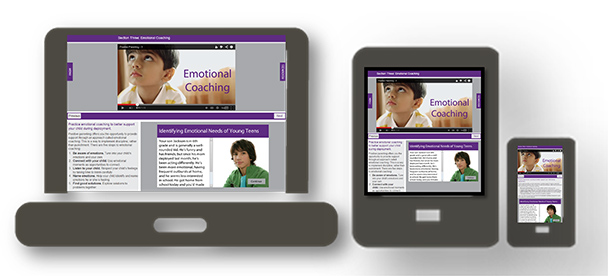
Figure 2: Responsive design works everywhere, not just on mobiledevices
Incorporate immersive scenarios
Immersive scenarios apply the concept of branching multiple-choicequestions within the entire learning experience. This type of learning providesan advanced opportunity for learners to choose their own adventure.
Learners, presented with a series of challenges orscenarios, are asked to apply strategies to navigate the scenario, and, basedon their response, are brought down various learning paths with the ultimategoal of selecting the best responses and accomplishing the mission. Soft-skillor process-oriented training provides an excellent opportunity to leverageimmersive scenarios.
Instead of telling learners that the process is 1, 2, and 3,present them with a scenario and let them decide that it is 1, 2, and 3!Depending on the budget, this can be accomplished through a basic animation andmultiple-choice questions, outcomes, and feedback, or through a more complexsimulation often seen in 3-D virtual worlds (Figure 3).
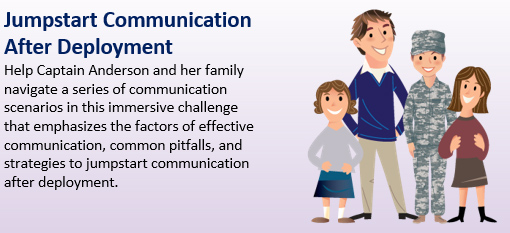
Figure 3: Immersive scenarios are effective for soft-skill orprocess-oriented training
Mix up your media and increase interaction
Select a theme for each lesson and use it consistently inmultimedia animations. Choose from concept animation, character animation,stock imagery, and more! Use text effects and screen transitions to communicateconcepts in animations. Using BIG text and purposeful movement can keep thelearner engaged without sensory overload (Figure 4).
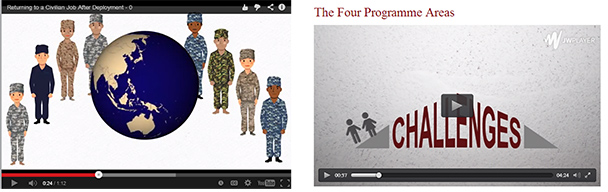
Figure 4: Providing variety in media helps to keep learners engaged
Increase interaction by incorporating a variety ofinteractivities throughout the learning experience. The more the learner cantouch the content, the more he or she will stay engaged. Simple ways tointeract with content that spans beyond multiple-choice quizzes includebranching scenarios, drag-and-drop exercises, video vignettes, images withrollover text, or callout sliders. Interactivities provide an opportunity toreinforce concepts and for learners to apply skills (Figure 5).
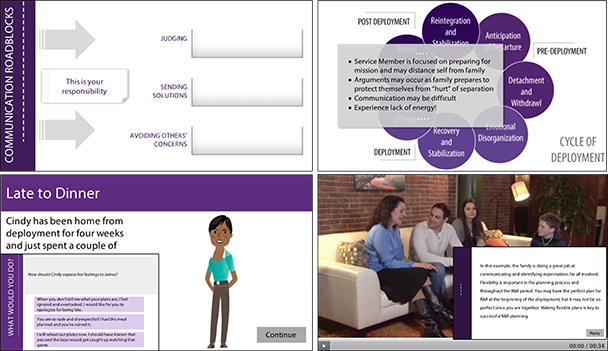
Figure 5: Increasing interaction events and styles provides anopportunity to reinforce concepts and for learners to apply skills
Leverage micro eLearning
Micro eLearning modules are attractive and highly effectivefor a population that lives on mobile devices and learns through visualapplications such as YouTube, Lynda.com, Vine, and other bite-sized increments.Micro eLearning opportunities complement initial and periodic training withjust-in-time solutions to a range of topics and challenges. I have seen microlearning defined broadly—from taking an eight-hour classroom training down to one-hourincrements, or one-hour online learning modules down to 15 minutes. However youchoose to define your micro eLearning experience, I would say some rules ofthumb are to avoid lengthy chapter structures (or avoid chapter structures completely),focus on a singular aspect of a very specific topic or subtopic (e.g., using gesturesin public speaking), and use scenario-based learning as a primary methodology.
Gamify!
Gamification—not to be confused with serious gaming—takes everyday concepts and turns theminto a game. Leader boards, badges, and progression through levels are justsome ways to gamify the experience, increase the intrinsic motivation oflearners, and provide cost-effective rewards.
Having worked with numerous government clients that supportmilitary service members and families, the concept of coins, badges, and medalswas not new to me; perhaps you have had similar experience. What better way tocustomize the approach to the audience than creating a similar reward system inonline learning!
These can be personal rewards or based on groupcompetition. Group leader boards that indicate the individuals who rank justabove and below a learner will help the learner feel like goals are attainable.In addition, personal rewards, such as coins earned for every chaptercompleted, and badges awarded for every module completed give the learner asense of accomplishment. Add some competition to the mix by providingrecognition for the learners who receive the most coins and badges. Read one ofthe latest features in Learning SolutionsMagazine for tips on what works: https://www.learningsolutionsmag.com/articles/1456/report-card-gamification-in-learning-what-works.





