
I’ve been with government my whole career and learned long agothat I could either not do something at all or I could figure out how to do itwith no money. Or make the best use of the limited resources I did have. Orbarter. Or otherwise punt. And spending lots oftime looking to see how others are managing this. Since I started writing aboutworking out loud I’ve tried to be moreconscious of times I do something that might prove useful to someone else—somethingI had to learn, or took time to figure out, or picked up somewhere. Latelywhile working with art I’ve caught myself in a few of these moments and thoughtfolks newer to eLearning might be interested.
Making the most of a single image
Figure 1 shows a recap from a safety tutorial. The program isbranded with this cartoon character; he needs to have a presence in all the safetyproducts but is a challenge to work with as he’s in a single pose and has noeyes or mouth. (Even Hello Kitty has eyes!) My solution is borrowed from an ideashared by Jeff Kortenbosch in the Articulate eLearning Heroes community, and I thankhim for letting me adapt it. To create the buttons, I took shots of theseparate pieces of the character—like the chest badge—in SnagIt and saved eachas an image. With the PowerPoint shapes tool I drew circles and used the ShapeFill > Picture command to bring the separate images in.

Figure 1: Making the most of HazardHero
(Image source: NCOffice of State Human Resources)
Capturing the essence, not the specifics
Figure 2 shows another example, again working with limited artoptions. For this screen I used a stock warehouse image. The background characterswere pasted onto it, saved as one image, and then blurred with SnagIt. I theninserted the image of the main character at the forefront. (Editor’s note: Anotherway to handle blurring is shown in this two-minute tutorial in the LearningExchange—search on “Blur Backgrounds”: Blur Backgrounds and Tutorial)
As you can see here, blurring—and you could go a little moreblurry than this if you wanted—is a great way to capture the idea of anenvironment even if it doesn’t exactly match a location in your own workplace. Itcan also help mask details like a background worker wearing not-quite yourcompany’s uniform.

Figure 2: Mike the supervisor
(Characters source:ELearning Art. Image source: NC Office of State Human Resources.)
There’s an app for that
Sometimes I have a different problem, like needing to mix imageswith different styles or from different libraries. Or I have a number of imagesfrom disparate sources or of varying quality and need them to have a unifiedfeel. Or I need to take a custom photo but want to obscure identities, as myaudience can find images of coworkers in training materials distracting or havinglimited credibility. Or I need to compensate for a problem with color or tintor exposure. There are so many free or inexpensive tools for helping with thiskind of thing now. For instance, the two images at right in Figure 3 werecreated with a free iPhone photo app from the original photo at far left.
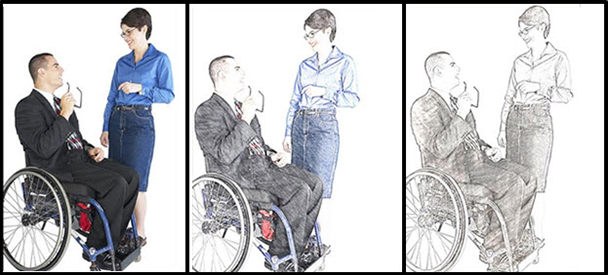
Figure 3: Photo edited with amobile phone photo app
Figure 4 shows the same original photo edited in PowerPoint. To get theseeffects I used Picture Tools > Format > then the “photocopy” and “cutout”filters respectively.
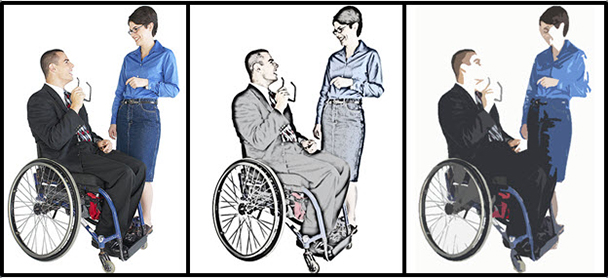
Figure 4: Photo edited withPowerPoint Picture Tools
So: Be creative. Look at what you have and ask, “What else can Ido with this? Can it be moved, combined, filtered, edited, changed?” Oftenthere are ways of maximizing resources or of finding ways to get “forgiveness”with limited image libraries, not-quite-right images, mismatched images, orimages with technical shortcomings.
Want more?
Don’t miss Connie Malamed’s great new book, Visual Design Solutions.
Tracy Parish has done agreat job of curating resources for low-cost eLearning development. Check outher lists oftools for image editing and icon creation.