





Performance support is in themidst of its second revival. The first, back in the 1990s, introduced us all tothe idea that you could help people learn quicker, and do their jobs significantlybetter and faster, by integrating specially designed tools directly into workapplications.
While those early efforts wereoften quite impressive, they were also quite expensive and required uniqueprogramming and technology skills. Every performance support project was acustom development job.
Fast forward to today, where anew category of performance support development tools are making it much easierto create resources that support work at the moment of need. They are much lesscostly, easier to use, and faster to learn.
One such tool is Leo (learn,evolve, operate), by Kryon Systems, an Israel-based software company with agrowing presence in the United States. As Kryon puts it, “Leo provides workersexactly what they need when they need it: real-time in-application processguidance and automation.”
Leo merges performance supporttechnologies, learning and development strategies, and desktop automation tocreate what Kryon calls a performance assurance model that focuses on service-facingorganizations like sales, operations, customer care, and many other businessfunctions that rely on software to accomplish their mission. Leo is alsoavailable to independent software vendors (ISVs) to incorporate into theirsolutions.
How Leo works
Leo focuses on helping workersget it right the first time. In supporting users at the moment of need, Leo employsboth push and pull delivery methods, operating in two modes, “guide me” and “doit,” in the live application in real time. Leo needs no back-end integration.
Leo’s “guide me” mode isanalogous to a GPS in a car. It takes users through the steps of any software-basedwork process, prompting the user to complete the task, and monitoring andcorrecting any mistakes made along the way. When the user has to input datainto a specific field, for example, Leo is smart enough to know if the input iscorrect. Where necessary, additional help appears on the screen in context,including links to any appropriate supporting resources.
The “do it” mode takes the carGPS analogy further, by also steering the car and driving the wheels. Leo takesover, moving through the steps of the process automatically. Like the “guide me”mode, when it needs user input, Leo asks for it and watches to providecorrective feedback, if necessary, or confirm the action and move forward.
YouTube videos of Leo “guide me”and “do it” modes are available here.
In both modes, Leo makes it easyto ask for help at any time. It uses natural-language search to find theappropriate support for the task at hand, like creating a table of contents in MSWord (Figure 1).
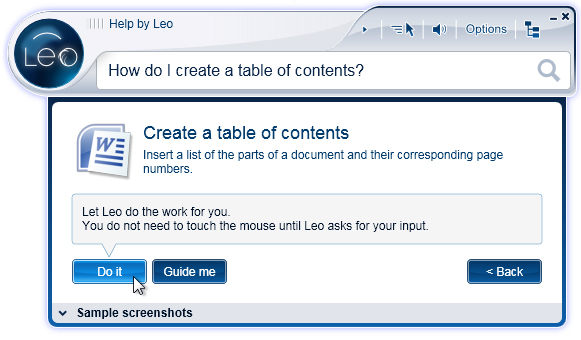 Figure 1: Leo usesnatural language search to help you find what you need
Leoarchitecture
The Leo product suite includesthree components: Leo Player, a lightweight desktop plug-in; Leo Server, theapplication’s cloud-based repository and administrative tool; and Leo Studio,the application’s authoring environment (Figure 2).
 Figure 2: Leo’sarchitecture
Authoring:the special sauce
Leo Studio allows SMEs ortraining professionals to create both “guide me” and “do it” modules for anysoftware application. As in many software-simulation tools, the first step isto record each step in the process as someone is doing it. Then, Leo Studiogoes further. The output creates LeoWizards that you can augment with specificworkflows, advice, narration, and links to additional resources.
Leo Studio itself is template andwizard driven, requiring no advanced programming or technology capabilities. Itworks with any application, and you do not have to integrate it into the targetsoftware, thus saving countless IT development hours. Its publishing andediting functions are both easy and secure. And, Leo is compatible with today’seLearning technologies. Finally, Leo generates a process diagram of theperformance support intervention for easy author validation. You can seeseveral demos of Leo Studio here.
TryLeo
Rather than paste a lot of screenshots into this review, the Leo website offers an opportunity to try Leo forMicrosoft Office products (Microsoft OS only). Give it a go here.
Supportservices
Kryon provides a number ofoptional support services for Leo, including deployment consulting, Leo Studiotraining, content development services, and a variety of ongoing technicalsupport packages. They also offer an “up to speed” service that providesadditional support through the customer’s first project.
Bottomline
There are many compelling reasons to useperformance support in the learning arena, where the demand for greaterefficiency and better performance is increasing, and in almost every front-lineoperation, where higher productivity, fewer errors, reduced costs, and improvedcustomer satisfaction are driving today’s successful businesses. Leo representsa new and proven way to go—beyond just helping people learn how to do the work,but to actually getting the work done.



