
Now, before we getstarted, don’t get me started. I completely agree that in a perfectworld everything “training” would involve high-end, interactive,emotionally compelling, 3-D simulations tied completely to theemployee’s immediate work needs. In a perfect world there would beno multiple-choice quizzes (how much of your job involvestaking multiple choice quizzes?) or requirements to memorize facts.
But in our imperfectworld of 2010, we have many, many trainers and instructionaldesigners doing their best to design simple online assessments,sometimes because management says to, sometimes because a regulationsays to, and sometimes because that’s the best they can do withwhat they have, right now. So let’s keep pushing toward the futureworld, but meantime look at ways we can make some simple improvementsto what we’re doing now.
Feedback that helps
Most online quizzes culminate infeedback that looks something like this:

Figure 1: Typical online feedback
The problem here isthat the feedback doesn’t really do anything to support learning.Rather, it encourages guessing. A better approach? Rememberthat most learners want to figure things out for themselves. Theexample below gives a little nudge back toward relevant trainingcontent and, it’s hoped, will help the learner understand why theanswer is not correct:
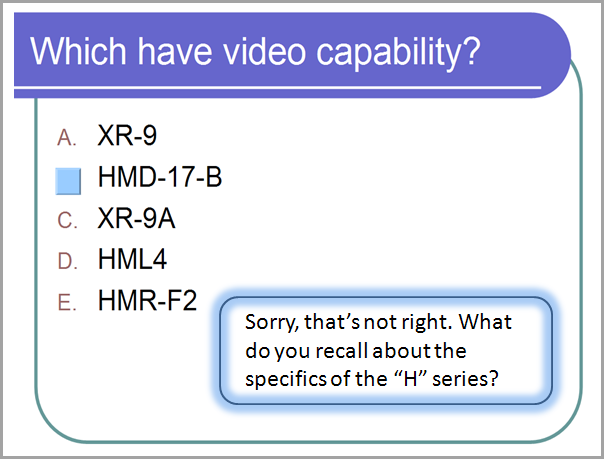
Figure 2: Good hints help the learner think through to the right answer
(Note: Feedbacklike “The answer is not C” is not a hint. It still supportsguessing. )
If the learner getsit wrong again? Then we know he’s guessing. Maybe he needs somemore help, not just more guesses:
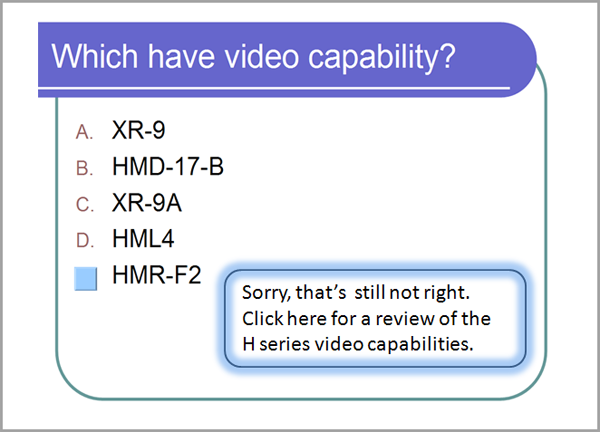
Figure 3: Progressive feedback does notjust ask the learner to keep guessing.
Creating thisprogressive, multilayered type of feedback – with the learnerreceiving different messages each time – just requires morepatience than technical skill. Those working with Web design toolscan do it with JavaScript; those using PowerPoint or a slide-basedtool can achieve it with a carefully planned branching slide layout.
Feedback that harms
If you don’t takeanything away from anything else I say in my whole life: Thepoint of instruction is to build gain, not expose inadequacy. Whatis the learner supposed to learn from the feedback below? How does itsupport gain? What does it do toward improving performance? And whatare the odds that the person is motivated to “Try again!”? Theexample below shows intentional overkill from me (although modeled onsomething real I once saw), but consider the damage this kind offeedback might do. Anything would be better. In craftingfeedback, watch out for negative or punitive messages, and theconnotations implicit in the example’s bold type, use of “wrong,”zero and F, and the red font. What other “mean feedback” have youexperienced with online quizzes and interactions? It isn’t unusualto find big red Xs, slash marks, or annoying honking sounds. Look forways to guide and support learners, not ridicule them.
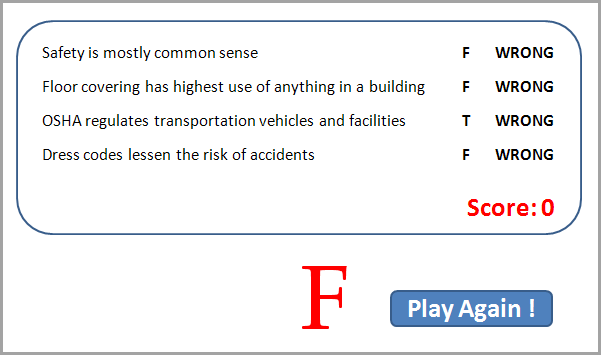
Figure 4: Punitive feedback doesn’t help anyone.
Interactions that make sense
I once had a friendwhose boss fell in love with drag-and-drop interactions andinstructed her –regardless of content or instructional intent –to insert them at regular intervals into every program she developed.The novelty for learners wore off very quickly, and rarely was thereany need for the interaction. It was not informative or engaging, andwas no more “interactive” than clicking a next button. It took uptime, and as often as not focused on asking the learner to recallfacts – random pieces of data culled from the content – thatwould never be of any real use at work:

Figure 5: What is the point of dragging and dropping words?
For some content thedrag-and-drop interaction makes sense. The example in Figure 6 belowshows an interaction that provides close-to-real practice and achance to consider why a choice matters, before having the new baggerhandle real bread and (expensive) strawberries. What are realinstances where a worker needs to put this thing in thatplace? Putting a machine part into place? Putting a piece of datainto a spreadsheet? Drag and drop interactions might be good forthose.

Figure 6: Practice moves toward the more realistic — without harming any groceries.
Some thought andcreativity can help move weak assessments and interactions up to, ifnot a perfect world, then at least a world more useful for thelearner. Keep asking what helps, what supports and what guides, andwhat supports gain – and leave out things that don’t.
(Figure 6. Bagging image from Bozarth,J. eLearning Solutions on a Shoestring (2005). San Francisco:Pfeiffer.)
Wantmore?
For more about thatperfect world I mentioned in the opening paragraph, see this reviewof Clark Aldrich’s Complete Guide to Simulations and Serious Games:https://www.learningsolutionsmag.com/articles/467/book-review-the-complete-guide-to-simulations–serious-games-by-clark-aldrich
And see thisLearning Solutions article on testing: https://www.learningsolutionsmag.com/articles/590/the-roles-and-design-of-tests-in-online-instruction