
In last week’s Spotlight, I shared with you the story of theAnn Arbor Hands-On Museum’s personalized interactive exhibits. In that project,we used RFID tags and the Experience API (xAPI) to create an enhanced fieldtrip experience for school children. The combination provided a richerexperience for the children by slowing them down long enough to interactmeaningfully with the exhibits and learn more. At the same time, the projectalso was able to show quantitative data related to the learning experience andthe science standards that schools and teachers are held to.
This week, I’ll show you how we are using the xAPI andtablets in a public health education project in Michigan.
The Stroke Ready App
This project is in pilot testing right now in select medicalclinics in Michigan.
The University of Michigan Health System’s Stroke Centerteam wanted a way to educate the public to recognize symptoms of a stroke andto get potential stroke victims to the emergency department quickly. Speed isof the essence as timely treatment and medication can dramatically reduce theimpact and severity of stroke. The team’s idea was to deliver quick, video-basedlearning via tablet to non-stroke patients sitting in clinics and doctors’offices while waiting for their routine doctor appointments. The team will thenevaluate an immediate increase in knowledge (Kirkpatrick Level 2 assessment) aswell as longer term impact on stroke recognition and early treatment(Kirkpatrick Level 3 assessment).
What it does
Medical assistants (MAs) in primary care practices offertablets with the Stroke Ready app to patients in the waiting room. The initialtarget audience is a low-literacy population, so there’s very little text onscreen and information is largely audio-visual. The learner chooses a narrator/guidefor their experience and watches an informational video about responding tostroke. Then the learner can watch one or more video scenarios and select howto respond in each case: wait and do nothing, drive to the hospital, call 911for an ambulance, or call the doctor.
The tablets may not always be connected to the internetduring use, so the transactions are stored locally on the tablet andtransmitted once the tablet connects to Wi-Fi.
How it works
On its face, this doesn’t strike one as a case for the xAPI.The selections and answer choices made by the learners in this project couldmostly be handled by SCORM with a little creativity. However, there are a fewthings about this project that make it a solid xAPI solution.
The tablets are offline while the learners use them. Anumber of course development tools and LMS products provide offline SCORMplayers, but the xAPI was designed to work disconnected from the Internet. It constructsand stores the activity statements locally. Once connected to the Internet, itsends the statements, checks to ensure receipt, and then clears the statementsfrom local storage to avoid duplicate sends later on.
Learners are allowed multiple attempts at each videoscenario, and with the xAPI we record each attempt. This allows us to comparesuccess rates over time and experience. (We may be the only people eager forlonger wait times in the doctor’s office!) Although some more sophisticated LMSproducts do handle repeated attempts in a traditional SCORM approach, only thelast attempt is stored and reported in the LMS. In the screen shown in Figure 1,the user selects a narrator/guide for the interactions. This selection is sentas an xAPI statement, which is further subdivided by gender and race.

Figure 1: The user selects a narrator (guide) from this screen forthe interactions with the app
In Figure 2, the user can choose a scenario to watch andthink about what they would do in the situation. They can come back and watchthe other scenario later, in which case another xAPI statement is recorded.

Figure 2: The user selects a scenario from this screen
In Figure 3, the user chooses an action based on thescenario they just watched: do nothing, phone 911, phone the doctor, or driveto the hospital. This is simply an image-based multiple-choice with branchingbased on the answer—but statements are kept each time a choice is made andwhether it was right or wrong. (FYI … call 911 is the right answer every timewhen a stroke is involved!)

Figure 3: At this point, the user selects an action based on thescenario: Do nothing, call 911, call the doctor, or drive to the hospital
A variety of aspects of the learning experience arerecorded, not just the correct or incorrect answers to the scenario questions.In this case, the learner’s demographics, the narrator/guide they select, andthe scenario(s) to which they’re drawn are all interesting data points that we’recollecting with xAPI statements. (Figure 4)
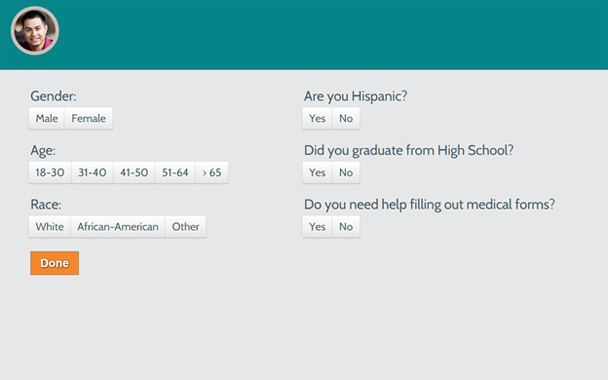
Figure 4: The app collects demographic data, using xAPI statements
The xAPI is flexible in the way it allows an ActivityProvider to determine what information is meaningful for the context. There arestandard ways of constructing statements, of course, and as long as you havethe actor, verb, and object you’ve met the minimum requirements—but you canfeed more information into the statement as required. For example, is aquestion part of a larger section? Are these smaller interactions part of agroup? In this case, we have the advantage of being both the Activity Providerand the report creators. This means we can tailor our statements and reports tocapture and display exactly what we want in the manner that is most useful,while also being valid xAPI statements that we can view and/or transfer to anyLRS and maintain their usefulness. We can then export this data to aspreadsheet for further analysis or filter it on the spot for quick access tospecific data points.
The AHA!
Using SCORM, a learner is often required to log into asystem to record their individual progress and interactions. But the xAPIallows us to record the activity of anonymous users in any location, anadvantage when there are privacy concerns or if you want to gather anonymous datawithout a complex system of authentication or a cumbersome backend.
For this project, we don’t want or need to know a user’spersonal information. The app is targeted initially at low-literacy audienceswho may not be comfortable with keyboards and email addresses, and beingrequired to divulge their information could possibly hinder their participationin the project. Since we’re already using local storage to keep xAPI data, weare also able to use it to give each user a distinct “instance” each time the appis launched. The appassigns a number to each app launch and keeps this number in local storage.This number serves as the user’s “name” in xAPI statements during the session.The next time the app is restarted or relaunched, it increments the number togive the next user a unique name. Of course, all of this is invisible to theuser. The upshot is that users participate anonymously and the research teamcan collect important information from an aggregate of multiple users.
This is a first iteration for this project.After leaving it in the field and collecting data for a few months, the teamwill regroup and assess what upgrades to make. It’ll be key in this process toaccount for the existing data structure as we add and change things for futureiterations if we want to be able to report across both iterations. In the oldSCORM world, this was never a factor. In the increasingly powerful and flexibleworld of the xAPI, we need to plan for things like this.