





ko·an (‘koän) (noun):A paradoxical anecdote or riddle, used in Zen Buddhism to demonstrate theinadequacy of logical reasoning and to provoke enlightenment. In Japanese, itmeans “matter for public thought,” and it derives from the Chinese gongàn, which means “official business.”
Romain Gagnon, the founder and CEO of Koantic, named his company this way bothbecause he likes the idea of koan asasking questions that lead to enlightenment, and because coupling that wordwith the suffix -tic makes thecombination “koantic” sound a bit like “quantum.” Quantum, of course, is defined as “the minimum amount of anyphysical entity involved in an interaction.”
Gagnon understands that human attention spans have taken abit of a beat-down lately. We now seem to have so many ways of distractingourselves that it is all too common for us to not be able to focus on a task aseasily as we once could. This is too broad a generality, of course, but it’shard to deny that eLearning courses, modules, and lessons have all becomeshorter and more focused. In the 1990s, it was not uncommon to have eLearningcourses that comprised 50 or 60 lessons, each lasting 20 minutes or more. Now,a three-hour course feels long to many.
Koantic exhibited at DevLearnthis past November, and I had the pleasure of meeting with Gagnon and seeingwhat Koantic can do. Let me explain my take on what you can do with Koantic.
It’s all about video
Ah, video. We hear the statistics. Over 180 million peoplein the US alone use YouTube. Each year we watch over 46,000 years’ worth ofcontent, and the average time of each session we spend on YouTube is about 40minutes. That equates to six billion hours of video watched each month onYouTube alone. So maybe, just maybe, video is not just a fad, right?
In eLearning, video has also become easier to use, ridingthe coattails of the technology that has made YouTube and Vimeo and many othersites possible. Servers are faster, bandwidth is broader, and we’ve becomequite accustomed to Internet movie channels like Netflix. We’ve already forgottenhow difficult it was to see video over the Internet just a few short years ago.
Koantic is a tool of the modern video age. It is web-based,of course, as almost all modern tools are. You can import video, edit it, and customizeit. There is a Koantic mobile app in development that you can already download,though it’s not officially released. Using the app, available for Android andiOS devices, I shot a video and then instructed the app to create a new course.The video uploaded automatically to the Koantic site and within secondsappeared in my account. Alternatively, you can just upload the video to use itin a course that you have already created or that you intend to create later.
I should note that it is not absolutely necessary to usevideo in Koantic. You can, in fact, create more of a standard slide-basedcourse. However, as I’ve noted, Koantic is built around the idea of usingvideos, especially those that support microlearning.
Two approaches
Besides shooting video on your mobile device and thenuploading it, you can also create courses on the Koantic site. There are twoways to create a course in Koantic, as seen in Figure 1.
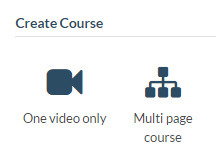
Figure 1: Two ways to create a course in Koantic
Choosing one video only, you can use a video you’ve alreadyuploaded or you can upload one video at a time. You then have many editingoptions. For instance, you can remove or change its audio track and even addvideo-in-video (also called PIP: picture-in-picture). You can stitch videostogether and more.
Multi-page courses give you extra options, as you can see inFigure 2.
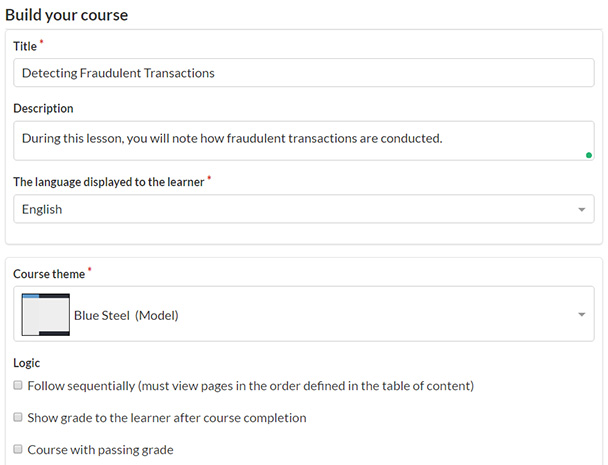
Figure 2: Building a multi-page course
Lots of features
While video is the focus, there are plenty of other elementsyou can add to your lessons and courses.
- Screen recordings, using an extension for theChrome browser
- Webcam videos
You can then add to the video those elements you see inFigure 3.

Figure 3: Elements you can add
The first section (“Add interactions”) lets you insert images and create textboxes, circles, bookmarks, and hotspots(markers). What makes them interactive? In each case, you can choose to havethe learner:
- Click to open a webpage
- Click to jump to a video time frame
- Click to show a tooltip
- Hover to show a tooltip
- Click to resume the video
I found the first two elements, Text Box and Circle, verysimilar because both allow for text to be included and both can be changed interms of colors. You can also include links in the text to jump out to othersites.
The only real differences I saw with a text box are that youcan make it scrollable and you can have a small arrow pointing out from thetext box from any of its four sides. The arrow is a bit subtle, though.
The question types include:
- Multiplechoice, both single answer and multiple answer
- Hotspot questions,which are quite nice because you can provide the learner with answer choicesthat are text boxes, circles, hotspots, or images
- Drag anddrop, which allow for text boxes and circles as drop zones and images, or textboxes and circles as items the user can drag
Animations
Almost any of the above additions that you can make to avideo can have animations applied when they appear and when they disappear.They include:
- Fade in/out
- Flip
- Flip and bounce
- Swoop
- Whirl
- Shrink
- Expand
- Bounce
- Bounce and move
- Slide
- SlideBig
- Perspective
Customization
Each of the features you see is customizable to a gooddegree. The text editor has almost all the customizations you’d expect, and iteven has tables and horizontal lines. See Figure 4.

Figure 4: Text editing
See how the course will look on different devices
View the course in different screen sizes so you can see howit will appear on different devices. Click one of the sizes, and you instantlysee how it will appear in that size. See Figure 5.

Figure 5: Screen sizechoices
Publishing your courses
When you publish your course, you download it as a ZIP file,at which point you can upload it to your learning management system. If youchoose “Stand alone,” as seen in Figure 6, know that you cannot run it in abrowser directly. You have to load it through a web server, though of course itcan be your own local web server using localhost, as you see in the figure.

Figure 6: Previewand publish
Collaboration
There are some nice collaboration options built in. You canhave team members add comments and tasks. You can track comments as well astasks. There is also an “Activities” section that shows you what activitieshave occurred with the lesson thus far. See Figure 7.
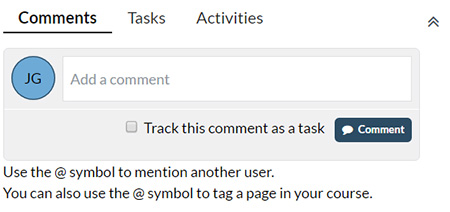
Figure 7: Collaborationoptions
Improvements I’d like to see
This is a pretty cool tool. I like it a lot. That beingsaid:
- When I upload images and videos to my account, Ican only upload one at a time. It would be nice if I could gather severalimages and videos I know I’ll need and choose them all to upload. That wouldsave time.
- It’s nice that a screen recorder is built inusing the Chrome extension. You had better check your microphone levelselsewhere before you start, because there’s no ability to do that from withinthe Koantic Chrome extension. You might be better off using Camtasia orCaptivate and then uploading the resulting MP4 file. That being said, thescreen recorder works and you may find it quite suitable for your needs.
- The timeline is not full-featured like that inCaptivate or Storyline. The only indications concerning where elements havebeen added are small blue lines, which don’t let you distinguish what islocated there until you move to those locations.
- The video editing tools are based on time codes,so you can’t just position your playhead at a point in the video and trim.
Pricing and final thoughts
There are four pricing levels:
- Personal(videos only), $9/month or $90/year
- Starter,$79/month or $790/year
- Professional(4 – 10 authors), $199/month or $1,990/year
- TeamEdition (11 – 20 authors), $349/month or $3,490/year




