For some time,we have been seeing the Flash format dying as HTML5 becomes the publishingformat of choice. Many authoring tools have been built in Flash ActionScript,and most authoring tools have offered Flash as a publishing option. Several ofthese have managed to switch to HTML5 output, but other tools are beingdiscontinued while their vendors are building new tools from scratch. Thelatest eLearning tool vendor to announce that it’s discontinuing a product is Trivantis,regarding its product Snap! (after October 31). Every software product reachesa point when it is no longer advisable to continue updating it because theunderlying code can become a patchwork of potentially conflicting codesnippets. At other times, of course, an application doesn’t sell well, and it becomesa sales decision to discontinue a product. Adobe, one of the biggest softwarecompanies catering to the learning market, has discontinuedquite a few products over its history for various reasons.
As I writethis, I am in Russia to speak at two conferences in Moscow, having been invitedby the fine folks at iSpring and Quorum. In speaking with the attendees here, I’mdiscovering that there are really no differences between the problems RussianeLearning professionals face and the problems I encounter in the US. That doesn’tsurprise me, but what I found curious was the number of attendees whoapproached me in private, mostly after one of my sessions, almost as if theywere embarrassed, to ask which one tool is the best. Once again, I was forcedto say that it really depends on so many questions, many of which I illustratedin one session I gave. It’s frustrating to hear that, I know, but just like anymajor purchase, it’s smart to do your homework first.
Eradicating bugs
As I’m wont tosay, what good is all the hard work you do in creating a wonderful eLearninglesson if, in the end, it’s full of bugs? Just like a small stain on a whitewedding dress, a bug will detract from the great work you put into creatingyour eLearning.
Some authoringtools build in review options so that you can invite quality assurance teammembers to perform thorough checks on your lesson and report back any problemsthey find, often in a way that you can see directly in the authoring tool.However, this is not always the case. Hence, a lot of organizations that createeLearning have invented their own review tools and systems in house. Havingworked with many of these types of systems, I can vouch for the fact that theycan be much more useful than getting an Excel spreadsheet listing of bugs.
Course Inspector

As is true ofmany tools that are built for in-house use, there comes a time when those whocreated the tool see that it can potentially be useful to others, so they startto offer it on the open market. Such is the case with Course Inspector. Thecompany in this case was founded to perform eLearning translation andlocalization (and still provides this service), and it had a need for a goodreview tool. Not finding one, the company built its own.
Supported authoring tools
As a reviewtool, Inspector works with any SCORM 1.2- and SCORM 2004-published output from thefollowing popular authoring tools:
- Articulate Presenter ’13
- Storyline 1, 2
- Captivate 7, 8, 9
- Claro
- Lectora 12
- Gomo 1.8
The xAPI formatis not supported at this time. SCORM 1.2 is generally the most widely usedprotocol still, though my friends in Russia have told me that SCORM 2004 is themost widely adopted there.
You might be wonderingwhy, if Inspector works with SCORM-published files, it doesn’t work with everytool that publishes to SCORM. That is because Inspector goes beyond looking atSCORM output. It digs deep into the published files to ensure that it is ableto report as much as possible to assist in the review process. That means thatInspector has to accommodate each tool’s output differently, and hence it hascustom ways to deal with each. I’m told that Storyline is the most complicated,for instance, in how it communicates the location in the course. Other tools,for example, output slide numbers in a simpler format.
What happenswhen a supported authoring tool comes out with a new version? Typically, theprotocols it uses don’t change much, if at all, but the company does a thoroughcheck and will update its tool if needed.
Video reviews
Reviewers canalso review videos and add their comments. By pausing the video, Inspector willbookmark the video time stamp and add the comment. This can be very useful whenyou use videos in your eLearning if you can provide the videos as separatefiles to review.
Performing a review
The reviewdashboard will give you an overview of open issues (Figure 1). Note that itshows that six out of eight items have been resolved in the first line, five outof 10 in the second, etc.

Figure 1: The Inspector dashboard
You can seeopen issues, as in Figure 2.
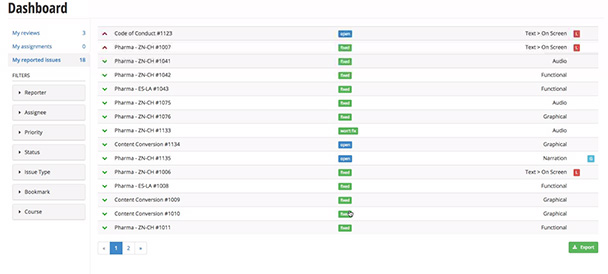
Figure 2: Open issues
The coursenormally plays in a window with the review panel on the right. The bookmarkupdates automatically as you move through the course. For Storyline, forinstance, 2.1 means Scene 2, slide 1. In Figure 3, you can see the bookmark is1.1.
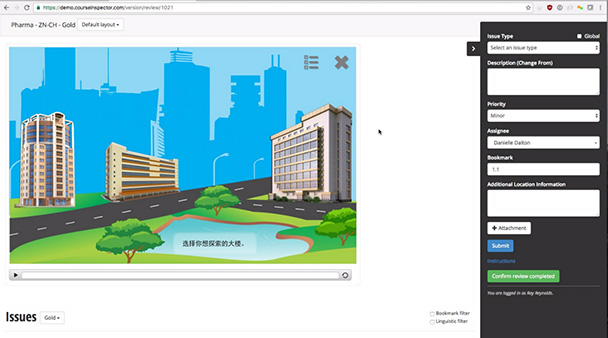
Figure 3: Reviewer layout
Some browsersdon’t allow for pop-ups, which the above layout uses, so there is a secondlayout option that shows the review panel below the screen shot.
You can choosethe Issue Type for each issue. You can also customize this list. Reviewerscheck the Global checkbox when an issue affects the whole or a large part of alesson, such as a recommendation to change the font.
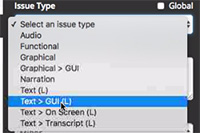
Figure 4: Issue type
You also choosethe Severity level for each issue. This list cannot be modified. Flagged is themost critical level.
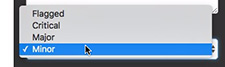
Figure 5: Severity level
Next, you canassign an issue to a specific person to resolve and type a description if youbelieve further explanation is warranted.
Note that screenshots are not created automatically. Reviewers have to create the screen shotand attach the image file if it is needed.
Review roles
As a dedicatedreview tool, Inspector has features that you won’t find in most internal reviewtools. For example, you can set roles for reviewers at different levels:
- Administrator
- Developers
- Reviewers (your internal QA)
- Clients
As the reviewer role is considered internal QA,it has more complete access to not just the current version of a lesson, butalso draft versions and other files.
The client role can be limited to specificversions, as they don’t need to be given access to drafts or other files theydon’t need to see.
The administrator role has, as expected, alot of power. Administrators can:
- Add users, delete users, etc.
- Assign owners, reviewer assignees, and due dates
- Create and edit the Issue Type list
- Manage notifications
- Set priorities and instructions
- See more information than reviewers when seeingthe list of active issues
- Filter the information in many ways
- Add administrator comments
- Click History to know why something was closed,etc.
- See issues that have been closed
- Have access to prior versions and add versions
- Add courses
Viewing reviews
You can seereports of reviews in several different ways. Figure 6 shows one such way.
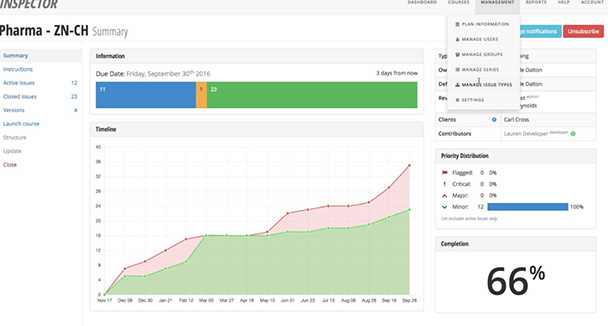
Figure 6: Report view
Access to Course Inspector and pricing
Everyone whoreviews must have a login. This allows the system to track each reviewer’scomments.
You must uploadthe courses to be reviewed to the Course Inspector server. If you run out ofroom and have to remove a course from the Inspector server, no worries. Any andall reviewer comments are preserved so that if you upload the course later, youwon’t lose its review history.
The pricingplans are as follows:
- Lite plan: $360 per year
- Admin/developer: 1 user
- Reviewers/clients: 5 users
- Storage: 1 GB
- Basic plan: $900 per year
- Admins/developers: 5 users
- Reviewers/clients: 20 users
- Storage: 2 GB
- Pro plan: $2,400 per year
- Admins/developers: 15 users
- Reviewers/clients: 50 users
- Storage: 5 GB
For customerswith higher requirements, the company will provide custom quotes.
Have you used Course Inspector?
Feel free tocomment with your thoughts below.
More Joe!
Join Joe Ganciat DevLearn 2016 Conference & Expo in Las Vegas, November 16 – 18, for hissessions:
- Session 412 (Thursday, November 17, 10:45a –11:45a): New Technologies That Will Change Your Learning Strategies
This session will explore the changing landscape oflearning technology. You will learn how wearable technology could enhance thelearning experience and how tools like Oculus Rift and Google Cardboard areopening eyes to the possibilities of virtual reality. You’ll examine whichtechnologies will soon help learners really leap ahead in incorporating newskills. It’s not just about avant-garde, bleeding-edge technology; you’ll lookat technologies that cost nothing at all that can take learners to the nextlevel!
- Session 815 (Friday, November 18, 10:00a –11:00a): BYOL (Bring Your Own Laptop®): Create the Best eLearning Using Adobe Captivate
In this hands-on session, you will build a short lessonone step at a time and see how easy it is to turn a “blah” lesson into a reallyinteresting experience for the learner, ensuring better learning results. Thepublished lesson will work on desktop and mobile devices. You can then take thelesson back to your office and reuse as you wish.
Register for DevLearn today!